

These days, the toughest thing about AI-powered assistants is choosing a device to use. Amazon’s Alexa powers not only Amazon’s Echo artificial intelligence, but the AI in smartphones, smart home products, and smartwatches. Microsoft’s Cortana is integrated tightly with Windows 10 machines. And Google recently announced that its voice-activated, artificially intelligent Assistant will make its way to Android devices running newer versions of Android.
But Sony thinks there’s room for one more assistant-touting wearable.
At the Mobile World Congress conference in Barcelona this week, the company took the wraps off a new version of the Xperia Ear “open-style concept,” which are earbuds that sport Sony’s Agent digital assistant. Unlike the off-the-shelf headphones you’re used to seeing packed in with a new phone, they’re completely “hands-free” and “eyes-free” thanks to “open ear” technology that transmits sound “directly to the ear canal.” You can hear not only audio, but the noises around you.
The prototype Xperia Ear achieves the bizarre effect with a spatial acoustic conductor: a driver unit that generates sound and a C-shaped duct that transfers that sound to a ring-shaped bit of plastic that fits inside your inner ear. Effectively, it’s a form of conduction, vibrating your skulls’ bones and amplifying whatever audio the Xperia Ear earbuds are playing.
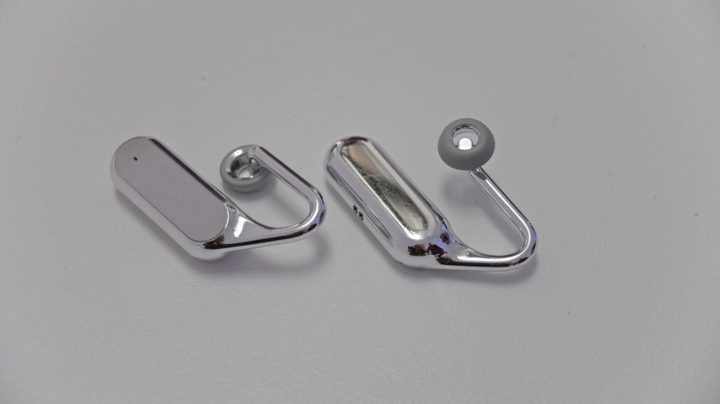
We tried a pair, which we weren’t allowed to photograph, at Sony’s Mobile World Congress booth. And the effect, safe to say, is disconcerting: When you listen to music, it seems as though everyone around you can hear it, because you can hear them. When a Sony representative wore them, however, we weren’t able to hear any sound leaking from the earbuds’ plastic cone.
The quality seemed good, though it was difficult to tell over the roar of MWC’s crowds. They’re obviously not ideal for a jam session, a fact Sony is well aware of.
Company reps told us that the open-concept Xperia Ear earbuds aren’t meant to replace a standard pair of headphones. Rather, they’re intended as a convenient, safe, and quick way of interacting with digital assistants on the street, in the office, or any environment where being able to hear ambient noise is important. The company sees them as an especially great fit for physical activities like running that require you keep an eye — and ear — on your surroundings. You’ll be able to cross the road safely, for example, or pretend you’re listening to a co-worker while streaming Aerosmith.

The Xperia Assistant component of the Xperia Ear wasn’t functional in the units we tried, but Samsung said it will be able to do things like let you know when you’ve got appointments or meetings, give you turn-by-turn directions to nearby places, and let you record reminders. If and when the open-style Xperia Ear comes to market, it’ll support the Google Assistant, too, for users who prefer the search giant’s assistant to Sony’s.
Unfortunately, that’s all Sony was willing to disclose. Company reps refused to talk about the Xperia Ear concept’s battery size and sensors, and in fact said the earbuds were at the “working prototype” phase — they stressed that the finished product would look different (and weigh a little more).
Whether they make it to market isn’t a sure thing. The Xperia Ear open-style’s availability and price will depend on its reception, Sony said. So if the idea of open-style earbuds strikes your fancy, you’d best show your interest on social media.
As for owners of Sony’s older Xperia ear earbuds, new features are coming down the pipeline. Sony announced Anytime Talk, which will let you start a group conversation by pushing a button or gesturing with your head, will launch in beta “in the coming months.” And the company said it’s working with the developers of messaging app Line on “a new integrated voice experience.”
Article originally published 02-27-2017. Updated on 02-28-2017 by Kyle Wiggers: Added hands-on impressions of the Xperia Touch.



