
Did you know that opening an email can send a world of information back to its sender? It can. Including when you opened it, how many times you opened it, where you were when you opened it, and much more. Like Apple iMessage and Facebook Messenger receipts, emails can share detailed information about when a recipient views a message and their actions. If you want to keep your email private, follow this guide on keeping your emails from being tracked.
If you are considering how to keep your online life secure, be sure to check out our article on how to make a disposable email address and stay safe around the web.
How are emails tracked?
Pixels are one of the most popular ways to track an email. A small image, the size of a single pixel, is often attached to the email’s end. When your email client loads the picture, your email service must retrieve it from the sending server; this server can then log when your email service loaded the image to understand when (and if) you opened the email. Additional information, such as your IP address, can alert the server to where you were located when you opened the email.
How can you stop tracking?
To stop tracking, the easiest option is to disable your email client from automatically downloading images; this way, the sending server can’t load its tracking pixel. There are also browser extensions that can analyze your web-based emails and alert you if there is a tracker in the data.
If you want to prevent your email client from downloading images that are included in emails, you’ll follow different steps according to your provider.
Gmail.com
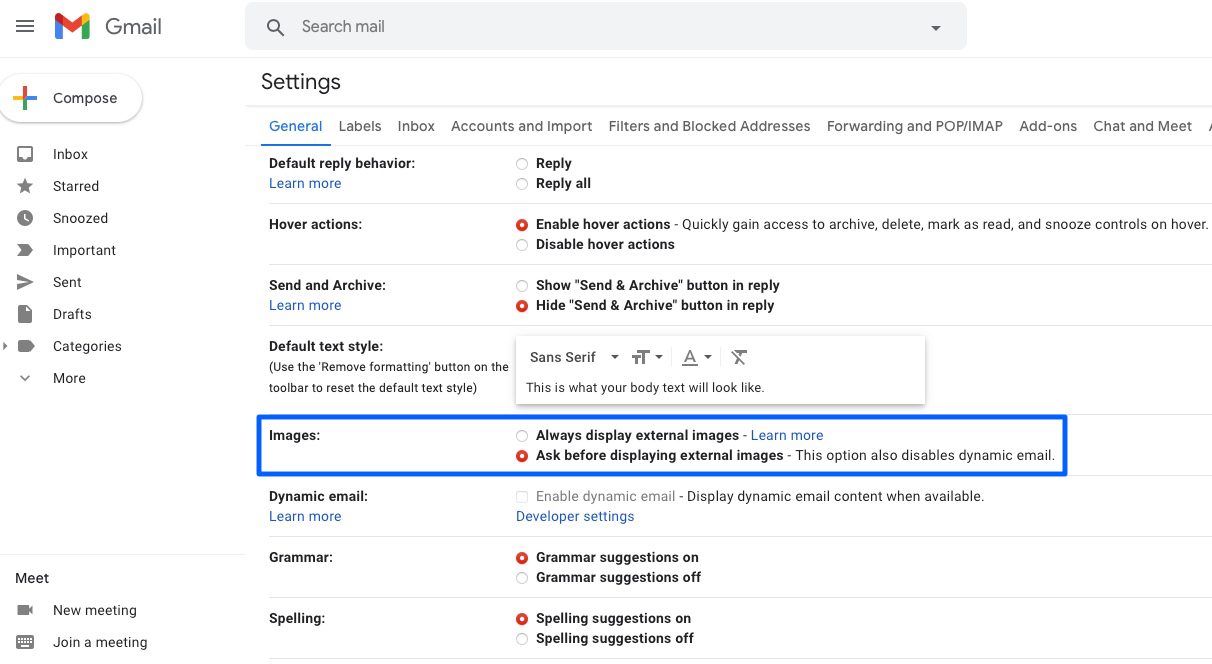
Step 1: Log into your Gmail account.
Step 2: Click on the gear icon in the upper right corner.
Step 3: Select the General tab.
Step 4: Scroll down to the Images category and select Ask Before Displaying External Images.
Step 5: Scroll down and click Save Changes.
Gmail app (iOS/Android)


Step 1: Open the Gmail app on your device.
Step 2: Tap on the hamburger menu (three horizontal lines) in the upper corner.
Step 3: Scroll down and choose Settings.
Step 4: Tap on the account you wish to alter.
Step 5: Scroll down and choose Images.
Step 6: Select the Ask Before Displaying External Images (Also Disables Dynamic Email) option.
AOL.com
Step 1: Log into your AOL Mail account.
Step 2: Select Options, then Mail Settings.
Step 3: Choose General.
Step 4: Under the Reading category, select Hide Images in Mail from Unknown Senders.
Yahoo.com
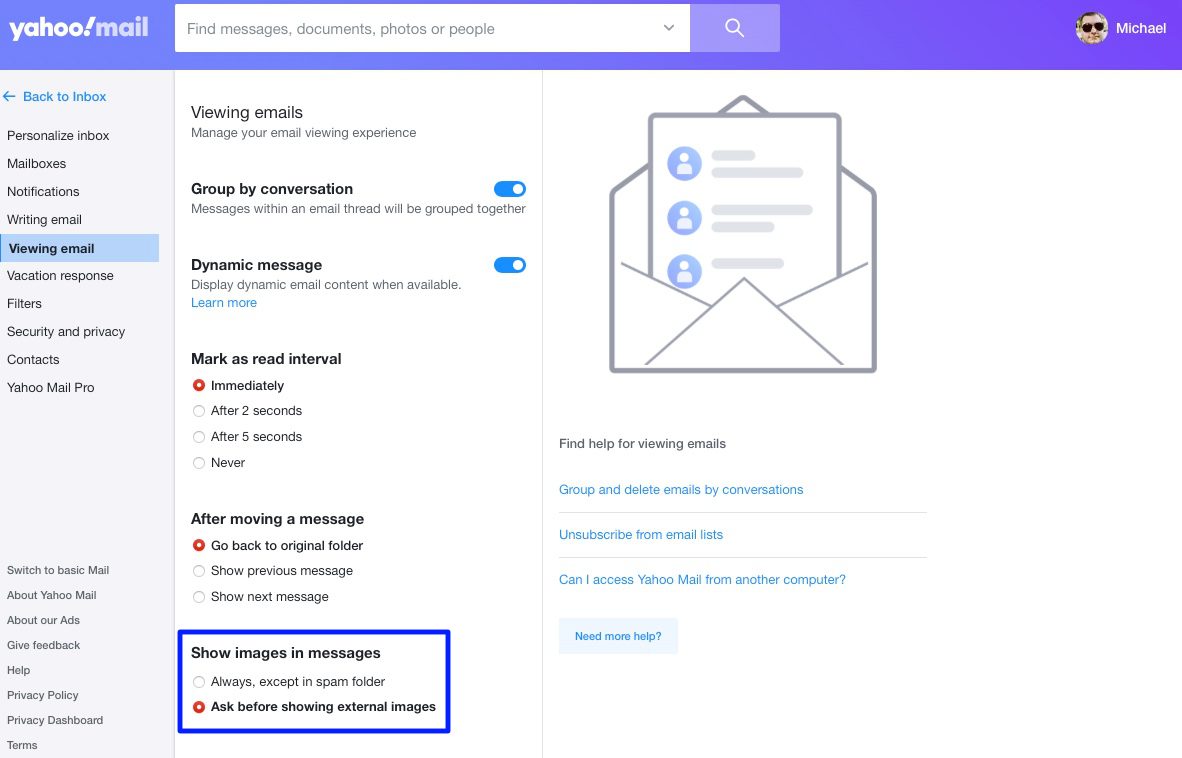
Step 1: Log into your Yahoo Mail account.
Step 2: Click the gear icon in the upper-right corner, then More Settings.
Step 3: Select Viewing Email.
Step 4: Under the Show Images in Messages menu, choose Ask Before Showing External Images.
iCloud.com
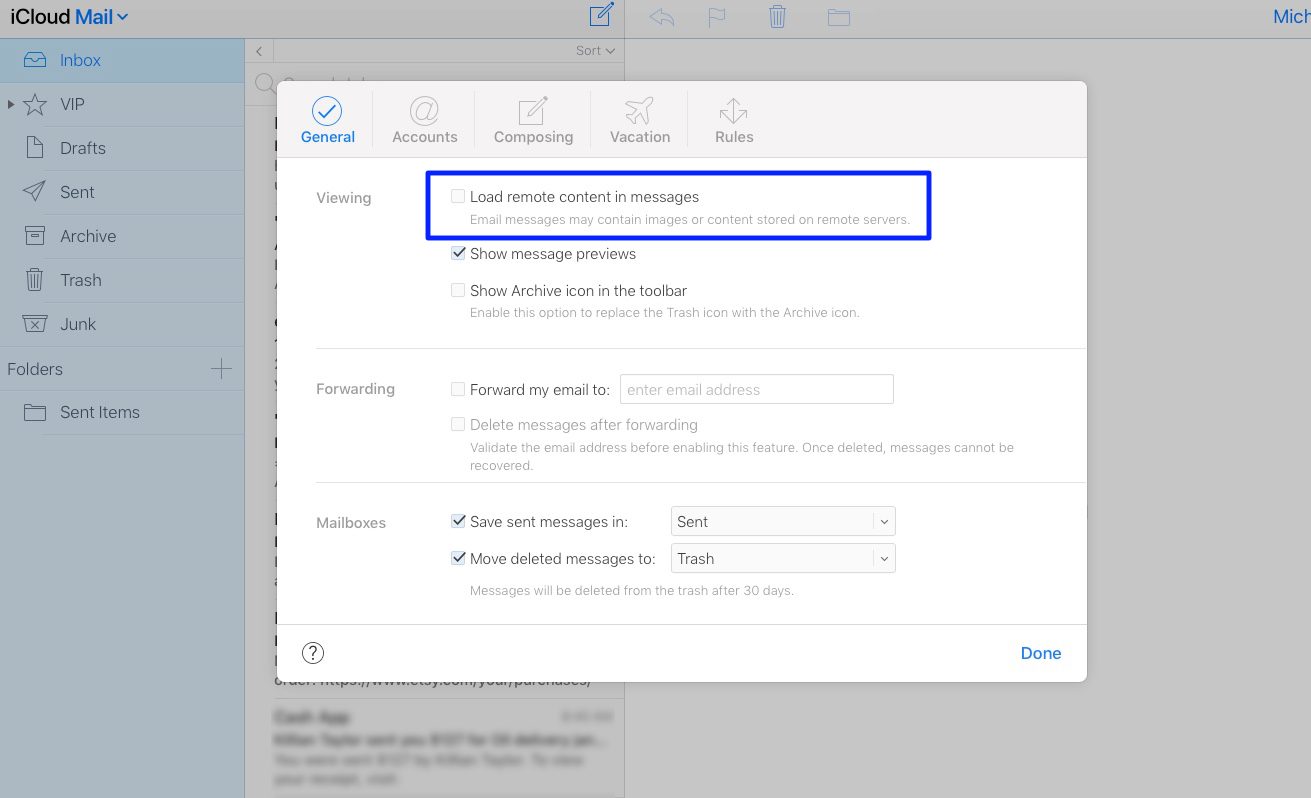
Step 1: Log into your iCloud Mail account.
Step 2: Click the gear icon in the lower-left corner.
Step 3: Select Preferences.
Step 4: Uncheck Load Remote Content in Messages.
iOS Mail


Step 1: Open the Settings app.
Step 2: Scroll down and select Mail.
Step 3: Under Messages, toggle off Load Remote Images.
Outlook
Step 1: Open the Outlook application.
Step 2: Choose File, then Options.
Step 3: Select the Trust Center.
Step 4: Click Trust Center Settings.
Step 5: Ensure Don’t Download Pictures Automatically in HTML Email Messages or RSS is checked.
What extensions are available?
You can also download browser extensions that can protect your privacy by alerting you if an email includes a tracker. Our top recommendation is PixelBlock for Google Chrome; it blocks pixel trackers and notifies you when any tracking attempts are made.
A second option is Trocker for Google Chrome and Mozilla Firefox, which does the same. Both of these extensions provide quality online security to prevent email tracking.


