

Cherry MX mechanical switches are famous in PC gaming land, but they’ve never made their way to a gaming laptop. That changes today with the Alienware m15 and m17 R4, the first laptops to feature the chunky, clicky switches under their keyboards.
Of course, you can’t just squeeze the high-travel Cherry MX Red or Blue switches into a laptop without sacrificing modern portability standards — there’s nowhere near enough space.
Cherry says it’s been engineering the solution — its “ultra-low-profile mechanical switches” — for three and a half years, working hand in hand with Alienware on the design. The challenge centered on shrinking down the switches to fit the much smaller form factor without losing the tactile feel of the keypresses.
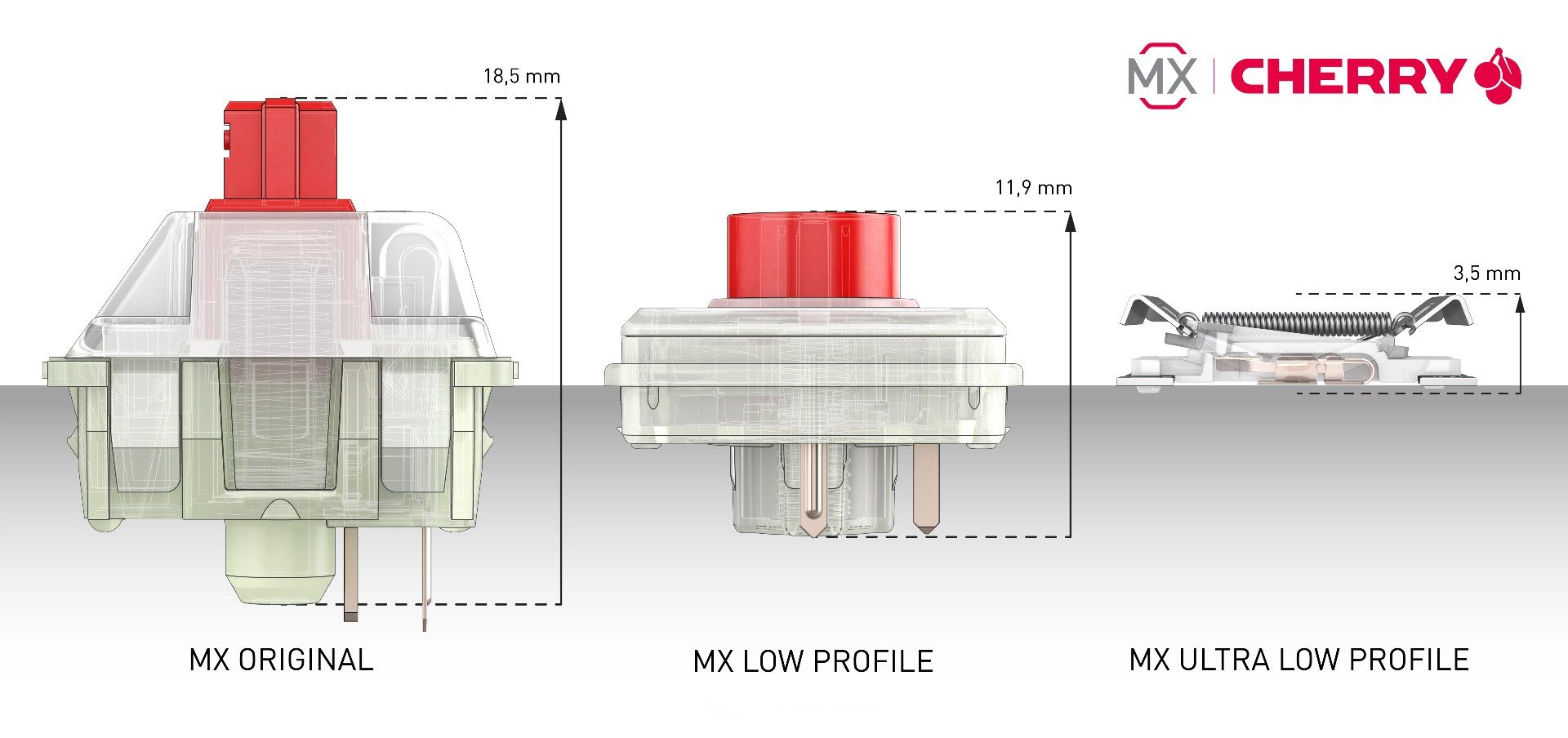
So, no, these keyboards won’t feel the same as the mechanical keyboard you use with your desktop setup. The key travel is just 1.8mm, which is only 0.1mm longer than on current rubber dome Alienware keyboards. But according to Cherry, you need more than long travel to re-create the feeling of a true mechanical keyboard in such a small package.
The operating point is the main area of contention, which is when the signal is sent to the keyboard. With these ultra-low-profile keyboards, Cherry is using a 0.8mm operating point with a remaining millimeter of overtravel. This long overtravel is what makes a mechanical keyboard feel so different from a typical rubber dome switch, which activates at the bottom of the keypress. For reference, the operating point of a standard mechanical keyboard is 2mm.
Cherry says the switches are closest in feeling to its Blue switches, but mentioned that there would be a learning curve for using the keyboard, whether you’re coming from a desktop mechanical keyboard or from a conventional rubber dome laptop keyboard.
You shouldn’t expect these switches to be as loud as an external mechanical keyboard either. Low-profile switches are already quieter than the original MX switches because of the smaller keycap volume. On a laptop, they’re going to be even smaller. Cherry did say, though, that there’s a noticeable click upon each keypress. You can hear the sound embedded in the tweet below.
Super 🍒 sweet 🍒 news is dropping tomorrow. Until then 🤫@cherrymx pic.twitter.com/YKkdMhpG7a
— ALIENWARE (@Alienware) March 17, 2021
Of course, the keyboard change won’t come in the base model of the Alienware m15 and m17 R4. It’s a $150 upgrade to add in the Cherry keyboard, which will still support the per-key RGB backlighting.
Aside from the change in keyboard, the Alienware m15 and m17 remain otherwise unchanged in what is now the fourth generation.
Alienware isn’t the only company to have experimented with more tactile keyboards in gaming laptops. Razer launched a version of its Razer Blade 15 that featured a keyboard that uses the company’s optical light sensor technology to emulate the feeling of a mechanical keyboard. The older Razer Blade Pro also featured a true mechanical keyboard in its larger chassis.


