
  1. Home
  2. Computing
  3. News

AI mode in Chrome gets a big upgrade to save you some tab hopping

Chrome just made tab hopping a thing of the past with its upgraded AI Mode, and it's genuinely useful.

Add as a preferred source on Google
Google AI mode mockup showing new feature
Rachit Agarwal / Digital Trends

If you have ever gone down a rabbit hole while searching for something online, you know the drill. You open one tab, follow a link, open another, and another, and suddenly you have 14 tabs open and zero answers.

It was one of the reasons that forced me to switch to Arc Browser, which offered easier-to-manage vertical tabs, which, incidentally, Google Chrome also added a week back. But Google is not stopping there, and is adding a meaningful upgrade to AI Mode in Chrome to fix this issue.

So, what has Google done to solve tab chaos?

The biggest change is that clicking a link in AI Mode no longer yanks you away from your search. Instead, the webpage opens alongside AI Mode, so you can browse the site and still ask follow-up questions without losing your place.

Recommended Videos

Google gave a shopping example to illustrate this feature. Say you’re shopping for a compact coffee maker that can pull a decent latte. You describe what you want in AI Mode and search for it. You find a model you like and click on its link. Instead of opening in a new tab, it will open right there on the right side.
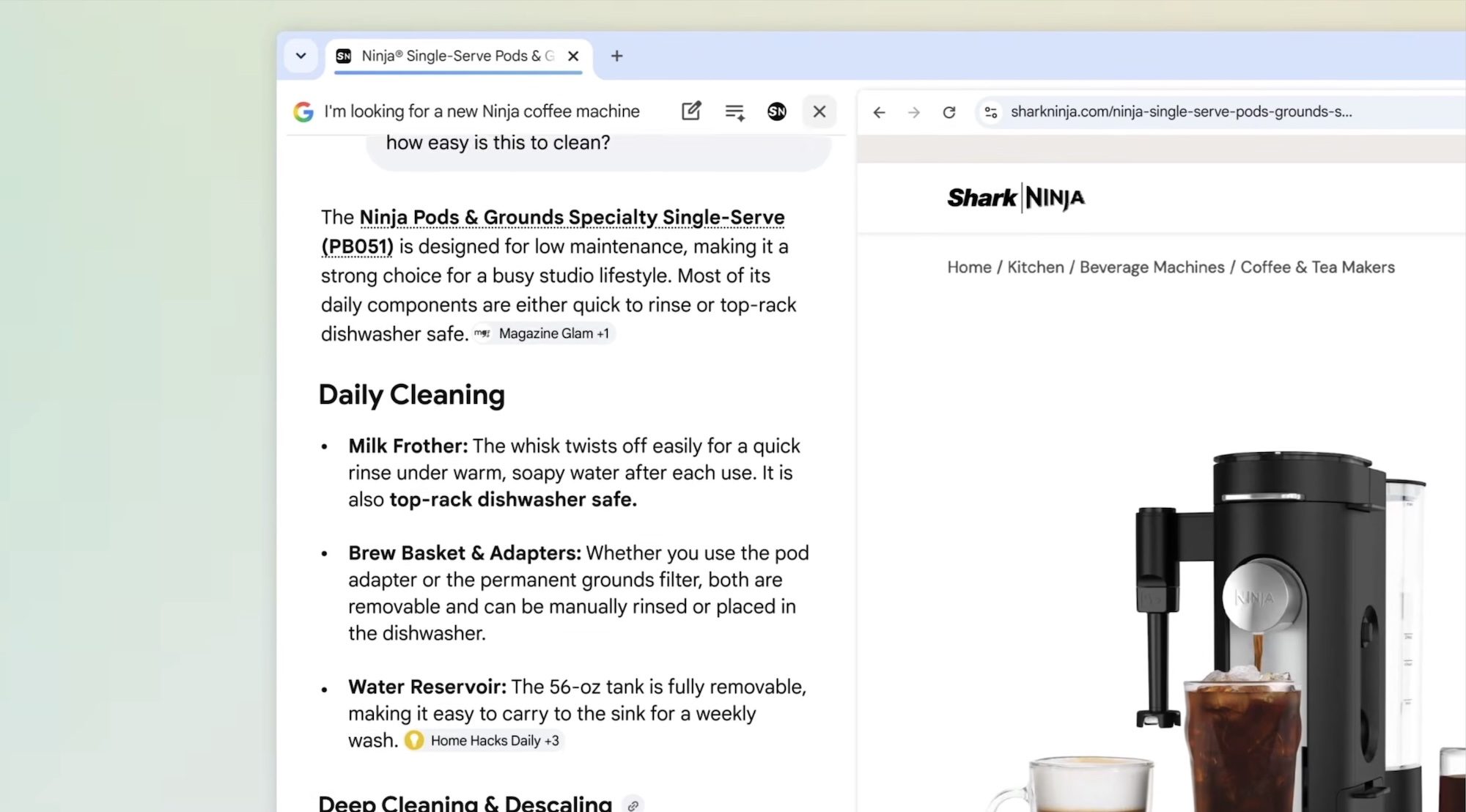
Now, you can ask questions like, “How easy is this to clean?” AI Mode will pull context from the page and give you an actual answer. No new tab, no starting over.

It works just as well for research. If you’re learning about McLaren’s racing teams, you can browse McLaren’s official site alongside AI Mode and keep firing questions in real time. 

I don’t think the feature has rolled out to everyone yet. I tried repeating the same steps, but the links are still opening in a new tab. So, if you are not seeing this feature, wait for it to roll out in the coming days. 

What else do you get with this new update?

Another major addition is the ability to search across tabs, and that is arguably the more exciting part for me. On both desktop and mobile, a new “plus” menu in the search box lets you pull in your already-open tabs and add them to your AI Mode search. You can mix and match tabs, images, and even PDFs.

Studying for an exam? Add your class notes, lecture slides, and reading tabs to the search, then ask AI Mode to explain something you are stuck on. It will use all that context to give you a tailored response.

Many AI browsers, including Perplexity Comet, offer a similar cross-tab search feature, and it’s good to see Google Chrome join the party.

Rachit Agarwal
Rachit is a seasoned tech journalist with over ten years of experience covering the consumer technology landscape.
Your hard drive is giving away your browsing habits and websites can see it
A new attack called FROST lets malicious websites spy on your open tabs and apps by tracking your SSD activity.
An SSD data port.

Your browsing habits may not be as private as you think, even with all the right precautions in place. According to Ars Technica, security researchers have uncovered a new attack technique that lets a malicious website figure out which other sites and apps you have open. You do not need to click anything, download anything, or grant any permission; just visiting the page is enough.

How can websites spy on your browsing activity through hard drive?

Read more
iOS 27 leak shows off Siri’s minimalist redesign and new tricks within a dedicated app
Bloomberg's iOS 27 leak reveals the most ambitious Siri redesign in the assistant's history.
Electronics, Mobile Phone, Phone

Apple’s biggest Siri overhaul in nearly 15 years is taking shape ahead of WWDC 2026 on June 8, 2026, and the first detailed look at what the revamped assistant might look like comes from Bloomberg. 

These aren’t official images or promotional materials, but renders based on the information that the outlet has collected from its sources. Furthermore, Apple often tests multiple designs and versions before releasing the final version of a product, so it could still differ. 

Read more
Qualcomm’s Snapdragon C chip eyes dirt-cheap laptops as MacBook Neo redraws budget lines
A $300 laptop that actually works? Qualcomm thinks it has the answer.
Qualcomm Snapdragon C

Budget laptops have always been a compromise. You either get a machine that struggles to keep up with your browser tabs or one that dies before lunch. And almost all of them feature a cheap plastic body. Qualcomm wants to change that with its new Snapdragon C Platform, a chip built specifically for entry-level laptops starting at $300.

Qualcomm says that the Snapdragon C is designed for students, families, and small businesses that need a reliable, everyday machine without breaking the bank. Devices powered by this chip will handle web browsing, video streaming, productivity apps, and video calls without a hitch. 

Read more