
Windows 11 is officially the next generation of Windows. Outside of the fact that the operating system exists, Microsoft announced several new features coming to the operating system at its Windows 11 event.
To keep you up to date on everything happening in the world of Windows, we rounded up all of the major announcements from Microsoft’s event.
A faster, more secure version of Windows

Today’s event confirms that the OS is officially called Windows 11. Nearly everything about the visual side of the operating system has changed, from new sounds to new icons. Under the hood, Microsoft said the OS is much faster, too. Waking from sleep has improved, Windows updates are 40% smaller and happen in the background, and browsers are faster across the board. Together, Microsoft says these features make it “the most secure Windows yet.”
Microsoft also unveiled the new centered taskbar, which isn’t just a visual change. The new Start Menu is powered by the cloud and Microsoft 365, allowing you to quickly switch from your desktop to your mobile device and work on the same content. It looks like this feature just works with OneDrive, but Microsoft didn’t clarify during the presentation.
As the leaked Windows 11 build showed, widgets are back, too. These are similar to the interests tab in Windows 10, showing you a curated list of news, weather, traffic, and other forms of content.
Microsoft didn’t announce a release date for Windows 11, but in a statement to press, the company said that it will be coming to general audiences this holiday season.
Android apps on the Microsoft Store

Perhaps the most exciting announcement to come out of the presentation is Android apps coming to the Microsoft Store. Microsoft showed Instagram and TikTok on Windows 11 and said that you’ll be able to use your favorite Android apps directly on the desktop.
The Microsoft Store itself isn’t offering the apps, though. Users can download Android apps via the Amazon App Store. Once installed, the app will function like any other native software. You can resize the window, drag it around your screen , or minimize it to the taskbar, all independently of your Android device.
Additionally, Microsoft announced that the updated Microsoft Store supports almost any kind of app. Developers no longer need to develop a Windows-specific UWP app for the store. You’ll be able to find popular Win32 apps like Google Chrome and Adobe Creative Cloud in the store instead of searching for them online.
Microsoft announced a new revenue sharing program for developers, too. Instead of giving up a cut of apps and services sold on the Microsoft Store, developers can opt to bring their own commerce platform and keep 100% of the revenue.
Xbox features coming to Windows

Many features available on the Xbox Series X and Series S are coming to Windows 11. The first is Auto HDR, which adjusts the color and contrast of non-HDR games automatically to make them appear as if they’re running with HDR. Microsoft says over 1,000 games will support the feature without any intervention from the developer, including Rocket League and Doom 64.
Direct Storage is part of Windows 11, too. This is an Xbox feature that allows the CPU the maximum amount of throughput, allowing developers to render more complex scenes based on what the player is looking at. It also decreases load times. Windows 11 includes the drivers for Direct Storage, but you’ll likely need a super-fast SSD to take advantage of it.
Microsoft also announced that Xbox Cloud Gaming is coming to Windows 11. Part of Game Pass Ultimate, this service allows you to stream Game Pass titles to your device from an Xbox in the cloud. That will allow PC gamers to play nearly all of the Game Pass library, even if a game isn’t on Game Pass for PC.
Improved multitasking and Microsoft Teams integration

Windows 11 brings a slew of productivity improvements. Snap Layouts allow you to quickly snap a window to a certain section of the screen by hovering over the top of the window. Once you found a layout you like, you can save a Snap Group, which allows you to recall previous window configurations instantly.
Users can also save and recall different desktop configurations. You can save different apps to different desktops and quickly switch between them. You could have a gaming desktop with Steam and your favorite games, for example, and a work desktop with messaging applications and your browser.
When working between devices, Windows 11 will automatically adjust the window size to accommodate the display. If you dock a laptop, for example, Windows 11 will automatically minimize your Snap Layout and resize the window to match the display. The same works in reverse whenever you dock your laptop, automatically recalling your previous Snap layout.
Another feature that will help you stay more productive: Desktop integration with Microsoft Teams. Teams is located front and center in the taskbar as a core part of the OS. Microsoft says that users will be able to call and chat others regardless of the platform they’re on, and you’ll see any updates immediately reflected in the Teams app.
Improved touch use and a redesigned keyboard
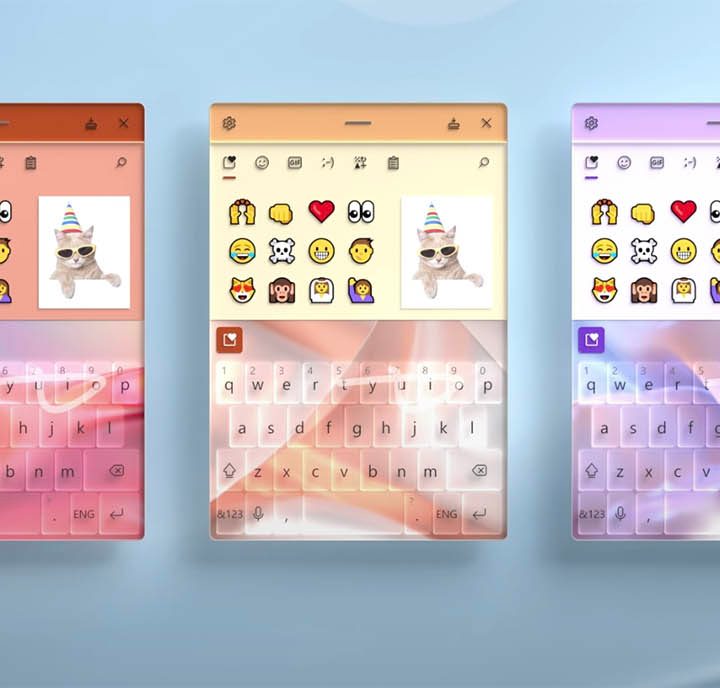
Windows 11 is built to handle keyboard and mouse as well as touch. There are a handful of small improvements that should improve the touch experience, including transition animations when going from portrait to landscape mode, touch gestures, and a new on-screen keyboard.
The touch keyboard doesn’t take up the entire screen. Instead, it’s a mobile-like keyboard that you can drag around to a convenient spot. You can swipe between letters to type, and you can use the space bar as a trackpad.
Voice typing is improved, as well. The voice system can automatically detect and add punctuation, and it can accept commands. Microsoft didn’t reference Cortona at all throughout the event, but it looks like a lot of its functionality is being reworked into the voice typing experience.


