
If you plan on attending an event, taking a flight, or going to a gym, you’re probably going to have to prove that you were vaccinated against COVID-19. When it comes time to prove that you were vaccinated, what are your options?
The simplest option is to carry the vaccination card you were issued by the Centers for Disease Control and Prevention (CDC) or the U.K.’s National Health Service (NHS). But what if you lose it? While you’re waiting for a new one to arrive in time, you’ll be wishing you had a digital copy. Keeping a digital copy of your card doesn’t require an app. You can just take a picture with your cell phone and store it in an easy-to-find folder. If you have the Google Drive app, you can also just scan your card or save a PDF to Dropbox.
Apple iPhone users have a built-in option now that iOS 15.1 is out. The Apple Health and Wallet apps will store verifiable immunization records, including those pertaining to the COVID-19 vaccine.
If you want the convenience that comes with a vaccination app, which one you use will depend on where you live. Many states in the U.S. and countries worldwide have their own entry, testing, and verification requirements, so this list should by no means be considered exhaustive.
CommonPass

For Samsung Galaxy users, there’s a built-in option in Samsung Pay to add proof of vaccination. To add the Vaccine Pass to your wallet, you’ll need to download the CommonHealth app. There, you can securely share your health status and present lab and vaccination results. Other Android and Apple users can also take advantage of the app, though it’s not built-in.
Google Play Store Apple App Store
Apple Wallet (iOS 15.1)
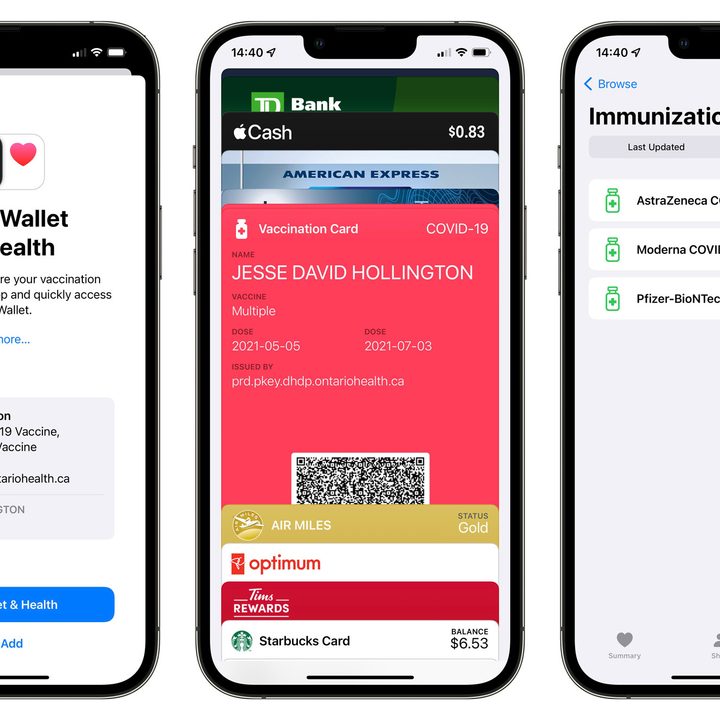
If you’re using an iPhone, iOS 15.1 and later provide a really easy way to store your proof of vaccination directly in Apple’s Wallet app, as long as your state health agency is using the SMART Health Card standard (most are). In this case, you can simply scan the QR code with the built-in camera app and tap on the link that to import it directly into the iPhone’s Health app, where it will be stored in the Health Records section under Immunizations. It also gets automatically added to your Wallet app so you can quickly bring it up any time you need to show it. You can even add vaccination cards for other family members, so you can keep your kids’ proof of vaccination handy as well.
NHS Covid Pass

If you live in the U.K., you can prove your vaccination status with an NHS Covid Pass. You’ll need a log in with the NHS App to make the pass, and it will take about two weeks for your login to be verified. Once you have the pass, you can access a digital version on the NHS website. The digital version can be downloaded, printed, or displayed using the NHS App. However, keep in mind that in order to get the app, you must be age 13 year and older and registered with a general practitioner surgery in England.
Google Play Store Apple App Store
Excelsior Pass

New York uses Excelsior Pass to verify your vaccination status (or recent negative test result) to create a QR code. The pass can be printed from the Excelsior Pass website or displayed in the app. Verifying your vaccination requires your name, date of birth, and the location you were vaccinated, but the app doesn’t store any personal health information.
Google Play Store Apple App Store
myColorado

Residents of Colorado can use the myColorado app. After you create an account with your driver’s license, you can use myVaccine Record to access a copy of your Vaccination Record Card from the CDC. The app stores digital copies of your vaccine pass, as well as fishing and hunting licenses, and can even renew your driver’s license.
Google Play Store Apple App Store
MyIR Mobile

Health departments from several states have partnered with MyIR Mobile to verify vaccinations. These states are Arizona, Louisiana, Maryland, Mississippi, North Dakota, Tennessee, Washington, West Virginia, and Washington, DC. You can print official immunization records for registering your child at school, and soon the app will provide QR codes to verify vaccination status. The app doesn’t seem to be publicly available until you’ve registered.
Clear Health Pass

Clear’s Health Pass is used by sports stadiums and Hawaii Safe Travels. People who were vaccinated at Walmart can easily access their vaccination records through the app. Clear has locations at many international airports, including Hartsfield-Jackson in Atlanta, O’Hare International Airport in Chicago, and Seattle-Tacoma International Airport. Clear is also used in New York’s largest airports and stadiums.
Google Play Store Apple App Store
VeriFly

About to take an international flight? American Airlines, British Airways, and several other major international airlines have partnered with VeriFly. The app does more than verify for vaccination status. By prompting you to put in your flight information, the app ensures that you meet the requirements for your destination. This takes the stress of a possible surprise quarantine out of traveling.
Google Play Store Apple App Store
Which one should you use?
Everyone should have a digital copy of their vaccination record card. If your state health department has partnered with a specific app, you should go ahead and download it. If you’re an iPhone user and your state uses the SMART Health Card standard, you can also simply scan your vaccination record right into Apple’s Health and Wallet apps on iOS 15. You can also use the app recommended by the venue or airline when you take a trip. Requirements and restrictions are also changing week to week as cases surge in certain locations, so it’s always wise to check with official government sources before relying on one of these apps to provide the proof you need.


