
After revealing the feature nearly two years ago, Nvidia’s DLAA has slowly worked its way into a long list of games including Diablo IV, Baldur’s Gate 3, and Marvel’s Spider-Man. It’s an AI-driven anti-aliasing feature exclusive to Nvidia’s RTX graphics cards, and we’re going to help you understand what it is and how it works.
At a high level, DLAA works on the same tech as Nvidia’s wildly popular DLSS, but with much different results. It helps improve the final quality of the image in games, rather than reducing the quality to improve performance.
What is Nvidia DLAA?
Nvidia Deep Learning Anti-Aliasing (DLAA) is an anti-aliasing feature that uses the same pipeline as Nvidia’s Deep Learning Super Sampling (DLSS). In short, it’s DLSS with the upscaling portion removed. Instead of upscaling the image, Nvidia is putting its AI-assisted tech to work for better anti-aliasing at native resolution.
Anti-aliasing solves the problem of aliasing in video games. Pixels are arranged in a grid on your display, so when a diagonal line shows up on-screen, it creates a blocky, stair-stepping effect. These are known as jaggies. Anti-aliasing techniques try to fill in the gaps between pixels, leading to a smoother edge on objects.
Next time you boot up a game, look at foliage, fences, or any thin object with straight lines. You’ll see some amount of aliasing at work. The three main anti-aliasing techniques are multi-sampling anti-aliasing (MSAA), fast approximate anti-aliasing (FXAA), and temporal anti-aliasing (TAA). Each takes samples of pixels to create an average color value, dealing with the jaggies, but the way they do it is different.
MSAA is the most demanding, sampling each pixel at multiple points and averaging the result to fill in the missing data. TAA is similar, but it uses temporal (time-based) data instead of sampling the same pixel multiple times. That makes TAA more efficient overall while providing a similar level of quality.
Finally, FXAA is the least demanding of the lot. It only samples pixels once like TAA, but it doesn’t use past frames for reference. It’s only focused on what’s showing up on your screen for a given frame, which makes FXAA much faster than MSAA and TAA, though at the cost of image quality.
This short romp through anti-aliasing techniques is important for understanding DLAA and DLSS. DLAA works just like TAA, but instead of sampling every pixel, it only samples pixels that have changed from one frame to the next to fill in the missing information. DLAA also uses machine learning, giving the anti-aliasing technique much more information to work with.
How does Nvidia DLAA work?
If you know how DLSS works, you know how DLAA works. It’s the same technique, just applied in a different way. Although DLSS deals with upscaling an image, it’s essentially an anti-aliasing technique. That makes DLAA much easier to understand, offering the anti-aliasing bit without the upscaling.
Under the hood, DLAA works by utilizing an AI model and dedicated Tensor cores on Nvidia’s RTX graphics cards. Nvidia trains an AI model by feeding it low-resolution, aliased images rendered by the game engine, as well as motion vectors from the same low-resolution scene. During this process, the AI model compares the low-resolution image to a 16K reference image.
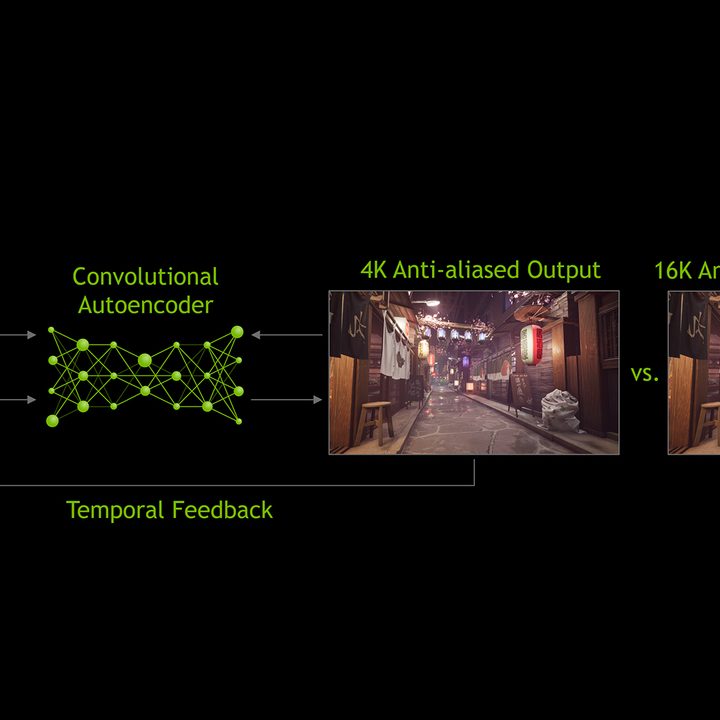
After being trained, Nvidia bundles the model into a GPU driver and sends it off to you. Once you download the driver, the Tensor cores on RTX GPUs offer the computational power to run the AI model in real time while you’re playing games.
To understand DLAA, we need to look again at TAA. As mentioned, TAA only collects one sample per pixel, unlike MSAA which collects multiple samples. These samples are collected to provide an average color value, equaling out the jaggies. For TAA, it jitters the pixels while collecting the sample, helping it gather more information for an average without taking multiple samples.
It’s a great solution, and it looks about as good as MSAA with a vastly lower performance cost. The problem is that TAA doesn’t handle motion well. The samples from jittered pixels aren’t usable once something in the scene moves, which leads to the ghosting effect that TAA is infamous for.
DLAA is just TAA, but it solves the problem with motion. The AI model can track motion, lighting changes, and edges throughout the scene and make adjustments accordingly. This gets around the old samples TAA has to deal with while providing a cleaner image.
DLSS and DLAA work in the same way. The only difference between them is that DLSS is using anti-aliasing to produce acceptable image quality with a big performance gain while DLAA is using anti-aliasing to provide the best image quality at a performance loss.
Nvidia DLAA image comparison
With the technobabble out of the way, it’s time to look at DLAA in action. The feature first launched in The Elder Scrolls Online, which also features DLSS and TAA. DLAA is meant to replace TAA, not DLSS. If you’ve been using the upscaling tech to improve performance, DLAA will take you in the opposite direction.


We took screenshots of The Elder Scrolls Online with the Maximum preset at 4K, only changing the anti-aliasing mode between shots. Zoomed in three times the original resolution, we can see some major differences between DLSS and DLAA. DLSS is working with less information, so areas like the shingles on the roof and the area under the spire ledge look muddy.
There’s not much of a difference between TAA and DLAA. They’re roughly the same, and some areas, such as the green leaves at the bottom, look slightly better with TAA. That makes sense, though. TAA and DLAA are using very similar anti-aliasing techniques, so they should produce about the same image quality.
The difference comes in motion. As mentioned, TAA doesn’t always handle motion well. DLAA does. In short, it provides the same image quality as TAA, just without the ghosting and smearing that sometimes accompany it.
It’s important to note that you’ll see a more pronounced difference at lower resolutions. Naturally, more pixels on the screen means less work for the anti-aliasing. As DLSS has proved time and again, Tensor cores can work wonders with an AI model on low-resolution scenes.
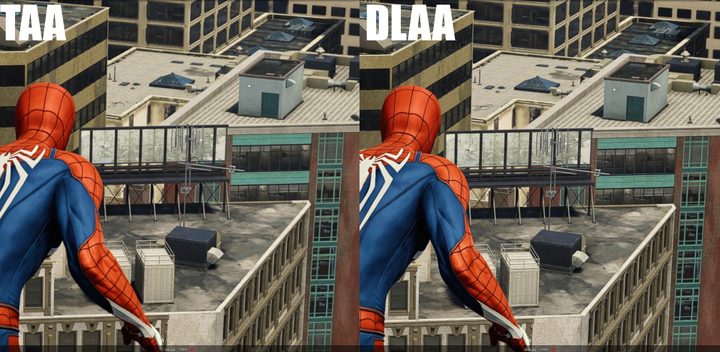
DLAA can be more pronounced in other games, though. For example, in Marvel’s Spider-Man with its vast cityscape, DLAA manages to extract more detail out of a scene than TAA for distant objects.
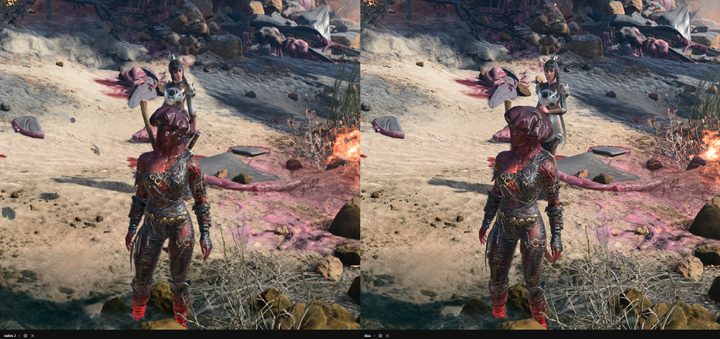
However, in a game like Baldur’s Gate 3, DLAA doesn’t do much more than TAA does on its own when looking at a static image. It’s slightly better in motion, but the quality largely depends on how fast the game is. In a fast game like Marvel’s Spider-Man, TAA shows more ghosting, while in a slower RPG like Baldur’s Gate 3, TAA and DLAA produce largely similar results.
Nvidia DLAA games
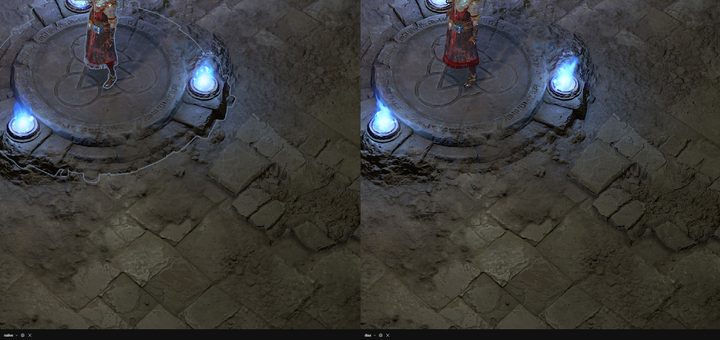
After launching with The Elder Scrolls Online, DLAA has been added to around a dozen more games. Here are all of the titles we’ve spotted a DLAA option in:
- A Plague Tale: Requiem
- Baldur’s Gate 3
- Call of Duty Modern Warfare II
- Call of Duty Warzone 2.0
- Chorus
- Crime Boss: Rockay City
- Cyberpunk 2077
- Deep Rock Galactic
- Diablo IV
- F1 22
- F1 23
- Farming Simulator 22
- Hogwarts Legacy
- Judgment
- Jurassic World Evolution 2
- Loverowind
- Lumote: The Mastermote Chronicles
- Marvel’s Spider-Man Miles Morales
- Marvel’s Spider-Man
- Monster Hunter Rise
- My Time at Sandrock
- No Man’s Sky
- Ratchet and Clank Rift Apart
- Redfall
- Remnant 2
- The Elder Scrolls Online
- The Finals
- The Lord of the Rings Gollum
- Trail Out
- WRC Generations
Same tech, but not DLSS
 xf
xf
Although DLSS and DLAA do the same thing and work with the same tech, you shouldn’t confuse them. Think of them as opposites. DLSS focuses on performance at the cost of image quality, while DLAA focuses on image quality at the cost of performance.
DLAA has applications in games like The Elder Scrolls Online, where a good chunk of players has extra GPU power that’s effectively left on the table. You won’t see it in the next Cyberpunk 2077 or Control, and if you do, you’ll need some of the most powerful hardware around to use it.
The unfortunate news is that, like DLSS, DLAA is restricted to RTX 2000 and RTX 3000 graphics cards. It requires the Tensor cores to work, but the end result is worth it.


