  1. Home
  2. Smart Home
  3. News

iRobot expands Roomba 2-in-1 lineup with Combo j5+ and Combo i5+

Add as a preferred source on Google

The Roomba Combo j7+ is getting two new family members, as iRobot is expanding its lineup of robot vacuum and mops with the Combo j5+ and Combo i5+. Both devices are now up for preorder, with an expected launch date of September 3.

Unlike the expensive Combo j7+, the Combo j5+ and Combo i5+ are lower-priced options that offer many of the same features. The j5+ is a particular standout, allowing you to swap between vacuuming and mopping to just vacuuming by switching out its bin. Its charging dock can hold up to 60 days of debris before it needs to be manually emptied, and the robot itself boasts AI that can identify cords, shoes, and other hazards scattered throughout your home.
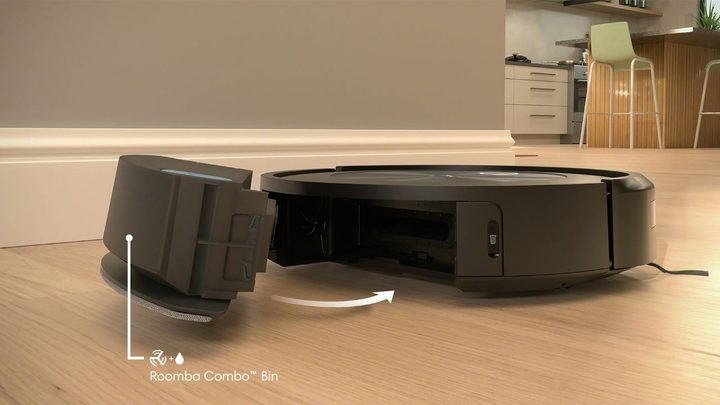
The j5+ having its bin swapped out.
iRobot

The Buy at Walmart.com costs $800, which is pretty pricey for a robot vacuum. Compared to the $1,000 j7+, however, it could be a great option if you need something that’ll both mop and vacuum and want to save a few bucks. The biggest departure from the j7+ is you’ll need to swap out bins on the j5+. The j7+ uses a swinging arm to automatically stow away its mop when traveling on carpet.
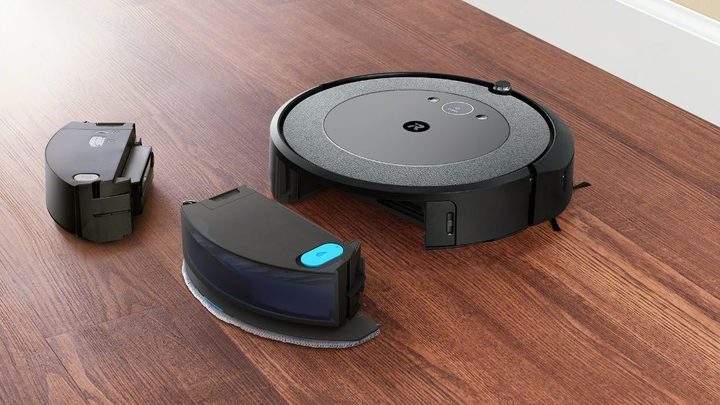
The Roomba Combo i5+ next to its different bins.
iRobot

Meanwhile, the Combo i5+ is designed for smaller homes without much carpet. It also shares the same bin-swapping design as the Combo j5+, along with a docking station capable of holding 60 days of debris. The main drawback is that it’s not quite as smart as the j5+ and won’t be able to detect obstacles in your home.

Recommended Videos

Its reduced navigational prowess makes it quite a bit cheaper, as the Buy at Walmart.com is just $500. But since it can vacuum and mop, it’s still a great companion for most homes. You may want to steer clear of it if you have pets, however, as it won’t be able to detect any toys (or other gifts) they could drop in your living room.

For more great products, take a look at the best robot vacuums of 2023.

Jon Bitner
Former Digital Trends Contributor
Jon Bitner is a writer covering consumer electronics, technology, and gaming. His work has been published on various websites…
Amazon’s Echo Hub just became the control freak your smart home needed
The Amazon Echo Hub showing the main screen.

Smart homes are supposed to make life easier. In reality, they often leave you juggling half a dozen apps just to dim the lights, check who’s at the front door, and figure out why the thermostat suddenly thinks you’re living in the Arctic.

That’s the problem Amazon’s Echo Hub has always tried to solve. It’s essentially a dedicated touchscreen for your connected home, bringing your lights, cameras, locks, thermostats, alarms, and routines into one place. Now, Amazon is giving that experience a significant refresh with a redesigned interface that feels like the smart home dashboard many people have been waiting for. The update is rolling out as a free software upgrade for existing Echo Hub owners, and while it doesn’t change the hardware itself, it may make the device much more useful day to day.

Read more
Amazon’s Sleep Studio feature turns Echo devices into a soothing sleep-bringer for kids
It brings bedtime stories, meditations, and calming sounds from Calm, Headspace, and Moshi to Echo Kids devices as part of the Amazon Kids+ subscription.
Amazon Echo Kids Sleep Studio featured

Amazon has added a new bedtime feature, called Sleep Studio, to its Echo Kids lineup. It gives children access to a curated library of sleep-focused content, including guided meditations, soundscapes, and stories from Calm, Headspace, and Moshi. The feature is included with Amazon Kids+, a subscription that comes bundled with Echo Dot Kids and Echo Pop Kids.

How it works

Read more
Apple Home app’s new AI superpowers are about to make your life easier
Apple Home App New features

At WWDC 2026, Apple showed off how Apple Intelligence is making its way into the Home app. While the Siri AI announcements stole most of the spotlight, these Home updates might be the ones that quietly make your day-to-day life easier. Here’s the lowdown on everything coming to the Home app with the iOS 27 update. 

Tired of notification overload?

Read more