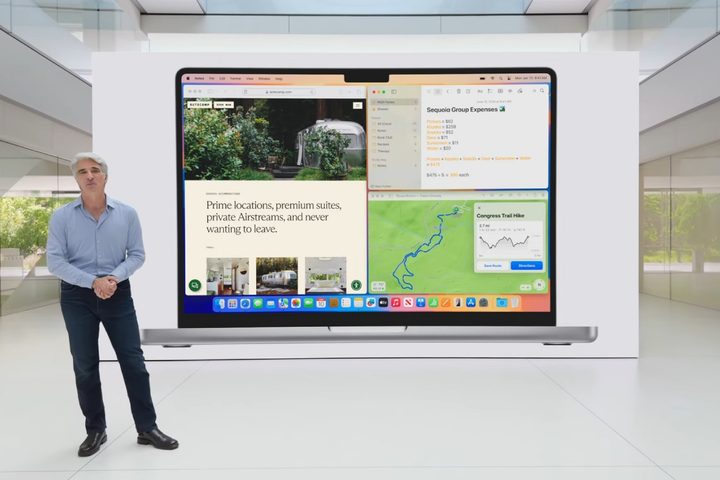
When Apple lifted the shroud on macOS Sequoia at its Worldwide Developers Conference (WWDC) in June, there were a lot of headline announcements: Apple Intelligence, iPhone mirroring, a new Passwords app, plus a whole lot more. Yet it was the much more modest announcement of window snapping and tiling that really caught my eye.
For years, Windows users have been able to point to the lack of macOS window snapping as proof of the inferiority of Apple’s operating system. After all, if Apple couldn’t even get such a simple productivity feature right, what else was it failing at?
Apple has finally put that idea to bed, and I’ve been testing out its new feature in macOS Sequoia’s developer beta. Yet despite the step forward that window snapping represents, it’s got nothing on a third-party app that I’ve been using for years to fill the void Apple has left.
That’s because compared to an app called BetterTouchTool (which costs $12 for a standard license), Apple’s solution is no great shakes at all. It’s outdone in nearly every way by BetterTouchTool, which provides more options, is easier to use, and more reliable to boot. If you’re after window tiling on your Mac, BetterTouchTool is the way to go.
Window snapping in macOS Sequoia
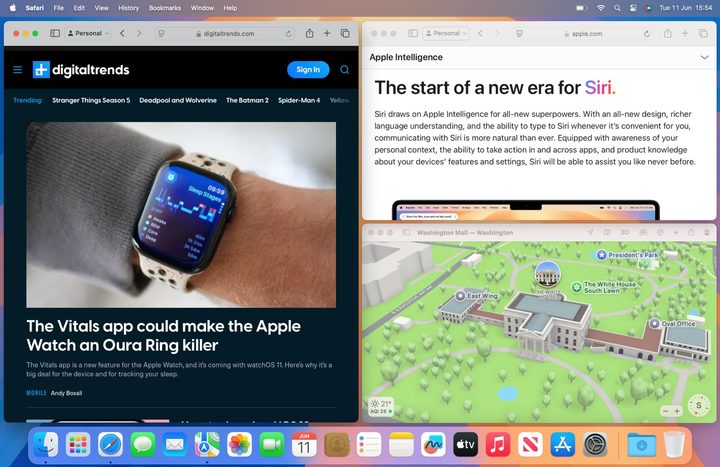
In macOS Sequoia, window tiling is fairly simple. You drag a window toward the edge of your screen and, when you get close enough, an outlined frame appears below the window. Let go of your mouse or trackpad and the window snaps into place. You can arrange windows to occupy half your screen, a quarter, or some combination thereof. There are keyboard shortcuts (Globe+Control+Left arrow moves the window to the left half of your screen, for instance), and you can see all the options by going to Window > Move & Resize in the menu bar.
Apple gives you a few customization options, but not many. You can hold the Option key when moving a window to give yourself a bigger “drop zone.” You’ll find more tiling choices if you hover over the green traffic light button in an app’s top-left corner. And you can also remove the gap between tiled windows, making them flush with each other.
But there are plenty of shortcomings that have left me wanting a whole lot more from Apple. While you can move windows around using keyboard shortcuts, you can’t customize these shortcuts to better suit yourself. Unlike in Windows 11, snapping a window doesn’t automatically give you the choice of snapping another app to the other side of your screen. Moving windows into place is fiddly, and some apps have minimum sizes that are larger than half a screen’s width, meaning they don’t tile well (or at all) with other windows.
In other words, window snapping in macOS Sequoia is fine, but not much more than that. I know we’re talking about a macOS beta here, but even so, this feature doesn’t feel anywhere close to where I’d like it to be.
Why BetterTouchTool is, well, better
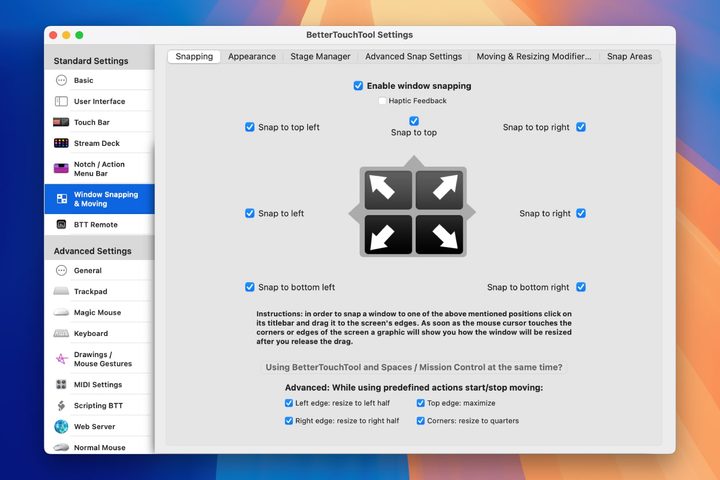
Enter BetterTouchTool. This app is absolutely stacked with window-snapping features — and a whole lot more — giving you greater control than Apple is ever likely to grant you. That ranges from custom keyboard shortcuts for window tiling to visual tweaks that change the way the app looks and feels. It all gives you much more power and flexibility than macOS Sequoia’s native solution.
BetterTouchTool has a wealth of advanced features and power tools to satisfy every morsel of curiosity you might have. You can create your own snap areas and shapes, decide if a window returns to its previous shape when it’s removed from a snap zone, delay Mission Control launching when you move a window upward, and so much more. There are even options specifically for Stage Manager. It’s a power user’s dream come true.
It’s not just window snapping that BetterTouchTool excels at. Here’s one of my favorite features: When you press and hold a modifier key, your mouse pointer will move or resize any window it is hovering over, without even needing to click a mouse button (you can also accomplish this with a three-finger drag). It’s a marvelously clever feature and absolutely effortless to use day to day.
But let’s be fair to Apple: It’s clear that macOS Sequoia’s window snapping, like many of its other features, is in a very early stage of development. I’m not worried about its bugginess — that’s standard procedure for beta testing, and it’s something that Apple can fix it easily enough.
But I’d like to see greater ambition on Apple’s part here, with more features and control over how window snapping works. If all that means is customizable keyboard shortcuts and a smattering of advanced tools, that’s better than nothing.
I doubt that will happen, though. Apple’s instinct is to create something straightforward and easy to use rather than rivaling the full-featured nature of BetterTouchTool. For now, that tells me that BetterTouchTool doesn’t have to worry about being Sherlocked by Apple — and that it’s here to enhance my macOS window tiling experience for the foreseeable future.