
I’ve been playing around with the ChatGPT app on macOS to see how it works and what it’s good at, and I’ve come away pretty impressed so far. It’s got all the power of ChatGPT in a handy desktop package. Better yet, you don’t need to pay to use it, as there’s no cost to download it, and it works with a free OpenAI account (free accounts do have limits placed on their usage, though, as they do on the web).
After seeing what I can get out of it, I’ve found there are three things I really love about the new ChatGPT Mac app. From the way it launches to its impressive capabilities, I think you’ll enjoy these aspects of the app as well.
It launches with a clever shortcut

Seasoned Mac users will know that pressing the Cmd+Space keyboard shortcut opens up the Spotlight search bar, letting you launch an app, find a file, look up a definition, and a whole lot more. OpenAI has taken its cues from Spotlight when it comes to the ChatGPT app, as it opens in a similarly quick and simple way.
In ChatGPT’s case, you need to press Opt+Space. This launches a small Spotlight-like bar that you can type any query into for OpenAI’s chatbot to tackle. Its familiarity as a shortcut makes it easy to learn and simple to find on your keyboard, ensuring ChatGPT is just a couple of button presses away.
And it’s more than just a simple text-entry field — it’s essentially the full version of ChatGPT shrunk down into a small bar. If you select the paperclip icon, you can upload a file or photo for analysis, take a screenshot of an open app, take a picture using your webcam, or open the full ChatGPT window. All that from a quick keyboard shortcut makes it a really handy feature.
It understands files and their contents
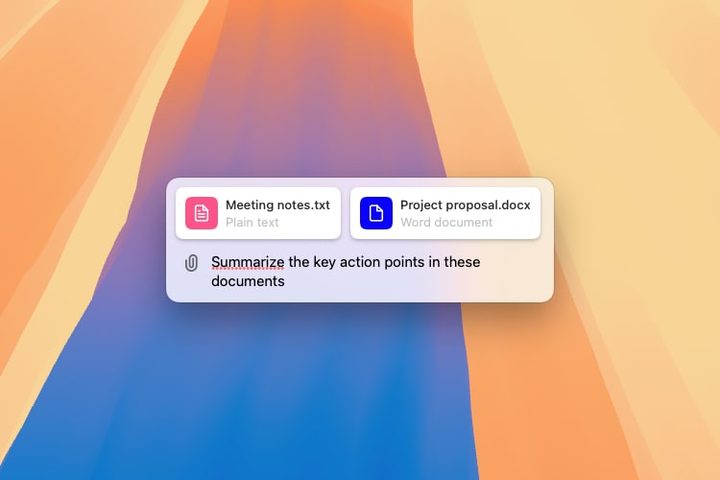
One of ChatGPT’s core strengths is analyzing information, even if it’s contained within files. For example, you can upload PDFs to ChatGPT for analysis. The Mac app is no different, and this makes it an excellent tool to help you with work and leisure alike.
For instance, you could upload a group of different sales reports and ask it to pull out important trends. Or upload several assignments and request that it sorts the deadlines into an easily digestible list. You don’t need to pull out this info and paste it into ChatGPT, as the app can scan through your files and find the data itself.
The fact that you can do this on your Mac app is significant. You’re less likely to have documents like the above on your iPhone, for one thing. I also tend to find that I’ll have several files and Finder windows open at any one time when working on my Mac; when that happens, I can just drag and drop my files from the Finder right into ChatGPT, without having to open a new browser tab and upload them there. You can keep ChatGPT on top of other windows, which helps this use case even more.
It’s great at working with images

One of the neatest features of the ChatGPT Mac app is its ability to work with screenshots. Select the paperclip icon and pick Take Screenshot, and you’ll see a list of open apps and windows. Choose one and ChatGPT will automatically screenshot the entire window and load it into the query box, ready for your input.
This has all kinds of uses. You can grab an image of code you’re working on and ask ChatGPT to fix it up for you. Or screenshot an email response and see if it can rewrite it in a more concise manner. It’s really useful for when speed is important — there’s no need to copy and paste any text or even switch apps, as ChatGPT handles it all for you.
Screenshots aren’t the only images that ChatGPT works with. You can also upload images to ChatGPT from your Mac or your Photos library, or use your webcam to snap a new image. Want to rustle up a meal idea for dinner? Grab a photo of the ingredients you’ve got to hand and ChatGPT will suggest a recipe.
Again, things get easier because it’s on the Mac. You can drag and drop images right out of the Photos app or the Finder and into ChatGPT, something that wouldn’t be anywhere near as simple in the iOS version. It makes working with images a cinch.
More coming soon
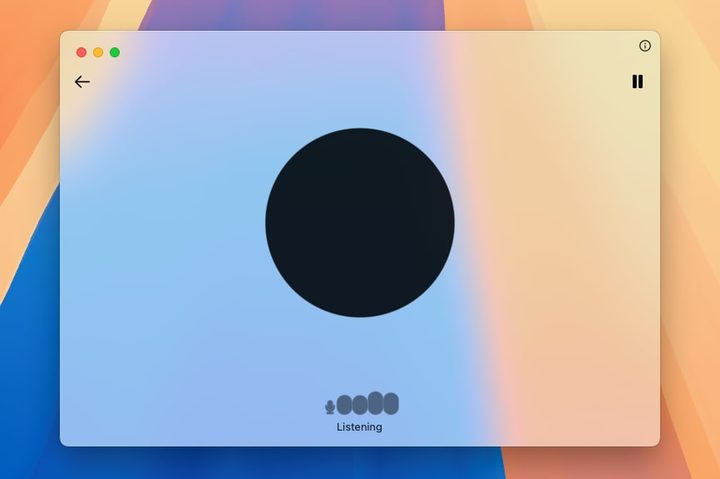
The ChatGPT app for macOS can do a lot more than the things I’ve mentioned above. If you’ve connected a microphone to your Mac, for instance, you can speak commands and queries to the chatbot, which you might find easier than typing (you need to open the full app window for this, rather than using the Opt+Space query bar). And, of course, you can enter the standard text queries that are bread and butter for ChatGPT.
OpenAI says that “GPT-4o’s new audio and video capabilities” are “coming in the future,” as is Windows support. If you want to run it on your Mac, you should have the latest macOS update installed (but it will run on macOS 14 Sonoma or later) and have an Apple Silicon chip (M1 or better).
One of the few things I don’t like about the ChatGPT Mac app is that OpenAI uses your queries to train its chatbot, but you can turn this off by selecting the ChatGPT icon in your menu bar and going to Settings > Data Controls and disabling the Improve the model for everyone option. There’s also no offline mode, which would be handy. It’s something that a smattering of third-party apps can offer.
Overall, though, the ChatGPT Mac app adds a lot to your workflow, whether you want to boost your productivity or simply perform tasks on your computer a little quicker. It’s available on the OpenAI website, but isn’t yet in Apple’s App Store.


