  1. Home
  2. Mobile
  3. Social Media
  4. Legacy Archives

Highlight 1.5 update adds location-based photos and event discovery

Add as a preferred source on Google
highlight-events
Image used with permission by copyright holder

Just in time for the tech fest that first launched Highlight into the limelight, before the alleged SoLoMo fizzle out, the location-based social network is prepping for SXSW with a slew of updates including photos and events.

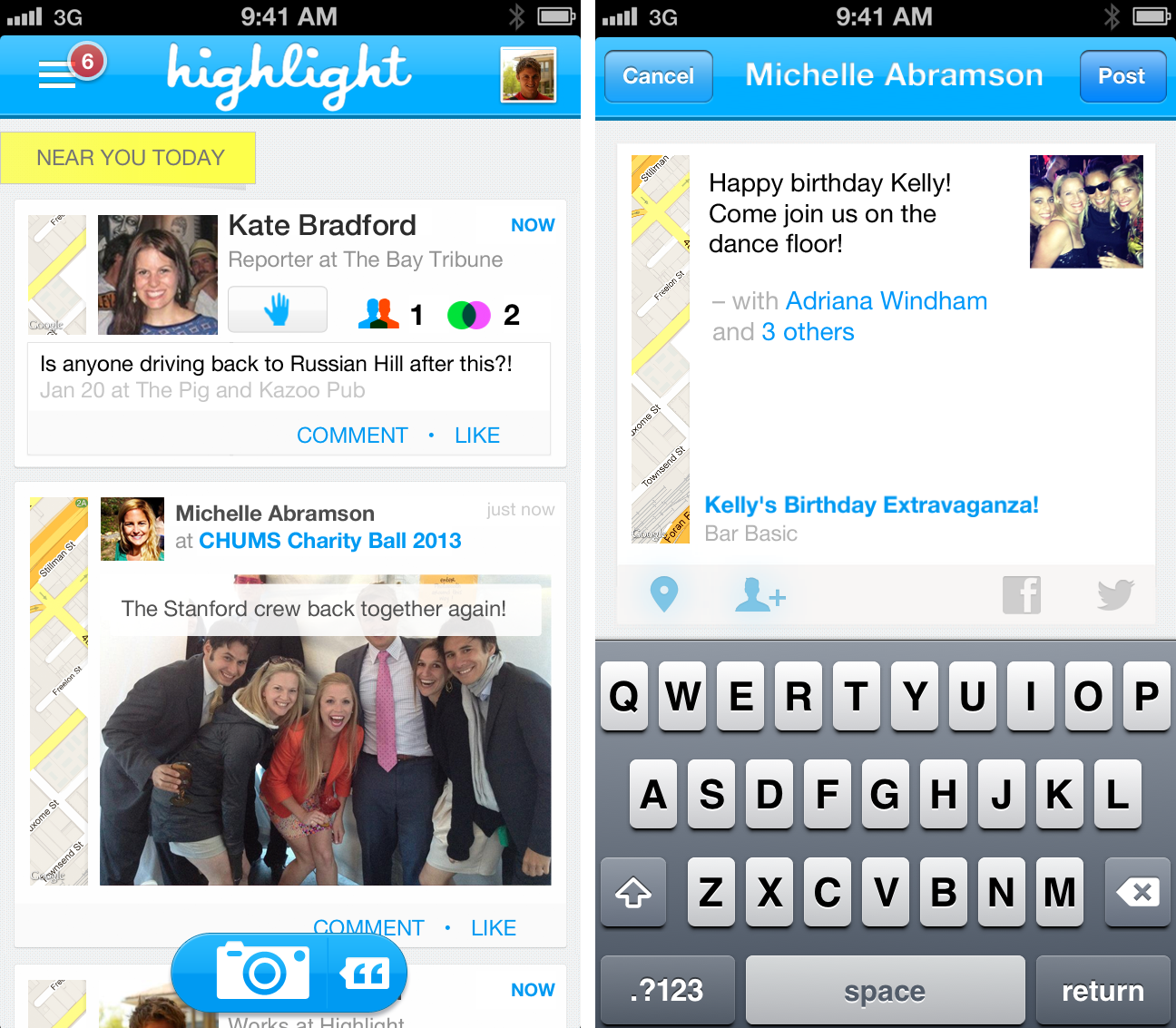
Highlight’s latest update is version 1.5, the app’s most significant update yet, largely thanks to the introduction of photos. Users can tag photos and the people they’re with based on their current location. To add some background information to the photos, captions can be added. Davison says that the purpose of photos is to share moments with people around you, and that in doing so Highlight is taking an approach that emphasizes “communication” rather than “publishing.” The photos aren’t intended for just anyone that happens to step into the same location where the photos were tagged in. Photos are only limited to select users within the vicinity.

Recommended Videos

The other important update is “Events.” Users are able to discover new events nearby, but they’ll have to be within a certain distance away. There’s a time constraint as well, which adds urgency and a hint of the self-destruct flair (since the event will disappear after the time limit is up) a la Snapchat. If you happen to be passing by an event at the right time, you’ll be alerted and can join in on your own accord.

It’s certainly a big step forward for Highlight, which has stalled since it’s launch. There’s nothing like a little SXSW magic to regain some interest – the trick is sustaining it after the show. 

Francis Bea
Former Digital Trends Contributor
Francis got his first taste of the tech industry in a failed attempt at a startup during his time as a student at the…
Snapchat Planets: What’s the order, and what do they mean?
Snapchat Planets turns your best friends list into a solar system, and yes, your orbit says a lot
Snapchat Planets being shown on the Snapchat app on iPhone.

Snapchat is already packed with little symbols that can be weirdly hard to decode. You have streaks, emojis, badges, scores, Best Friends, and if you use Snapchat Plus, a tiny solar system that shows where you sit in someone’s closest-friends list.

The feature is called Friend Solar System, though most people just call it Snapchat Planets. It takes your position in a friend’s Snapchat orbit and turns it into a planet. From Mercury to Neptune, these celestial bodies signify how close a person is to you.

Read more
How to use WhatsApp Web
We'll show you how to use WhatsApp on your desktop or laptop
WhatsApp Web

As one of the most popular messaging services, you’ve already heard of WhatsApp. From its humble beginnings in 2009—two years before Apple introduced iMessage—to its acquisition by Facebook (now Meta) in 2014, WhatsApp has become the dominant messaging platform around the globe.

In recent years, it's grown even more potent with new features like video messages, self-destructing voice messages, the ability to edit sent messages, and more. We even finally got an WhatsApp iPad app in May 2025.

Read more
What is WhatsApp? How to use the app, tips, tricks, and more
From setting it up to mastering hidden features, here is your complete guide to WhatsApp.
Electronics, Phone, Mobile Phone

There's no shortage of messaging apps out there. The past decade has given us more options than we know what to do with, largely because smartphones demanded something better than plain old SMS.

Both the App Store and the Play Store are packed with apps that promise to revolutionize the way we communicate. Most of them didn't make it. The truth is, a messaging app is only as good as the number of people using it, and most apps never cross that threshold.

Read more

