  1. Home
  2. Mobile
  3. Legacy Archives

Android tablets should finally start getting better apps

Add as a preferred source on Google
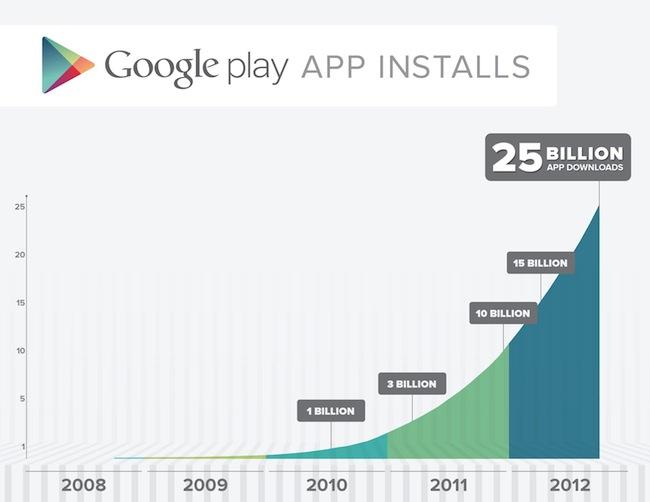
google play 25 billion
Image used with permission by copyright holder

It was promised and Google I/O delivered, Android Studio is the company’s latest development environment for Android and it brings a lot of changes that should benefit both developers and users. Android Studio works like a WYSIWYG editor for application creation. You can make changes to things like layout and language, while seeing the real-time preview change as you tweak the settings. Google’s hoping this will help developers make better-looking apps with minimal effort. 

One of the most exciting features shown was a simpler way for developers to scale applications for different screen sizes, which (if taken advantage of) could lead to many more tablet-optimized applications on Android. The lack of tablet apps is a sore spot for Android right now and often the most compelling reason to choose an iPad over any competing tablet. 

Recommended Videos

There was also a new development console shown off, a way for developers to learn more about the performance of their applications on the Google Play Store. The console will suggest optimization techniques for developers to help reach a larger audience like translating the app into an additional language or designing it for use on tablets as well.

The benefit for developers here is obvious, but users will get some perks as well – mainly more well-designed Android apps that will work both on a smartphone and a tablet. 

Andrew Kalinchuk
Andrew covers news and opinions pertaining to smartphones, tablets, and all else mobile for Digital Trends. He recently…
Topics
Snapchat Planets: What’s the order, and what do they mean?
Snapchat Planets turns your best friends list into a solar system, and yes, your orbit says a lot
Snapchat Planets being shown on the Snapchat app on iPhone.

Snapchat is already packed with little symbols that can be weirdly hard to decode. You have streaks, emojis, badges, scores, Best Friends, and if you use Snapchat Plus, a tiny solar system that shows where you sit in someone’s closest-friends list.

The feature is called Friend Solar System, though most people just call it Snapchat Planets. It takes your position in a friend’s Snapchat orbit and turns it into a planet. From Mercury to Neptune, these celestial bodies signify how close a person is to you.

Read more
How to use WhatsApp Web
We'll show you how to use WhatsApp on your desktop or laptop
WhatsApp Web

As one of the most popular messaging services, you’ve already heard of WhatsApp. From its humble beginnings in 2009—two years before Apple introduced iMessage—to its acquisition by Facebook (now Meta) in 2014, WhatsApp has become the dominant messaging platform around the globe.

In recent years, it's grown even more potent with new features like video messages, self-destructing voice messages, the ability to edit sent messages, and more. We even finally got an WhatsApp iPad app in May 2025.

Read more
What is WhatsApp? How to use the app, tips, tricks, and more
From setting it up to mastering hidden features, here is your complete guide to WhatsApp.
Electronics, Phone, Mobile Phone

There's no shortage of messaging apps out there. The past decade has given us more options than we know what to do with, largely because smartphones demanded something better than plain old SMS.

Both the App Store and the Play Store are packed with apps that promise to revolutionize the way we communicate. Most of them didn't make it. The truth is, a messaging app is only as good as the number of people using it, and most apps never cross that threshold.

Read more

