  1. Home
  2. Mobile
  3. Apple
  4. Legacy Archives

Siri for iOS 7 is a man! And he can now search Wikipedia or Bing…

Add as a preferred source on Google
iOS 7 Siri
Image used with permission by copyright holder
Promotional logo for WWDC 2023.
This story is part of our complete Apple WWDC coverage
Updated less than 16 hours ago

Since iOS is getting a makeover with iOS 7, it’s only right that the voice of iOS gets a bit of a change as well. Apple revealed at WWDC 2013 that Siri, the virtual assistant of iPhone and iPad users, will speak to you in new ways – and with a new sound.

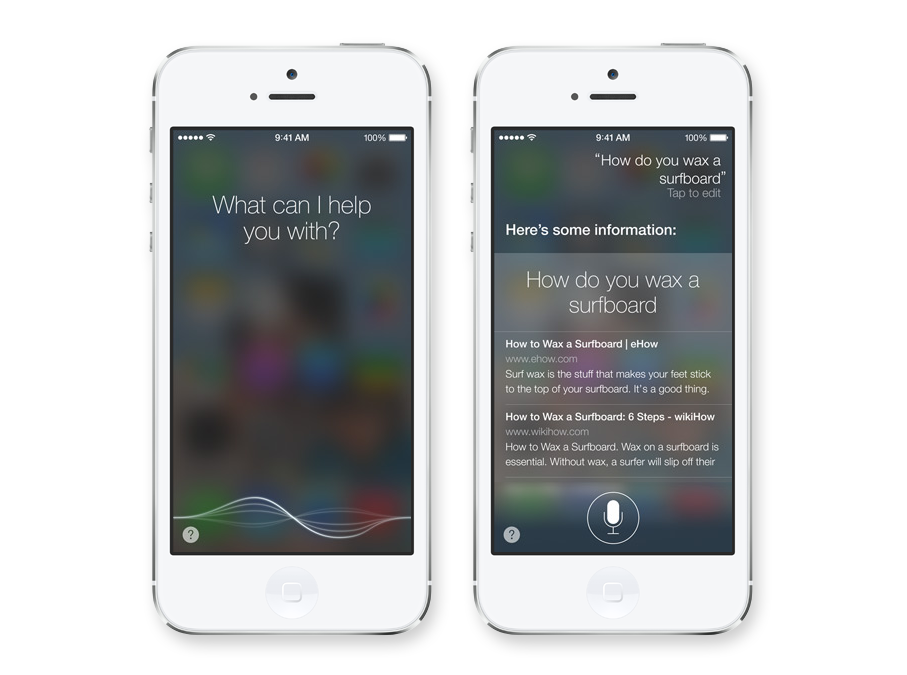
The Siri app has been redesigned to fit into the new look of iOS 7. It now features a continuous audio wave at the bottom of the screen and the results you receive from your voice searches have a flatter, cleaner look.

Recommended Videos

You can now ask Siri to do for you more things for you, including finding things on Wikipedia or searching through Twitter. Web results are now powered by Bing, so maybe you can ask Siri to have Bing Google something for you. You can also have Siri run commands on your iOS device for you, like adjust screen brightness and modify other settings.

Feeding you the answers for your requests will be the lifelike voice of Siri, which has gotten a makeover. The female voice is still there, though she’s a bit different. If you don’t care for her, you can switch over to a male voice as well. Voices will also be available in other languages, including French and German.

The future for Siri in Apple’s eyes appears to be in the car. In an on-stage demo, Eddy Cue showed off how Siri will allow users to place calls, get directions, and interact with iOS 7 while in their car. 2014 appears to be the year for major iOS and Siri integration in cars, with partnerships in the project including Honda, Ford, Kia, Jaguar, Ferrari, and others. 

AJ Dellinger
AJ Dellinger is a freelance reporter from Madison, Wisconsin with an affinity for all things tech. He has been published by…
Snapchat Planets: What’s the order, and what do they mean?
Snapchat Planets turns your best friends list into a solar system, and yes, your orbit says a lot
Snapchat Planets being shown on the Snapchat app on iPhone.

Snapchat is already packed with little symbols that can be weirdly hard to decode. You have streaks, emojis, badges, scores, Best Friends, and if you use Snapchat Plus, a tiny solar system that shows where you sit in someone’s closest-friends list.

The feature is called Friend Solar System, though most people just call it Snapchat Planets. It takes your position in a friend’s Snapchat orbit and turns it into a planet. From Mercury to Neptune, these celestial bodies signify how close a person is to you.

Read more
How to use WhatsApp Web
We'll show you how to use WhatsApp on your desktop or laptop
WhatsApp Web

As one of the most popular messaging services, you’ve already heard of WhatsApp. From its humble beginnings in 2009—two years before Apple introduced iMessage—to its acquisition by Facebook (now Meta) in 2014, WhatsApp has become the dominant messaging platform around the globe.

In recent years, it's grown even more potent with new features like video messages, self-destructing voice messages, the ability to edit sent messages, and more. We even finally got an WhatsApp iPad app in May 2025.

Read more
What is WhatsApp? How to use the app, tips, tricks, and more
From setting it up to mastering hidden features, here is your complete guide to WhatsApp.
Electronics, Phone, Mobile Phone

There's no shortage of messaging apps out there. The past decade has given us more options than we know what to do with, largely because smartphones demanded something better than plain old SMS.

Both the App Store and the Play Store are packed with apps that promise to revolutionize the way we communicate. Most of them didn't make it. The truth is, a messaging app is only as good as the number of people using it, and most apps never cross that threshold.

Read more

