Is your Twitter name embarrassing, or do you just need a fresh start on your Twitter account? No problem. Unlike other social media sites, changing your name is simple and quick. Plus, no one will ask you to verify your identity, unlike with Facebook, and there is no limit to how many times you can change your name.
Though used interchangeably, your Twitter username and display name are not the same things. Your username is your unique Twitter handle, the name that appears in your profile URL and allows you to log in, reply to tweets, and direct message others (it’s the name that follows the @ symbol). Your display name, on the other hand, appears above your username on your profile page and is likely the name that most users will recognize you by.
If you think it’s time for a name change — whether to add a level of professionalism to your online persona or you’re just tired of the old name — here is our quick-hit guide on how to change your Twitter name. Unlike creating a new account, changing your username or display name leaves your existing followers, direct messages, and replies intact. Here’s how:
How to change your Twitter username
Step 1: Log in to your Twitter account
Log in to Twitter as you normally would with your current username (or email) and password. Note: This can also be done using the Twitter app on your phone or tablet.
Step 2: Access the Account Settings
Next, click More > Settings and privacy on the website or select Settings and privacy after tapping on your profile icon in the app. Go to Account. The Account tab should open by default on the website, but you’ll need to click on the Account option in the app.
Step 3: Change your username
You’ll see the Username option. Choose it and type your desired username in the text field. It just needs to be 15 characters or fewer. A message will appear prompting you to choose another username if your first choice is unavailable.

Your new username can only contain alphanumerical characters and must omit both the words “Twitter” and “Admin” unless you’re using an official Twitter account. You can refer to the Twitter Help Center for more details regarding username restrictions. When you’ve finished, click Save to save your new username.
If you have a verified account (designated by the blue check mark next to your name), you’ll lose your badge if you change your username. We recommend that verified users contact and alert Twitter before making any changes.
How to change your Twitter display name
Step 1: Log in to your Twitter account
Like before, log in to Twitter with your username and password. Note: This can also be done in the app.
Step 2: Head to your profile
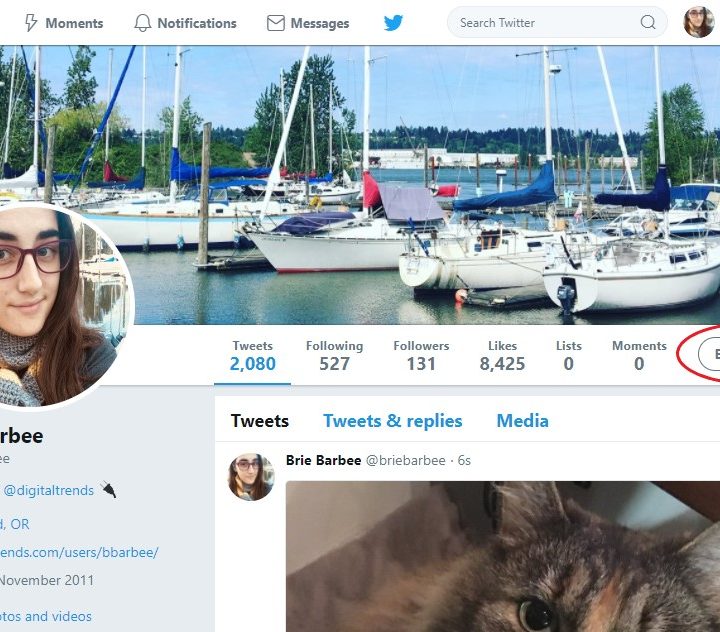
In order to access your profile, click on your portrait on the left of the screen and then select Profile on the app. On the website, click on the Profile option on the left side of the screen.
Next, select Edit profile. It’s a big, hard-to-miss button on the upper right-hand side of the screen in both the app and the website.
Step 3: Change your Twitter display name
Type in your desired name — it can be 50 characters or fewer now — in the Name text field located directly below your profile picture. Unlike your username, your display name doesn’t have to be unique to your account (John Smiths of the world, rejoice!) and can even include emojis.

When you’re finished, click Save on the right-hand side of the page to save your new display name.
And that’s it! You can change your name on Twitter as many times as you’d like following these instructions. As mentioned before, however, if you have a verified account, changing your username will cause you to lose your verification check mark. It can also be confusing to your followers if you are constantly changing your name. After all, with great power comes great responsibility. Happy tweeting!