  1. Home
  2. Computing
  3. News

Google Flow AI video creator adds creative controls that make Sora look tame

Google Flow is getting the new Veo 3.1 AI video engine.

Add as a preferred source on Google
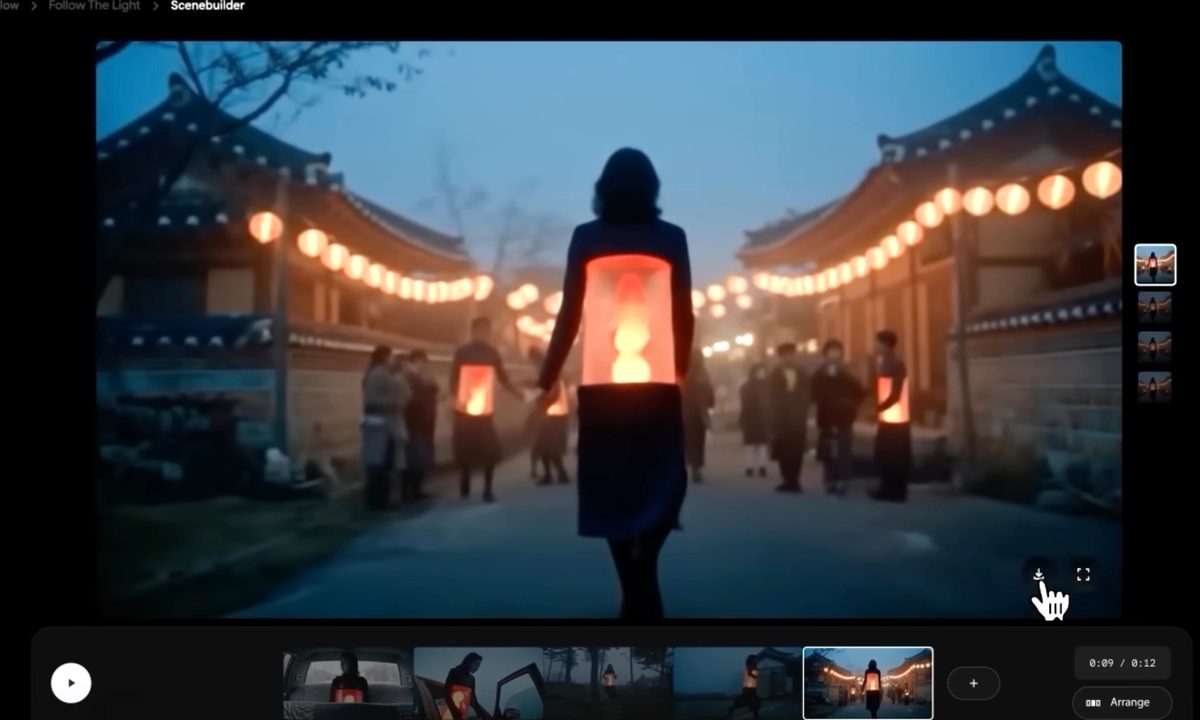
The Google Flow tool in action.
Screenshot Google

Merely days after OpenAI released its Sora 2 AI video generator app, which quickly went viral for some pretty morbid reasons, Google is giving a lift to its own AI video tools. The company’s Flow video creation platform is getting upgraded to the new Veo 3.1 AI video model, alongside a bunch of new tricks in tow. The next-gen video AI model is now available to users in the Gemini app, as well, starting today.

What’s new? 

One of the biggest upgrades this time around is the ability to add audio, alongside a bunch of new creative controls in the Flow suite. For example, the new “Ingredients to video” system lets users upload multiple images to ensure that they can achieve just the right style and character control in the scene. 

The overarching idea is that instead of describing every minute detail, users can take the easier route. For example, you can upload the image of a person, pick another image with the background of your choice, and the third image is that of a costume for the character. 

Recommended Videos

The AI will combine them all. It’s not just convenient, but also offers a far more granular control over the videos you want to create, instead of dealing with hit-or-miss AI prompts. It’s almost like creating hybrid emojis using the Emoji Kitchen system in Google’s Gboard app. 

A whole new level of creative control

In addition to controlling the scene elements, Flow is also getting a new “Frames to video” feature that lets users create a scene by simply supplying the start and end frames. Once the two images are uploaded, the AI will automatically stitch them together and create a seamless video out of it. 

Next, we have the new “Extend” tool. As the name makes it abundantly clear, it comes in handy for prolonging a scene without having to write a fresh prompt or add another image as the source material. “Flow creates a new video based on the final second of your original clip,” source material.

And finally, we have the new “Insert” feature, which lets users add anything to a video naturally without disturbing the background continuity. Soon, Google will also let Flow users remove objects from videos, somewhat like the Magic Eraser feature in the Google Photos app. As far as the Veo 3.1 model goes, it adds “richer audio, more narrative control, and enhanced realism that captures true-to-life textures” to videos created in Flow. 

Nadeem Sarwar
Nadeem is the Managing Editor at Digital Trends.
Google Search can now monitor the web for updates on things you care about
AI Mode on Google search now lets users create search agents
Google Search information agents featured

Google has started rolling out AI Search agents that can monitor the web for users and send updates when relevant information changes. The feature was first announced at Google I/O 2026 as part of Google’s wider AI Mode overhaul, which also included a redesigned search box, Gemini 3.5 Flash, personal intelligence features, and new agentic tools for creating mini apps and dashboards.

The new feature is called information agents. It is designed for searches that do not end with a single answer. Instead of checking the same query again and again, users can ask Google to keep tracking a topic in the background.

Read more
Apple made Liquid Glass adjustable, which says plenty about Liquid Glass
The new slider is useful, welcome, and mildly hilarious after a year of Apple acting like transparent everything was the obvious future.
Text, Document, Business Card

Apple’s big glassy software future now comes with a way to make it less glassy. In iOS 27, users can adjust the translucency of the Liquid Glass effect, while macOS Golden Gate adds its own Liquid Glass controls under System Settings.

Liquid Glass is still alive across Apple’s platforms, still shimmering through menus and panels, still doing the elegant UI trick Apple clearly likes. The big visual bet has already earned a dimmer switch. After a year of treating translucency like the obvious next step, WWDC’s most revealing design update may be the one that lets people dial it back.

Read more
Windows 11 just fixed one of Search’s dumbest limitations, and you’ll wonder how you lived without it
One less character, one less annoyance every time you search your PC.
Person sitting and using a Windows Surface computer with Windows 11.

If you have ever typed two letters into the Windows 11 search box, paused, and watched nothing useful happen until you added more characters, you already know exactly why this Windows 11 update matters. 

Microsoft's June 2026 Patch Tuesday update, part of a release Windows Latest calls the biggest of the year (via Windows Latest), quietly fixes that. Windows Search can now find and prioritize files with as few as two characters, down from the old three-character minimum.

Read more
