  1. Home
  2. Computing
  3. News

Long overdue video embedding finally comes to OneNote

Add as a preferred source on Google

OneNote, Microsoft’s information management software, has gotten a new update, and with it you can finally embed videos into your notes. The developer has also added a bunch of other features, making this one of the heftier updates to the app.

If a user pastes a link to an online video to their notes they’ll see thumbnails of that video and play it if they wish. The new functionality will work in OneNote for Windows 10, Mac, or iOS, supported websites include Youtube, Vimeo, Vine, and Sway. But let’s scramble through the other updates included this time around.

Recommended Videos

On Windows, users will be able to sign in to OneNote using their Office 365 organization ID. Windows Phone users will be able to speak their notes with the new audio recording feature.
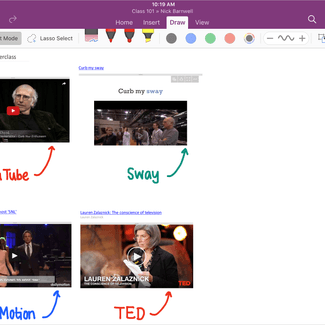
OneNote-April-2016
Image used with permission by copyright holder

The other platforms are also receiving some love. If you’re on iOS you can rearrange audio recordings, images, text, and shapes by touching and dragging. There’s also a lasso tool to select several separate items and rearrange them. Another neat feature for Apple fans is that they now can insert multiple photos on a page at the same time. And if you’re not satisfied with the angle you’ll now also be able to rotate the images on both iPad and iPhone.

In OneNote Online you will find a Smart Lookup addition. Using this OneNote will provide content related to whatever you may mark in the text. Just select a phrase, open the context menu, and click to get inspiration or research related to your graduation work.

Those who are using OneNote more may also find themselves lost in all of the material they’ve produced. To solve this, OneNote has done work on their notebook list view. “We’ve re-shelved the notebook list and now you can distinguish between your personal notebooks, notebooks that others have shared with you, and OneNote Class Notebooks you belong to.”

Dan Isacsson
Being a gamer since the age of three, Dan took an interest in mobile gaming back in 2009. Since then he's been digging ever…
Yet another research breaks the hype bubble for AI browsers serving serious security flaws
Four popular AI browsers can be exploited to steal your data from other open tabs.
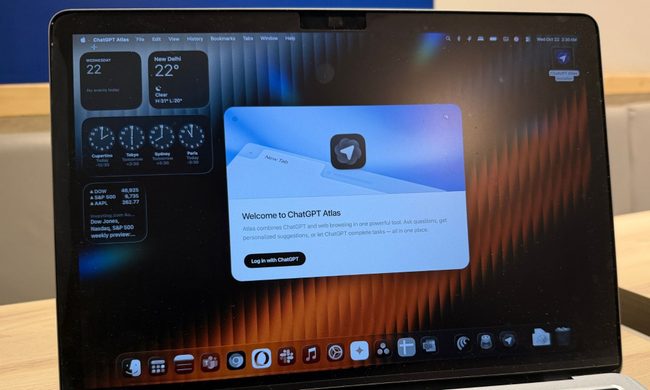
ChatGPT Atlas browser on a MacBook.

AI browsers are being sold as the next big thing. They can summarize pages, book trips, and even make purchases for you. But a new study from the University of Washington found that four of the seven most popular ones come with a security risk serious enough to let malicious websites steal data from other sites you have open. The more capable the browser, the bigger the risk turns out to be.

The 30-year security rule that AI browsers are breaking

Read more
Valve just gave away the blueprint for its coolest Steam Machine mod
Valve giving away the recipe instead of the dish, and honestly, we're okay with it.
Valve Steam Machine Featured Design Coverplate

While Valve’s Steam Machine launched at a higher-than-expected price due to the AI-driven chip shortage, it seems that the company is not sitting on its haunches and is still working hard to make the product more enticing to users. 

One of the coolest features of the Steam Machine is the user-customizable front faceplate, and Valve has just made it better. The company open-sourced its "Inkterface" project, which allows users to build their own e-ink faceplate for the Steam Machine.

Read more
Brave’s new Container feature is a lifesaver for anyone juggling multiple accounts
With this feature, you won't need to open three different browsers
Brave browser 3D logo

Brave has added Containers to its desktop browser, giving users a built-in way to keep different accounts, sessions, and browsing activity separate. The feature is available in Brave 1.92 for Windows, macOS, and Linux, and is rolling out in phases over the next few days.

Containers have been a highly requested feature, especially for users who regularly switch between work, personal, developer, or creator accounts. Once enabled, they let users open tabs in separate spaces where cookies and site storage are not shared outside that container.

Read more