


“An unapologetically overkill router with plenty of practical rewards.”
- Solid performance
- Rich port selection
- Meaningful AI perks
- Doesn't add subscription burden
- Freakishly expensive
- Design is not everyone's cup of tea
- App has some quirks
Asus and excess have a well-known reputation. From gaming laptops with dual screens to phones with more RAM than your PC, the brand likes to flex its muscle from time to time. But doing so for a router, a device that sits and blinks on a shelf, sounds a little too much. Yet, the ROG Rapture GT-BE19000AI is just that. It’s a one-of-a-kind networking product that genuinely asks to be talked about like a computer.
Asus told me this is the first consumer router shipping with a dual-processor architecture, a dedicated 7.9 TOPS NPU, plenty of ports, some future-proof networking tricks, and of course, plenty of performance creds to make the gaming audience wish they had cash to spare for this indulgence. Both systems get their own 4GB of RAM and 32GB of flash storage.
That setup powers a long list of features that go well beyond moving packets around your gaming PC and other devices. There’s an on-device AI chatbot, full Docker container support, a Linux-based OS, and a brand-new FCC protocol that can nearly double your 6GHz throughput at range. It’s also, by Asus’s own admission, the most expensive Wi-Fi 7 router on the market right now. After spending time with it across an entire household with kids, gaming, streaming, smart-home gear, and everything else in between, I think it’s worth the $899.99, as long as you really push the whole suite of goodies it has to offer.
Asus ROG Rapture GT-BE19000AI specs
| Model Name | GT-BE19000AI |
| Network Standard | WiFi 7 (802.11be), WiFi 6 (802.11ax), IEEE 802.11a/b/g/n/ac, IPv4, IPv6 |
| Product Segment | BE19000 ultimate BE performance: 1376 + 5764 + 11529 Mbps |
| WiFi Data Rate | 2.4GHz BE: 4×4 (Tx/Rx) 4096 QAM, up to 1376Mbps 5GHz BE: 4×4 (Tx/Rx) 4096 QAM, up to 5764Mbps 6GHz BE: 4×4 (Tx/Rx) 4096 QAM, up to 11529Mbps |
| Antenna | 8 x External antennas |
| Transmit / Receive | 2.4GHz 4×4, 5GHz 4×4, 6GHz 4×4 |
| Processor | 2.6GHz quad-core processor |
| Memory | Router: 32GB Flash, 4GB RAM AI Core: 32GB Flash, 4GB RAM |
| Operating Frequency | 2.4 GHz, 5 GHz, 6 GHz |
| Operating Mode | Router (AiMesh router), AiMesh node, Access point |
| I/O Ports | 1 x 10Gbps for WAN/LAN 1 x 2.5Gbps for WAN/LAN 1 x 10Gbps for LAN 3 x 2.5Gbps for LAN 1 x RJ45 10/100/1000Mbps for LAN 1 x USB 3.2 Gen1 1 x USB 2.0 |
| Buttons | WPS Button, Reset Button, Power Switch, LED Control Button |
| LED Indicators | Power x1, WAN(Internet) x1, 10G LAN x1, 1G/2.5G LAN x1, 2.4GHz x1, 5GHz x1, 6GHz x1, WPS x1 |
| Power Supply | AC Input: 110V~240V (50~60Hz) DC Output: 12V with max. 5A current |
| Product Weight | 2000 g |
| Product Dimensions | 350.41 x 350.41 x 220.6 mm |
| AiMesh | Supports Primary AiMesh Router and AiMesh Node |
| Gaming Features | Mobile Game Mode, Gear Accelerator, ROG_First, OpenNAT (Game Profile), Dedicated Gaming Port, Gaming Network |
| Security & AiProtection | AiProtection, Router Security Assessment, Malicious Site Blocking, Two-Way IPS, Ad/Tracker Blocking, Firewall |
| VPN Capabilities | Instant Guard VPN Client: L2TP, OpenVPN, PPTP, WireGuard VPN Server: IPSec, OpenVPN, PPTP, WireGuard VPN Fusion |
| Traffic Control | Adaptive QoS, Bandwidth Limiter (Max 32 rules), Real-time/Wired/Wireless Traffic Monitor, Traffic Analyzer |
| USB Applications | 4G/5G Auto Mobile Tethering, Media Server, Samba Server, FTP Server, Shared Folder Privileges Supported File Systems: HFS+, NTFS, vFAT, ext2, ext3, ext4 |
| User Interface & Admin | Web: ASUSWRT, App: ASUS Router APP, Configuration Backup/Restore, Diagnosis Tools, System Log, Auto Firmware Update |
Asus ROG Rapture GT-BE19000AI design and build: Over-engineered, for a purpose
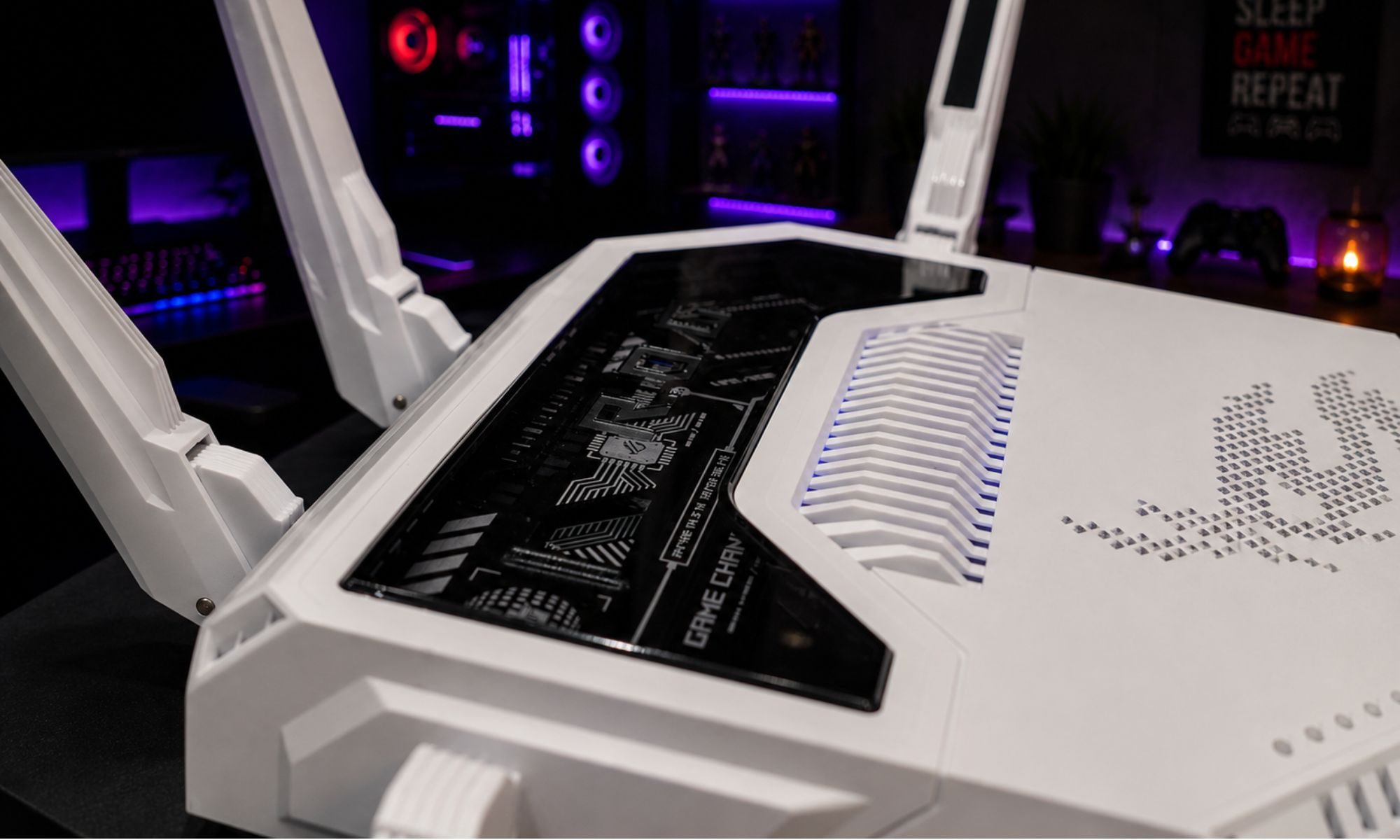
Let’s address the elephant in the room first. The Asus ROG GT-BE19000AI looks like a mechanical spider that ate a server, and then ingested some gamer-pleasing LED lights, too. Eight antennas splay out from a large, futuristic chassis with RGB lighting woven into the housing. There’s no pretending it’ll blend into a living room. Some people will love this, but most will be looking for a closet shelf close to their gaming rig. If the glow is a problem, the on-router AI agent can actually kill the LEDs for you, but more on that later. If you look closely, the exposed innards with a glass shield are reminiscent of the Asus ROG Flow, a gaming tablet that is also a definition of excess.
Beyond the aggressive looks, the engineering is actually thoughtful. Asus told me the chassis uses a 30 percent thicker aluminum plate than the previous generation, paired with a nanocarbon layer, a redesigned heat spreader, and additional venting. The result, per the company’s measurements, is an 18 percent improvement in heat dissipation over its spiritual predecessor, the ROG Rapture GT-AXE11000. The AI board has its own dedicated cooling kit, including a heatsink and thermal pads, because the NPU runs almost constantly in the background.
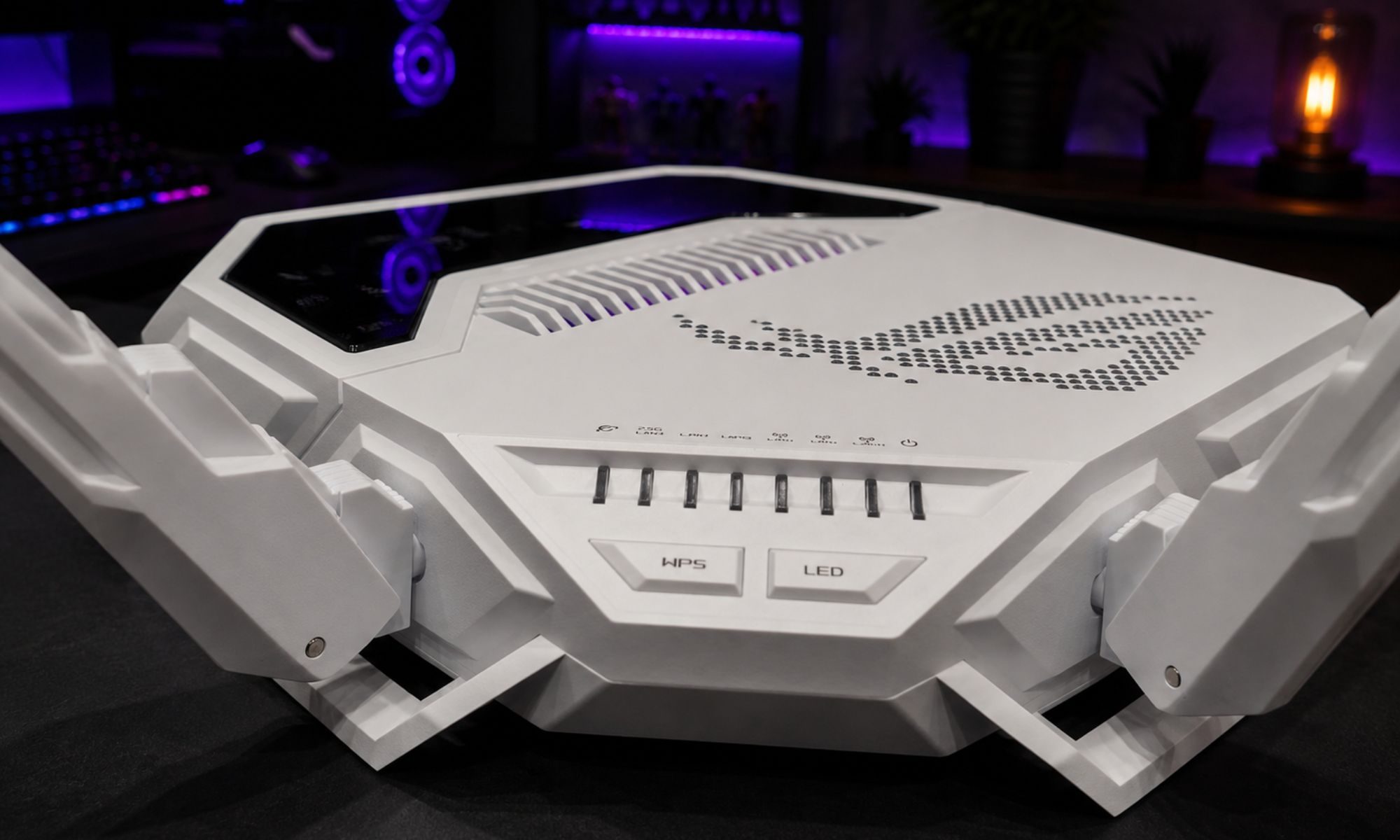
Crucially, all of this cooling is passive. Asus told me it that its engineering team deliberately avoids fans on routers because nobody knows to clean dust out of a router or replace a dying fan bearing, and a router is one of the few devices in your home that genuinely never turns off. Routers fail mostly from heat and electrostatic discharge, so reducing thermals without adding moving parts is a real long-term reliability play.
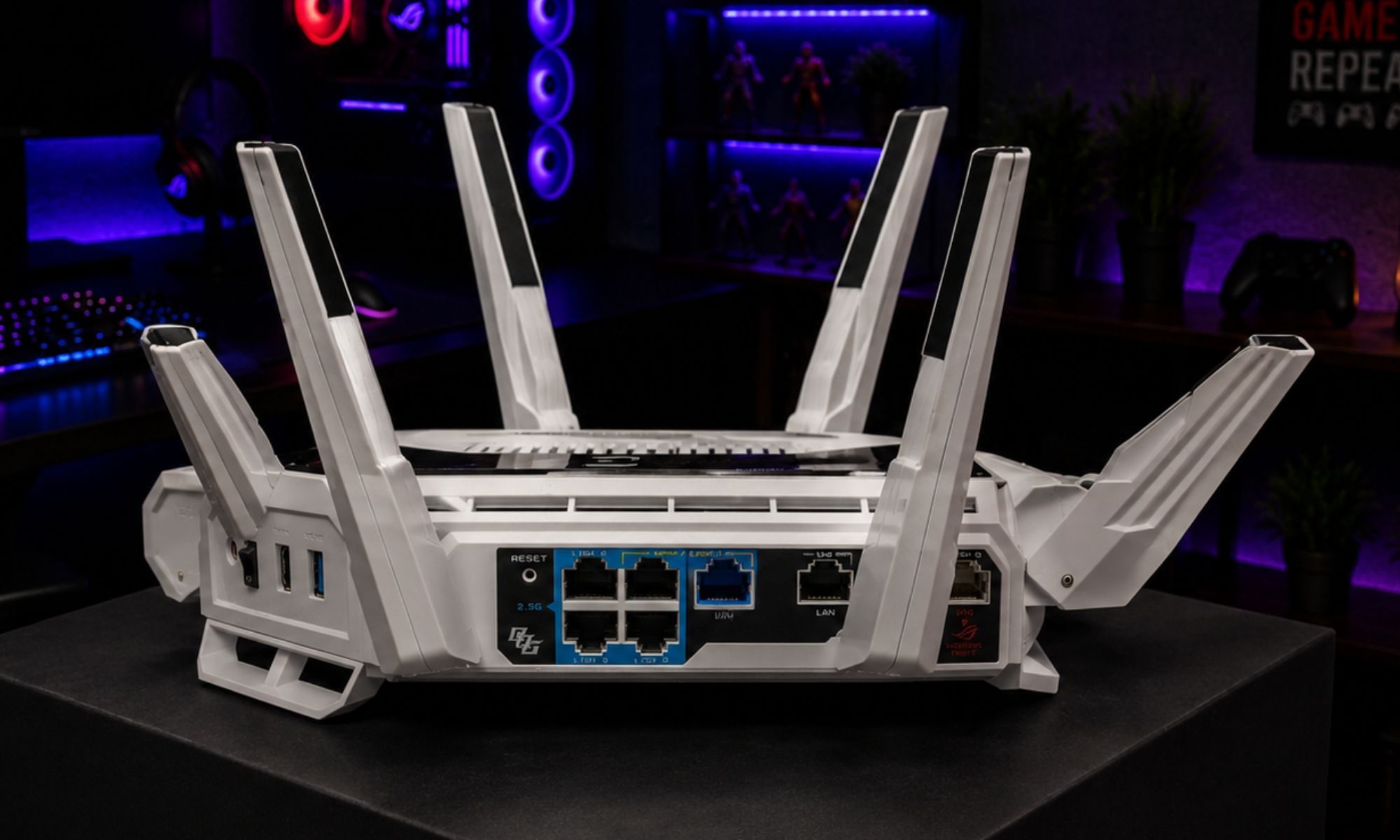
The antennas, despite the questionably arachnid aesthetic, are a feature, not a flex. Asus told me each one carries two output fields to maximize coverage and flexibility. Moreover, they offer enough movement that you can angle them toward known dead zones in your home or workplace. Then there’s the back panel, which is where this router earns its asking price more honestly than the marketing does.
You get two 10G LAN ports, four 2.5G ports, and a USB 3.2 Gen 1 port. That’s 31 Gbps of aggregate wired bandwidth, and if your network gear can take advantage of it, you can bond the two 10G ports into a single 20G Link Aggregation pipe. Both the 10G and one of the 2.5G ports can also serve as WAN inputs, with an auto-detection facility thrown into the mix.
Asus ROG Rapture GT-BE19000AI performance: Rises to the occasion, with room to spare
The headliner here is the 19 Gbps of net tri-band throughput, which is among the highest figures you’ll see in the segment. Asus touts the gains courtesy of 320MHz channels on the 6GHz band and 4096-QAM modulation for blazing fast speeds, delivering up to 2.4x gains compared to regular Wi-Fi 6 band. The coverage is rated at up to 3,500 square feet with support for over 200 simultaneous device connections.
The most surprising performance story Asus walked me through, though, isn’t a Wi-Fi 7 feature at all. It’s AFC, short for automated frequency coordination. For the unaware, it’s a new FCC-sanctioned protocol that lets the router scan for unused government-licensed spectrum nearby and, if it’s clear, crank up its 6GHz transmit power well beyond the usual limits. Asus told me it’s the only manufacturer in the industry with AFC enabled on a consumer networking gear right now. The catch is that it’s available in the US only, for now.
The test data Asus shared was pretty impressive. In a real-world home test with an iPhone 16 Pro at 40 feet, throughput went from 480Mbps to 948Mbps with AFC on. At 60 feet with a wall in the way, it climbed from 218Mbps to nearly 600Mbps, which is still pretty respectable. That’s close to a 100 percent uplift on the 6GHz band. AFC won’t quite make a night and day difference if you’re already working a well-covered area, but wherever you can benefit from it in tight corners, it offers a sizeable performance gain.
USB performance is another aspect that buyers will appreciate. Asus argues that USB performance on routers is mostly a sham. A port can be labeled USB 3.2 and still cap out around 50MB/s because the silicon driving it can’t keep up. On the GT-BE19000AI, Asus claims read speeds of 350–400MB/s, which is closing in on the NAS territory. The implication is that if you’ve been on the fence about buying a NAS kit, an external SSD plugged into this router can get meaningful work done.
Addressing the dead zone dilemma
One of the biggest issues with most home routers is how quickly the signal drops once you move away from the main room. To test the ASUS router, we brought a phone to the furthest parts of the house where WiFi usually struggles, including a back bedroom, basement area, and outside near the yard.
For us, there’s actually a specific spot in the driveway where the internet almost always freezes up. Apps usually stop loading, videos buffer endlessly, and sometimes the connection drops completely. It’s been a consistent dead zone with previous routers we’ve used.
With the ASUS router, the difference was immediately noticeable. We were able to stand in that exact same spot and still load apps instantly, scroll social media without lag, and stream videos without buffering. Even larger content like 4K YouTube videos loaded surprisingly fast with no noticeable delays.
What stood out most was consistency. Instead of the signal randomly dropping or slowing down in certain corners, the connection stayed stable the entire time. For everyday use, this ended up being one of the most impressive and noticeable improvements compared to a standard router.
Cruising through traffic challenges
Most routers work fine when only one or two devices are connected, but the real challenge is when an entire household is online at the same time. To really push the ASUS router, we decided to create a more realistic “busy house” scenario by inviting some of the kids’ friends over for the afternoon.
At one point, there were TVs streaming Netflix, kids watching YouTube and TikTok on tablets and phones, gaming consoles running online matches, and multiple devices connected all at the same time. Normally, this is where many routers start slowing down – videos buffer, games lag, and everything just feels overloaded.
Surprisingly, the ASUS router handled the traffic extremely well. Even with all the devices running simultaneously, apps still opened quickly, videos stayed sharp without buffering, and the gaming experience remained smooth with no noticeable lag spikes or disconnects.
The biggest takeaway from this test was how stable and “effortless” the network felt under pressure. Instead of struggling to keep up with the demand, the router seemed to manage everything in the background without issue. For larger families or homes filled with smart devices, streaming, and gaming, that kind of reliability makes a very noticeable difference in everyday use.
AI is a menaingful touch
Setting up routers has traditionally been a frustrating process, but ASUS has clearly put effort into making the app experience simple and user-friendly. Using the ASUS Router app, it was easy to see every connected device on the network, monitor traffic usage, and run built-in security checks.
What we liked most was that it didn’t feel overly technical or intimidating. Usually, setting up or managing a router involves logging into confusing menus that look like they were designed 15 years ago. With the ASUS app, everything felt clean, modern, and surprisingly straightforward.
One moment that really stood out was seeing just how many devices were actually connected throughout the house, such as phones, TVs, tablets, gaming systems, smart speakers, and more. The app made it incredibly easy to identify devices, monitor usage, and even prioritize certain connections if needed.
For everyday homeowners, this is the type of feature that genuinely matters. Instead of constantly troubleshooting WiFi problems or navigating confusing settings, the ASUS router feels more like a “set it and forget it” system that’s easy for anyone in the family to manage.
Asus ROG Rapture GT-BE19000AI special features: Where it really flies
It’s hard to recommend a router that costs close to a thousand dollars, but this one embraces features that you will mostly find on enterprise-tier networking gear. Let’s start with the most unique one, an 0on-device AI chatbot to assist you. Asus told me that their Private Edge AI built into this router is, to its knowledge, the first on-device AI chatbot integrated into a Wi-Fi router. It isn’t trying to be Gemini or Siri. It’s not hyperconnected or multimodal. It’s rather modest, but extremely focused on its utility.
It has been trained on Asus’s own product and support documentation, and meant to function as an alternative to calling customer service when you can’t figure out how to shut down the RGB lighting at night, or switch modes, among other chores. What sold me on the approach was the privacy approach.
Everything happens on the secondary AI chip and its dedicated 32GB of onboard storage, so the queries you ask about your own network never leave the device. As Asus put it during an interview, your network is one of the more personal things you own. As such, the company didn’t want to dump it all on a cloud server for AI, just so it could tell you which menu the LED toggle lives under.
The chatbot, however, is only the user-facing side of the AI integration. The bigger story is what the AI chip does the rest of the time. Asus told me it spends most of its cycles monitoring the RF environment around the router and logging interference from other signals. Think of microwaves, wireless printers, and all other devices with their own signals that quietly slow down your Wi-Fi without you ever knowing why. When the AI sniffer detects a disruption, it can shift traffic to a cleaner band automatically.
As Asus explains, Wi-Fi signals usually lose priority to more powerful sources, so the only way to fight back is to dodge. A normal router can’t really do this in real time because its primary chipset is too busy actually moving packets. Splitting the work across two chips is what makes the constant monitoring possible. All of that data also feeds a feature called Wi-Fi Insight, which gives you a 24-hour history log of what is hurting your network, and on which channels.
Beyond AI, Asus says this is also the first router to ship with its new WRT 6.0 firmware, which is the biggest OS jump the company has made in a decade. The company tells me that it’s the only router on the market running a full Linux distribution rather than a stripped-down firmware. Practically, that’s what enables Docker container support, on-device DVR functionality, home automation, and the new dashboards that give you a peek at all the RF interference data the AI chip has been logging in the background.
If you’re a smart home enthusiast, there’s full onboard Docker support, as well. Essentially, the router acts as its own mini-PC for cross-device interfaces and connections. Then we have the gaming chops of this machine. Asus claims up to 34 percent lower latency with its AI game acceleration, and I pushed them on where that number comes from. The company says it’s a layered approach.
First, the router identifies gaming devices on Wi-Fi automatically by reading UDP packet behavior and pushes those devices to the front of the processing queue. Next, the Adaptive QoE engine constantly rebalances priority in real time rather than working off a static hierarchy. Third, the optional GTNet service routes traffic through gamer-centric server networks optimized for latency rather than raw throughput. And when needed, simply move the gaming devices to the 6GHz lane.
One of the most practical (and practical) add-ons is the energy saver mode. Routers are one of the few devices in your home that never turn off, and high-end trims can easily chug over 100 watts continuously. The GT-BE19000AI has an adaptive power-down state, in which the secondary chip keeps an eye on household traffic patterns and, when it sees you’re asleep and only IoT devices need a heartbeat, it shuts down the high-power bands.
Thanks to this automatic mode switch, Asus touts an 18 percent reduction in power consumption based on predicted usage. It’s not going to dramatically lighten up your monthly electricity bill, but it can bring down the power uptake, and with it, heat generation. Asus is also diving into the safety and digital wellness side of things, without charging a subscription fee for it.
A majority of players out there charge for perks such as parental controls. Asus told me it doesn’t put a paywall on that. The on-device stack ROG Rapture GT-BE19000AI router includes AI Protection (Trend Micro–powered blocking for malicious hosts), a triple-level content filter (Edge AI, AdGuard local, AdGuard DNS cloud), Security Scan (audit of your router’s configuration), Safe Browsing (content filtering), and Parental Controls with time scheduling. There’s also an Instant Guard facility, which is essentially a one-tap personal VPN that turns the router into your own remote-access endpoint when you’re traveling.
The tri-band hardware can also be partitioned into as many as five separate SSIDs running simultaneously with their unique network rules. Asus suggests a dedicated gaming SSID (which carries the three-tier acceleration automatically), an isolated IoT SSID, a one-click VPN SSID for connected devices through your preferred service provider, a parental band with time limits and content filtering for the kids, and a temporary guest network you can time out automatically. It’s the same hardware doing all of it.
Another clever addition is USB WAN. Broadly put, the USB port doubles as a failover WAN. If power goes out, you can plug your phone into the router with a regular USB cable, enable the USB WAN feature, and the router will take your phone’s cellular connection as the upstream for the entire house. It doesn’t require any complex app or software setup.
Should you buy the Asus ROG Rapture GT-BE19000AI router?
The Asus ROG Rapture GT-BE19000AI is the most expensive Wi-Fi 7 router on the market right now, and Asus doesn’t pretend otherwise. Whether it’s worth that asking price depends entirely on who you are, and whether all the add-on features highlighted above make sense to you for daily usage.
If you’re a competitive gamer who actually cares about the difference between 12ms and 8ms of latency, and perks like the three-tier acceleration, dedicated gaming port, and GTNet routing matter to you, this one is worth the upgrade. If you live in the US and you’re in an area where AFC spectrum is unrestricted, the big gain in 6GHz throughput at range is a serious performance lift. If your household runs a dense mix of smart-home gear, streaming, and remote work, the dual-chip architecture genuinely keeps the router responsive under load. We can confirm that based on our heavy-traffic testing.
Additionally, if you care about privacy, security, or parental controls, an unpaywalled approach further adds to the value. On the other hand, if you live in a smaller space and don’t care too much about millisecond-level gaming latency, you don’t need this. A mid-range Wi-Fi 6E or entry-level Wi-Fi 7 router will serve you just fine at a fraction of the price. The Asus ROG Rapture GT-BE19000AI is built for people who want a fully-loaded digital backbone for their home, and not just a Wi-Fi box. Whether you’re willing to pay for that overkill is the real litmus test.
Why not try
Netgear Nighthawk RS700S: A lot more affordable at $599, Netgear’s flagship is the closest rival to the GT-BE19000AI. It’s a tri-band machine that offers a 10G WAN port plus a 10G LAN port. On the flip side, it lacks some of Asus’ software perks, such as an on-device AI chatbot, Docker support, and AFC. Moreover, a bunch of features are tied to a subscription.
TP-Link Archer BE800: Yet another fairly low-cost alternative, this one serves a quirky LED screen on the front, offers dual 10G ports, tri-band connectivity, and mesh compatibility. But do keep in mind that certain features are tied to a subscription. The Total Security Package, for example, costs $129.99 per year. But if you just want brute performance, it’s a great pick for the price.
Eero Max 7: If your primary concern is a mesh network, the Eero Max 7 is a solid pick. It’s ready for Wi-Fi 7, supports 4.3 Gbps wireless speeds per node, and integrates seamlessly with Amazon’s ecosystem. It’s ideal for households with odd designs that can be a challenge for coverage, but once again, you will be tied to a service subscription, too.