
Photoshop is one of the most versatile and powerful photo and image editing tools available, and Adobe is adding amazing new AI features to make it even better.
AI is also coming to Illustrator and Adobe Express. I took a look at how Adobe is expanding possibilities with AI and the results are impressive and easy.
AI image generation

You’ve probably seen Photoshop’s Generative Fill feature demonstrated, but it doesn’t just make images bigger. You’ll never have to worry about starting with a blank canvas if you use Photoshop Beta’s image generation feature. Create a blank document, hit Control+A to select all, then type a few words in the Generative Fill text box.
I asked for a “a beautiful landscape photo with a tree beside a huge boulder.” Adobe’s cloud processing quickly returned three options, all nice representations.
Adding AI-generated objects
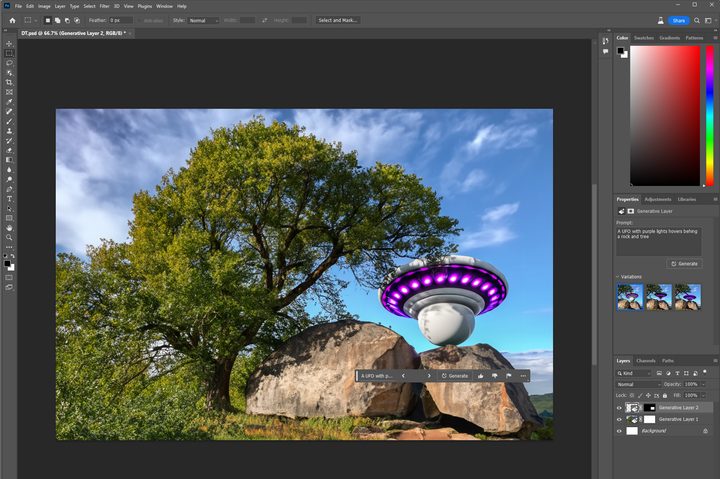
You can add objects to an existing photo or image using the same method. Just select a portion of a picture with the lasso or any of the marquee tools, then type in a prompt and click Generate.
It’s similar to the AI image generation mentioned above, but Adobe’s generative fill adds or updates details that fit within the scene instead of creating on a blank canvas.
I added a nicely glowing UFO behind the tree and rock shown in the first example. That means you don’t have to worry about creating a perfect prompt that includes every element you envision.
Reframing and extending

When working with photographs, you can add a little (or a lot) to the edge of a picture to reframe it or change the aspect ratio. Once again, generative fill comes to the rescue.
It’s similar to Photoshop’s Content Aware Fill but uses more advanced AI to fill in critical details in a way that blends nicely with the scene.
I used my wife’s photo of my epic icicle sword in this example and extended the top, left, and bottom edges with Adobe’s AI feature.
Expand the canvas with the crop tool, then select the blank edges. It’s important to overlap the photo or image enough that the AI can understand which elements in the background to match.
Removing objects
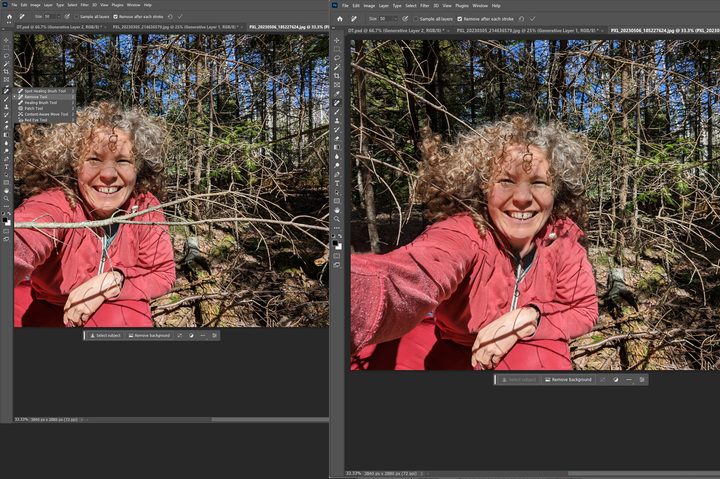
Photoshop’s new AI tools aren’t just for adding new content. You can also remove objects. It’s like Google’s Magic Eraser, but it works on high-resolution images on your desktop computer.
To find Adobe’s AI-powered Remove tool click and hold the Spot Healing Brush tool. A menu will appear, and the remove option is the second in the list.
I brought in a photo of my beautiful wife in the woods. She purposely took a photo with a branch in the foreground, but it serves as a good test of Photoshop’s object removal feature.
After painting over the branch in multiple strokes, Tracey’s chin and red hoody are cleared of branches with minimal distortion that’s easily touched up.
Background swapping

It’s simple enough to remove backgrounds in Photoshop. But now, you can try different backgrounds in seconds with Photoshop’s new AI tools. First, select the people and any foreground elements you want to keep. Then invert the selection so you can fill the rest of the picture with new content.
In this example, my jaunty hat made me think of Robin Hood, so I went for a medieval sunrise. I started with the Object Selection tool, then corrected a few errors with the Lasso.
After typing “A beautiful vista of a medieval landscape at sunrise” as the prompt, I was rewarded with a convincing composite. A little adjustment to the color balance made us look right at home in the generated scene.
About Adobe Firefly
Photoshop’s AI image generation uses Adobe Firefly, which is trained on images from Adobe Stock, not public images. That means using Adobe’s AI output in commercial work is safer. Adobe’s generative AI includes “nutrition labels” in accordance with the Content Authenticity Initiative (CAI). That said, it’s also important to note that Adobe states, “Generative Fill is currently not available for commercial use.”
You can use Adobe Firefly via the website without owning Photoshop, but the most advanced features are only possible when you subscribe to a Creative Cloud plan that includes Photoshop. You can learn more about Photoshop’s AI tools in Adobe’s blog post.
If you’re a subscriber, you can install the beta version (24.7.0) of Photoshop now from Adobe Creative Cloud Desktop. If you don’t have Photoshop, subscriptions start at $10 per month, making it affordable to explore what’s possible.
Firefly is being integrated into Adobe Express and Illustrator as well. Adobe Express will get an AI image generation feature that works within the browser, adding another tool to this quick and easy online image editor.
Adobe Illustrator fans will get AI features to cycle through various color palettes for their artwork using a prompt-based system. Adobe’s generative recolor uses AI to understand descriptive phrases and apply a matching theme to fills and strokes.
All of which makes Adobe more of a compelling solution to your image editing needs should you decide to find out how much Adobe Photoshop might cost. Then again, there are options for using Photoshop for free.


