  1. Home
  2. Computing
  3. Legacy Archives

Print tweets with Adafruit’s Raspberry Pi-powered ‘Internet of Things’ wireless printer

Add as a preferred source on Google

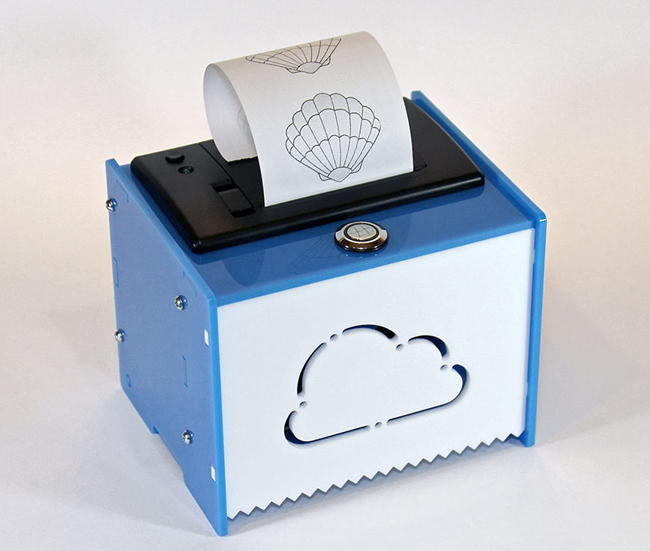
Adafruit Internet of Things WiFi printerBesides using your Raspberry Pi computer to manage your digital beer list, you can actually build a Wi-Fi printer and program it to print whatever you like from the Internet. With Adafruit’s latest Internet of Things (IoT) Wi-Fi printer kit, you can build your own BERG Little Printer and save a bit of money at the same time: the Adafruit kit is just $190 compared to the $219 BERG.

The IoT printer kit includes the Raspberry Pi model B computer (a $35 value), which plugs into the bottom panel inside the printer and runs Raspbian Linux, and the printer can be customized if you know how to code in Python. According to Engadget, unlike the previous Adafruit Ethernet-based printer kit, this model can handle typography and graphics in addition to text, so you can take advantage of Python’s extensive image libraries to make your print-outs more aesthetically pleasing.

Recommended Videos

Don’t know how to code? No problem. This printer has several neat tricks built-in that will be able to make good use of your roll of 2.25-inch receipt paper. Out of box, this little device will be able to spit out daily weather forecast reports, Sudoku puzzles, images, and even tweets. You can tell the printer to output tweets from a particular person, hashtag, or tweets that mention a specific keyword. This way, you can keep 140-characters of wisdom in your pocket, stick it on a fridge for bragging rights, or show your non-tweeting mom your witty one-liners.

To put this printer together, you do need to have some soldering tools and skills, but Adafruit believes it’s a simple enough project that you should be able to put it together over the weekend. The company isn’t taking orders just yet for this Wi-Fi printer, but you can sign up to find out when it will go on sale. Alternatively, you can go for the $100 cheaper Ethernet version so you can start printing now.

Gloria Sin
Former Contributor
Gloria’s tech journey really began when she was studying user centered design in university, and developed a love for…
Open-source GIMP reskin gives it a familiar Photoshop look without the hefty fee
This open-source Photoshop lookalike starts with good old GIMP
PhotoGIMP announced to make GIMP feel like Photoshop

Switching from Photoshop to GIMP might feel like a big move. Everything is suddenly in the wrong place, and the UI could feel alien. This is exactly where PhotoGIMP comes in. PhotoGIMP is a free, community-driven patch for GIMP 3.0 and newer that reshapes the open-source image editor into something much more familiar for Photoshop users.

It doesn’t turn GIMP into Adobe Photoshop. The patch just shakes up the layout, shortcuts, and app identity to match Photoshop, so that new users don't feel lost on day one.

Read more
Google I/O 2026: What to expect from Gemini, Android 17, and more
Google is about to put AI into everything again
Google I/O 2026

Google is preparing to kick off its annual developer conference, Google I/O 2026, and this year’s event is shaping up to be heavily focused on artificial intelligence, Android 17, and the future of Google’s ecosystem. The conference begins on May 19 at the Shoreline Amphitheatre in Mountain View, California, with CEO Sundar Pichai expected to lead the keynote presentation. The event will be livestreamed globally through Google’s official I/O website and YouTube channels.

While Google I/O has traditionally focused on developers, this year’s announcements are expected to directly affect everyday users across Android phones, Search, Chrome, Workspace, and smart devices.

Read more
Microsoft is retiring the Together Mode in Teams in favor of something cleaner and simpler
Teams is retiring Together Mode for layouts people may actually use
Computer, Electronics, Laptop

Microsoft Teams is retiring one of its more recognizable meeting features, and it might be for the best. The company announced that Together Mode is going away in Teams as Microsoft is shooting towards a simpler set of meeting layouts.

To recall, Together Mode was introduced during the pandemic-era video call boom, placing participants inside shared virtual environments such as auditoriums or classrooms. It was a cute idea at the time, but it never became the everyday meeting view for most people.

Read more