  1. Home
  2. Computing
  3. News

Apple defends the M4 Mac mini’s power button

Add as a preferred source on Google
The underside of the M4 Mac mini, showing its vent and power button.
Apple

Apple announced a new wave of product refreshes recently, and not only does the charging port for the Magic Mouse remain on the bottom of the device — the M4 Mac mini’s power button has been moved to the bottom, too. These design choices have riled up plenty of people, but it seems Apple stands by its new power button placement for the Mac mini.

In a video posted on Chinese social media platform Bilibili, Apple’s Greg Joswiak not only defends the decision but praises it. He calls it a “kind of optimal spot for a power button,” claiming that you just need to “kinda tuck your finger in there and hit the button.”

Recommended Videos

According to our M4 Mac mini review and many others, however, there isn’t enough room to reach the button without lifting the entire PC — and there’s no way to tell which side the button is even on. Things like that don’t just magically stick in everyone’s heads.

Joswiak also comments that “you pretty much never use the power button on your Mac,” so even if the button isn’t that easy to access, it seems Apple believes it doesn’t matter that much. Whether people should turn their computers off regularly or not is a topic of much debate — but at least we now know what Apple thinks. Who’s betting someone somewhere is now going to run a test to find out what happens when you turn a Mac mini off every night versus never turning it off at all.
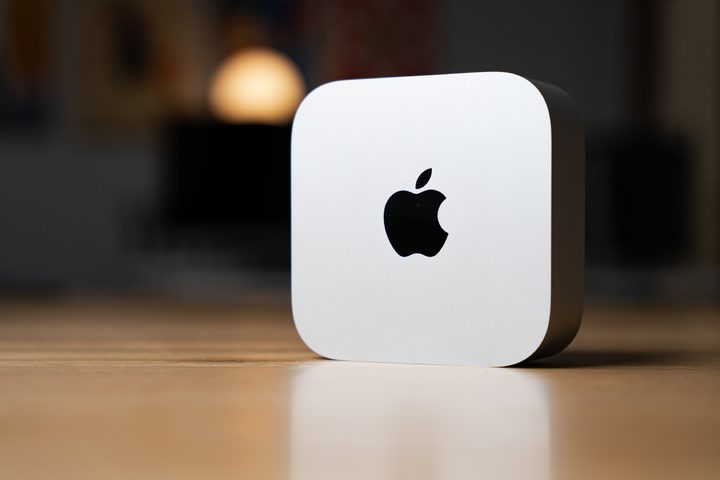
The Mac mini up on its side on a desk.
Chris Hagan / Digital Trends

In terms of the actual reason for the button placement, Joswiak implies that it’s due to the size reduction. If that’s true, it does seem like a decent trade-off — but some people are pretty convinced that Apple likes to sacrifice practicality just to achieve the most minimal design possible.

If you can deal with the power button, it’s worth noting that the power the M4 Mac mini provides is fairly amazing for the price.

Willow Roberts
Willow Roberts has been a Computing Writer at Digital Trends for a year and has been writing for about a decade. She has a…
Google Search can now monitor the web for updates on things you care about
AI Mode on Google search now lets users create search agents
Google Search information agents featured

Google has started rolling out AI Search agents that can monitor the web for users and send updates when relevant information changes. The feature was first announced at Google I/O 2026 as part of Google’s wider AI Mode overhaul, which also included a redesigned search box, Gemini 3.5 Flash, personal intelligence features, and new agentic tools for creating mini apps and dashboards.

The new feature is called information agents. It is designed for searches that do not end with a single answer. Instead of checking the same query again and again, users can ask Google to keep tracking a topic in the background.

Read more
Apple made Liquid Glass adjustable, which says plenty about Liquid Glass
The new slider is useful, welcome, and mildly hilarious after a year of Apple acting like transparent everything was the obvious future.
Text, Document, Business Card

Apple’s big glassy software future now comes with a way to make it less glassy. In iOS 27, users can adjust the translucency of the Liquid Glass effect, while macOS Golden Gate adds its own Liquid Glass controls under System Settings.

Liquid Glass is still alive across Apple’s platforms, still shimmering through menus and panels, still doing the elegant UI trick Apple clearly likes. The big visual bet has already earned a dimmer switch. After a year of treating translucency like the obvious next step, WWDC’s most revealing design update may be the one that lets people dial it back.

Read more
Windows 11 just fixed one of Search’s dumbest limitations, and you’ll wonder how you lived without it
One less character, one less annoyance every time you search your PC.
Person sitting and using a Windows Surface computer with Windows 11.

If you have ever typed two letters into the Windows 11 search box, paused, and watched nothing useful happen until you added more characters, you already know exactly why this Windows 11 update matters. 

Microsoft's June 2026 Patch Tuesday update, part of a release Windows Latest calls the biggest of the year (via Windows Latest), quietly fixes that. Windows Search can now find and prioritize files with as few as two characters, down from the old three-character minimum.

Read more
