

Fresh off wowing Wall Street with its its fourth quarter financial results, Apple is rolling out updates to its consumer-oriented desktop and notebook lines just in time for the holiday buying season…plus introduced a new multi-touch “Magic Mouse” that handles multi-finger gestures for things like scrolling and panning—without the need for gizmos like scroll wheels.
First up, Apple’s new iMac all-in-one desktop computers feature built-in 21.5-inch and 27-inch LED-backlit displays, with a new edge-to-edge glass design and aluminum cases. The 21.5-inch model offers a 1920 by 1,080 pixel resolution, while the 27-inch display scoots all the way out to 2,560 by 1,440 pixels, making for some serious work area—and both displays offer a 178° viewing angle. In addition to big screens, the new iMacs pack some power under the hood, featuring Intel Core 2 Duo processors at speeds up to 3 GHz, 4 GB of RAM (expandable to 16 GB), Nvidia GeForce 9400M or ATI Radeon graphics, 500 GB to 1 TB hard drives, a slot-loading 8× dual-layer Super Multi DVD burner, and (in a first for an Apple desktop) an integrated SD card slot. The iMacs also sport Apple’s Mini DisplayPort video output, gigabit Ethernet, 4 USB 2.0 ports, a FireWire 800 port, an integrated iSight webcam, and 802.11n and Bluetooth 2.1 wireless networking.
Pricing for the new iMacs starts at $1,199 for the low-end 21.5-inch version—although that does pack the 3 GHz processor and the 4 GB of RAM. The 27-inch version starts at $1,699 and sports 1 TB of storage and ATI Radeon HD 4670 graphics. If you really want a top-flight iMac, Apple is also offering a $1,999 version with the 27-inch display, ATI Radeon HD 4850 graphics, and a 2.66 GHz Intel Core i5 quad-core processor…and there’s a built-to-order option for a 2.8 GHz Intel Core i7.
Next, Apple has revved up its diminutive Mac mini, offering three models: a $599 unit with an Intel Core 2 Duo CPU, a base 2 GB of RAM, Nvidia GeForce 9400M graphics, and a 160 GB hard drive, and a $799 Mac mini with a 2.53 GHz Core 2 Duo, 4 GB of RAM, and a 320 GH hard drive. All the minis feature five USB 2.0 ports, along with FireWire 800, gigabit Ethernet, 802.11n networking, and a SuperDrive DVD burner. Folks looking for mini servers will not be disappointed either: for $999, Apple is offering a mini pre-configured with Mac OS X Snow Leopard Server and two 500 GB hard drives…all in the same tiny case.
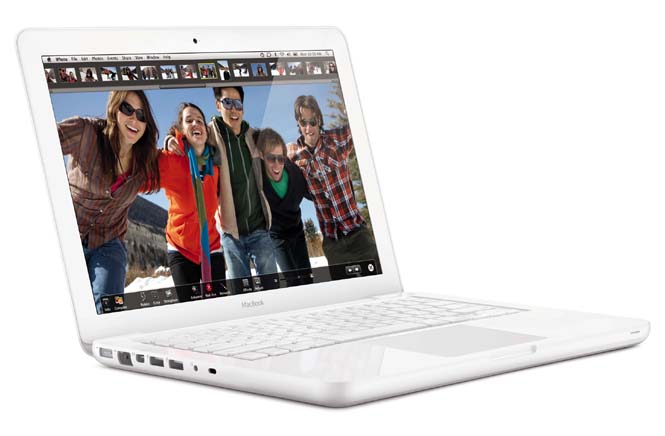
Apple has also refreshed its MacBook consumer notebook, adding a unibody polycarbonate case and a glass multi-touch trackpad to the unit…along with some of the same battery technology Apple packed into the 17-inch MacBook Pros to give the MacBook a claimed 7-hour battery life. The new MacBook features a 1.3-inch 1,280 by 800-pixel LED-backlit display, a 2.26 GHz Intel Core 2 Duo CPU, Nvidia GeForce 9400M graphics, 2 GB of RAM (expandable to 4 GB), a 250 GB hard drive, a slot-loading 8× dual later superdrive, a Mini DisplayPort video output, gigabit Ethernet, 802.11n Wi-Fi and Bluetooth wireless networking, an integrated iSight webcam, and two USB 2.0 ports—built-to-order options include more RAM and storage, and pricing starts at $999.

Finally, Apple also debuted the Magic Mouse, which the company claims is the world’s first multi-touch mouse. Instead of using scroll wheels and a flurry of buttons, the Magic Mouse uses multitouch technology to enable users to pan, zoom, scroll, and navigate their documents and computer using gestures rather than gizmos. The Magic Mouse features a seamless no-button surface and a laser tracker for operating smoothly on a wide variety of surfaces. And, of course, it’s wireless, relying on Bluetooth to talk to a computer. The Magic Mouse is shipping now with Apple’s new iMacs, and will be available for $69 at Apple Stores; it can be configured via System Preferences, and requires Mac OS X 10.5.8 or newer.


