
The best free antivirus software for your Mac offers robust protection without breaking the bank. Although macOS was once an unlikely target for hackers, that’s changing. As Apple computers become more popular, malware prevention is increasingly important to safeguard your personal and financial data.
Finding the best antivirus software can be challenging. While subscription prices are affordable, your budget might already be tight. Thankfully, there are several good, free malware solutions for macOS. Here are our top picks for free antivirus software for Mac, with each specially tailored to protect your Apple computer. If you use Windows, we also have a list of free antivirus software for PC.
Avast One Basic

While Avast One Basic is free and shows no ads, this powerful antivirus software still protects your Mac from malware infections, and blocks new threats before they become a problem. Perhaps more impressive is the Web Shield feature that identifies malicious downloads and prevents access to hazardous websites, halting phishing attempts and other online dangers.
I was impressed with the free version when I reviewed Avast One for Mac. It has proven effectiveness, with a near-perfect record in independent testing from AV-Test. The free app also includes a VPN with a 5GB data cap that renews every month. It won’t help you stream geo-blocked content, but provides essential encryption and privacy benefits.
Overall, Avast One Basic provides comprehensive security features and proven effectiveness, making it an excellent choice for Mac users seeking reliable, no-cost protection. The Premium version is quite affordable for the first year, but rates increase when it’s time to renew.
Bitdefender Virus Scanner
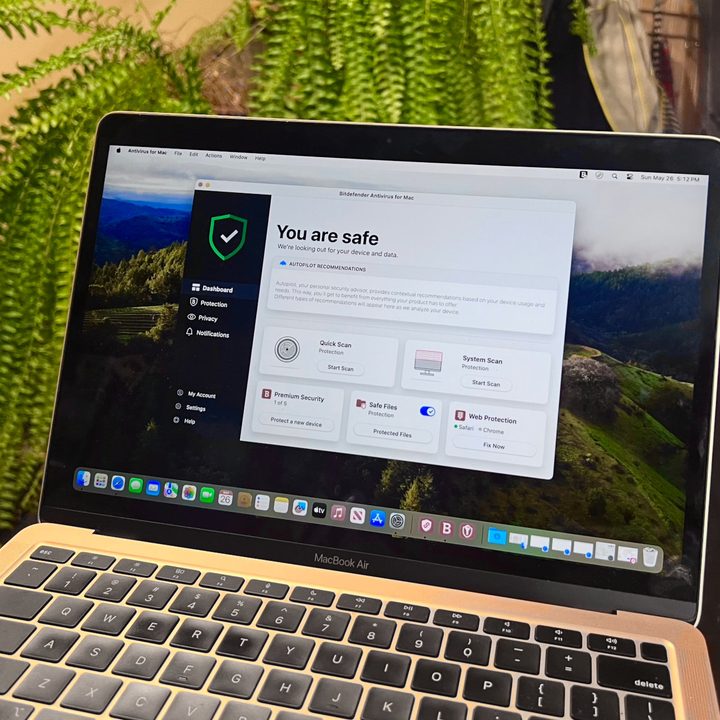
Built upon the company’s award-winning antivirus engine, Bitdefender Virus Scanner features a host of scan options, allowing users to quickly perform deep scans of the entire system or target specific locations. If granted, it even provides an option for scanning critical locations — such as launch agents and the entire system library — allowing users to bypass lengthier scans when pressed for time.
This antivirus software automatically updates with Bitdefender’s hourly malware definitions before scanning while providing a quick means for blacklisting specific locations from system scans. It attempts to disinfect and quarantine suspicious files, and though the feature is not unique to this software, it can also quickly search for malware within various archives and file types (PDF, PKG, ZIP, RAR, etc.).
From the home screen, users can choose four different scanning options, in addition to an Update button and a View Quarantine button. It’s all very easy to understand and use. You can get it straight from the Mac App Store or download it from Bitdefender.
Bitdefender’s subscription plans add stronger privacy and more robust security features. While subscription prices tend to be a bit higher than competing solutions, Bitdefender is among the best antivirus tools with a perfect six score from AV-Test since 2017 in all but one test.
Avira Free Antivirus

Avira strikes a nice balance between ease of use and quick access to advanced utilities, ultimately rendering basic system scans just as simple to execute as those that are scheduled and file-specific. The software includes standard spyware and adware protection, along with the ability to intercept harmful websites and block tracking. If it finds an infected file or folder, it can repair or delete the problem. It can also scan USB devices for any potential dangers.
Avira’s full-featured interface uses a left-hand navigation bar for viewing the system’s status, scheduling tasks, and viewing past quarantine history, among other options. This antivirus will provide you with up-to-date information about threats. It’s resource-heavy but capable enough when looking for automation, scan history, and other advanced features.
One distinction between Avira and our other recommended choices is that it uses more system resources. Consider yourself warned, but there is a lengthy installation process as you’re starting; the updates also tend to eat up a lot of time as well. The slow-rolling installation and updating isn’t a huge problem considering the meager price and comprehensive antivirus tool, but it’s definitely an inconvenience.
If you need more than what the free tool provides, Avira Internet Security adds advanced ransomware protection, real-time alerts, and more for a single Mac at an affordable price.
AVG

If you’re looking for a hands-off solution, AVG Antivirus for Mac is a solid option. AVG runs quietly in the background, offering live protection and schedule scans, as well as the option to manually scan your system or specific files if you’re concerned. AVG draws from a constantly updating database of known viruses and can even catch “zero-day” threats.
It offers both local and web-based protection, watching for malware downloads and malicious links, as well as email attachments that may contain nefarious software.
The user interface is intuitive, and though it pushes you toward some of AVG’s premium offerings, it gives you plenty of information to know how secure your system is.
The premium version requires a subscription offers added layers of protection, including guards against ransomware and phishing malware.
Malwarebytes Free
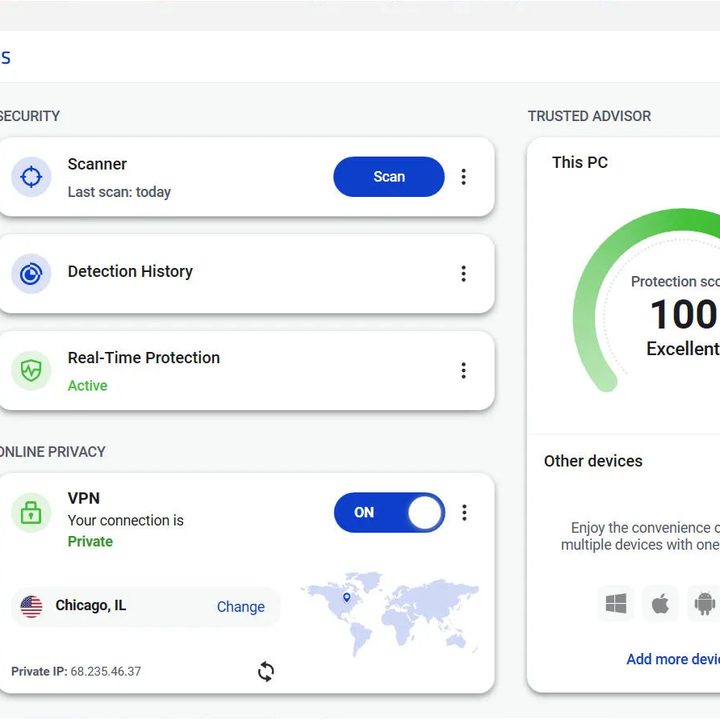
Windows users have long turned to the Malwarebytes free version as a backup for always-on antivirus software. The Mac version started as an adware removal tool, but as of today, it’s also a full-fledged tool for protecting your machine against other forms of malware. Plus, Malwarebytes is as effective in macOS as it is in Windows, a fact that’s aided by the team’s constant research on current threats. In fact, the company identified the first Mac malware threat in 2017.
Using the app couldn’t be easier. Just select Scan, and the software quickly alerts you to any malware infection — often when other antivirus software misses something. However, it’s not an always-on solution, so it’s more suited for performing deep scans and ridding yourself of particularly nasty Mac viruses.
While the free version only cleans a Mac that has already been infected, the paid version of Malwarebytes antivirus software offers live protection. While it lacks third-party testing for Mac protection, the company was founded in 2006 so it has a long history as an antivirus software developer.
Do I need antivirus software on my Mac?
For many years, the PC reigned supreme with such a large share of the market that Mac computers were largely overlooked by hackers. Why create a virus that works on a small percentage of computers when you can target hundreds of millions of systems? That’s changed in the last few years as Apple gains ground with its powerful line-up of Mac desktops and MacBooks.
If your Mac, like most computers, holds personal and financial data that you can’t risk being compromised, a using the best antivirus subscription might be worth the expense. To learn more, check out our article devoted to Mac malware threats, Apple’s built-in protection, and why you might need antivirus software for your Mac.


