


A motherboard might not be the most exciting PC component, but what a motherboard is, is the most important. Having a poor motherboard can leave you with weak VRMs for overclocking, not enough ports for what you need, and limited storage space. The best motherboards come packing the latest features, like support for Wi-Fi 7, 2.5Gbps Ethernet, USB4, PCIe 5, and more.
There are a number of top CPUs worth considering in 2025, though, so we've tried to give you the best spread of motherboards we could find. Whether you're building a cutting-edge gaming machine or want something more affordable, here are the best motherboards you can buy.


Best AMD AM5 motherboard
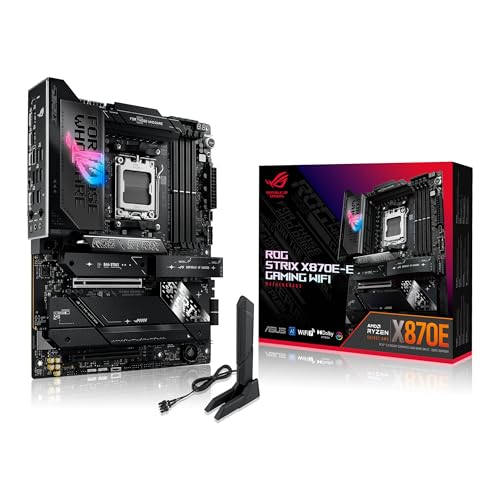
Asus ROG Strix X870E-E
- Powerful VRMs for stable overclocking
- Supports Wi-Fi 7
- Loads of USB ports (including USB4)
- Supports 5Gbps Ethernet
- Lots of fan headers
- Expensive
- Overkill for most gaming PCs
Why should you buy this: It's the best AM5 motherboard out there.
Who’s it for: Gamers and enthusiasts who want peak performance and the latest features from their motherboard.
Why we picked the Asus ROG Strix X870E-E:
If you're looking for the absolute pinnacle of performance and features for an AMD Ryzen motherboard; something to pair with a new Ryzen 7000 or 9000 CPU — then you really want to consider the Asus ROG Strix X870E-E motherboard. It offers fantastic performance for all of the latest CPUs, with support for the fastest of memory standards. It has stellar VRMs, so whether you're using automated overclocking or going in manually, this board will help push your chip to its limit.
On top of that, you get stellar features like Wi-Fi 7 and 5Gbps Ethernet built in. There's also excellent wired connectivity, with fast-charging USB4 ports and loads of other USB-A and USB-C connectors for all your devices. There's PCIe 5 support for the fastest GPUs and storage, too.
This isn't going to give you much better gaming performance than most X800 boards, so don't spring for this instead of upgrading your CPU or GPU, but for the best of the best, this is it.

Best LGA 1700 Intel motherboard
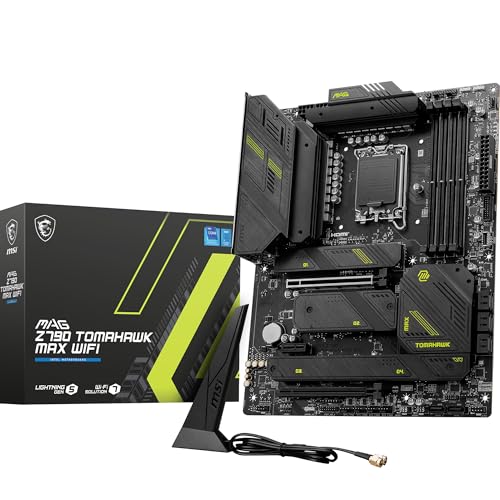
MSI MAG Z790 Tomahawk Max
- Excellent VRM stability for overclocking
- Lots of SATA and M.2 storage connections
- Wi-Fi 7 support
- Supports 2.5 Gbps Ethernet
- Doesn't support the very latest generation of Intel CPUs
- No Thunderbolt 3 or 4 support
Why should you buy this: It's the best Intel motherboard for LGA 1700 CPUs from the 12th, 13th, and 14th generations.
Who’s it for: Gamers and enthusiasts who want fantastic Intel performance on older CPUs.
Why we picked the MSI Mag Z790 Tomahawk Max
Intel's Arrow Lake CPUs (also known as Core Ultra 200) are the latest and greatest Intel chips, with 800-series motherboards to go with them. But if you're building a system based on an Intel 12th-, 13th-, or 14th-generation CPU and want the best performance and features you can find, the MSI MAG Z790 Tomahawk Max is the board for you.
It has fantastically stable VRMs for intense overclocking and its feature list is excellent. For networking, it offers Wi-Fi 7 and 2.5Gbps Ethernet built-in, and there are a massive number of USB ports, including a USB-C 20Gbps port. There is no Thunderbolt 4 support, which is a shame, but you can get that on higher-end boards if it's a dealbreaker.
If you have a lot of storage drives, though, this board is for you. It has four high-speed M.2 slots, and eight SATA connectors. All the storage space you could need.
Want even more features at a higher price? Check out the MSI MEG Z790 Godlike Max. You can get Thunderbolt outputs and slightly better VRMs for four times the price!

Best budget AMD AM5 motherboard
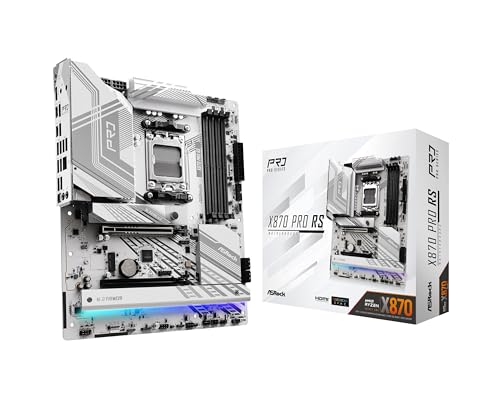
ASRock X870 Pro RS
- Lots of USB ports
- Strong VRMs for overclocking
- Has multiple USB4 ports
- Armored PCIe x16 slot
- Supports high-end RAM speeds
- Lacks built-in Wi-Fi
Why should you buy this: It's a very affordable high-end AMD AM5 motherboard.
Who’s it for: Gamers and enthusiasts who want great performance at a great price.
Why we picked the ASRock X870 Pro RS:
ASRock's X870 Pro RS is an excellent motherboard for the latest Ryzen 7000 and 9000 CPUs, giving them excellent support and stability whether you're a gamer, creator, or office worker looking for a powerful new machine to speed up your workday. This board supports high memory speeds and has very capable VRMs, so overclocking is very viable for unlocking additional performance.
It also supports USB4 and 2.5Gbps Ethernet. It doesn't have built-in Wi-Fi, so if you need that, upgrade to the Wi-Fi version, or add an add-in card or adapter down the line. It has lots of USB-C and USB-A ports for all your devices, and it has armored PCIe slots to help prevent GPU sag.
The paint job and RGB lighting are striking, too, making this a great motherboard for alpine-look builds.

Entry-level Intel motherboard
Asus Prime H610M-A
- Affordable price
- Intel 1Gb Ethernet
- Provision for V-M.2 Wi-Fi module
- Multiple M.2 slots
- No PCIe Gen 4 storage support
- Not recommended for high-end CPUs
Why should you buy this: It is the best sub-$100 motherboard for Intel's LGA 1700 CPUs.
Who’s it for: Those who are planning to build an entry-level Intel system.
Why we picked the Asus Prime H610M-A:
Intel’s older 12th and 13th generation CPUs are excellent if you are planning for a budget build, the H610 chipset-based motherboard should suit your needs. Priced at about $100, the Asus Prime H610M-A is suitable for chips like the Core i3-12100 and i3-12300 and should also be able to handle the Core i5s, too. Remember, unlike higher-end motherboards like the Z690 and B660, the H610 does not offer any overclocking abilities. Thus, the Asus Prime H610M-A motherboard is recommended for entry-level systems. As for the features, the motherboard comes with onboard heatsinks and thermal pads for the VRMs and chipset, along with some fan headers and temperature sensors to ensure your system stays cool and stable. There are two DIMM slots that support up to 64GB DDR4 3200 memory and XMP for improved memory performance.
For storage, there are two M.2 slots and four SATA 6Gb/s ports, while the PCIe 4.0 x16 slot should support all modern graphics cards as well as other add-on cards. Rear I/O includes two USB 3.2 Gen 2 ports, four USB 2.0 ports, DisplayPort, HDMI, D-Sub port, Intel 1Gb Ethernet port, triple audio jacks, and two PS/2 ports to connect legacy peripherals. For front I/O there is a USB 3.2 Gen 1 header that supports additional 2 USB 3.2 Gen 1 ports and two USB 2.0 headers that support an additional three USB 2.0 ports. The board also comes with addressable RGB headers if you like to add some bling to your rig.

Best B550 motherboard for AMD offering great value
Asus ROG Strix B550-F Gaming Wi-Fi
- Solid 14-phase power delivery
- 2.5Gbe LAN with Wi-Fi 6
- Good set of rear I/O ports
- Only two M.2 slots
- No VRM temperature sensors
Why should you buy this: It's the best B550 motherboard offering solid value.
Who’s it for: Gamers and content creators looking for the best features at reasonable pricing.
Why we picked the Asus ROG Strix B550-F Gaming Wi-Fi:
B550 motherboards are supposed to be cheaper than AMD's X570 platform, and the ROG Strix B550-F Gaming is a fine example. Selling for under $200, you get quite a few features along with a premium-looking design with fancy RGB lighting. The board comes with 14-phase power delivery, dual M.2 slots, a 2.5 Gbps ethernet, Wi-Fi 6 with AX and Bluetooth, along with four DIMM slots DDR4 memory that can be clocked at 4400MHz. The primary PCIe x16 slot support Gen 4 as does one of the two M.2 slots.
The board also comes with six SATA ports while the rear I/O includes a total of eight USB ports — two USB 3.2 Gen2 (Type-A and Type-C), four USB 3.2 Gen1, and two USB 2.0. Apart from the 2.5GbE LAN port and dual antenna connections for Wi-Fi, there are also HDMI and DisplayPort video outputs and standard 5-plug analog audio outputs plus SPDIF. Additionally, it can handle overclocking and should remain stable with the right set of cooling hardware, and as the name suggests, this is a solid gaming motherboard.
Frequently Asked Questions
When it comes to Intel, The Z-series boards (Z790, Z690, Z590) offer the ability to overclock the CPU as well as the memory. With the introduction of the 12th-gen, Intel began offering memory overlocking on the mid to low-end B660, H670, and H610. It is best to make sure you check for overclocking capabilities by heading to the product page on the vendor's official website.
All AMD motherboards outside of the super affordable A520 chipsets support overclocking, so you don't need to worry so much about which one you buy. That said, The X570, X670E and X870E boards are more suitable for safely overclocking AMD chips, as they feature the highest quality components, including better VRMs.
Yes. You should reinstall Windows if you are replacing the motherboard. Apart from hardware compatibility, a fresh installation of Windows ensures that the license key is tied in with your new motherboard. Thus, it is recommended that you keep your Windows digital license or a product key handy in case you are planning to upgrade your motherboard. We also suggest going through Microsoft's guide on how to reactivate your Windows after a hardware change.
Not sure which motherboard suits your budget?
Choosing a motherboard is not easy. Every component you choose for your PC build depends on getting the right motherboard. To help you choose, check our PC motherboard buying guide to ensure your requirements meet your budget.


