In the world of consumer tech, the word “motherboard“ gets thrown around a lot, especially when talking about brands like Asus and Intel. But what is a motherboard? And more importantly, what does it do?
If you were to think of your computer as a body, the motherboard would be the circulatory system. Instead of blood it’s pumping around the system, it’s responsible for routing power and data, which helps coordinate how all components work with one another.
Note that this is not the same as the CPU, which is where all the computations are performed. The motherboard simply organizes these computations and their results and connects the various other components such as storage, RAM, and connections. While it doesn’t hold a lot of power itself, nothing else could work without the motherboard, which is why it is considered so vital. Here’s what else you need to know.
What is a motherboard, and what does it do?
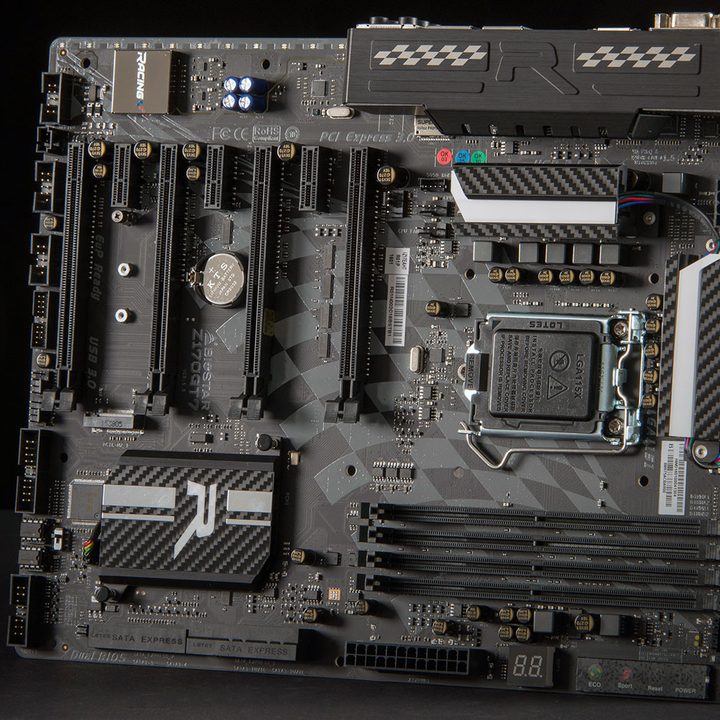
The main purpose of a motherboard is to move power around and provide a central place where all your components can communicate with each other. On its own, your motherboard doesn’t affect performance at all. However, depending on the chipset (more on that shortly), your motherboard can enable higher performance when paired with other hardware.
Another important function of the motherboard is to load your operating system. A firmware chip on the board stores the Basic Input/Output System (BIOS). A more modern version of the same firmware is known as the Unified Extensible Firmware Interface (UEFI). These very lightweight applications are the first thing your computer loads, which allows it to read data off of your hard drive and, eventually, load your operating system. It’s right there in the name: The BIOS is “basic.” The point is to get all your components to recognize each other before loading the operating system.
The functionality of a motherboard is largely determined by the chipset. A motherboard’s chipset is responsible for handling communication between your various components, and they come from CPU manufacturers (AMD and Intel both have a range of chipset options). You’ll usually see CPU makers release new chipsets along with new generations of processors. That’s because the chipset is where most motherboard innovation happens, allowing users to use RAM and access features like PCIe 5.0, among other things.
Motherboards also handle the logistical hurdle of building a computer. The layout of a motherboard is intentional, placing critical power delivery and communication parts close to the components that need them. Your CPU, for example, receives power through the motherboard. However, the motherboard also has a voltage regulator module (VRM) placed between the power connection and the processor to maintain consistent power.
What components make up a motherboard?

There are several different motherboard designs and form factors, which have been updated over the years for different devices and evolving technology. For example, Mini-ITX is a small form factor that has grown to prominence recently as people demand smaller solutions.
However, all motherboards have a few things in common. All of them have circuits used to coordinate computer processes and a heat sink for absorbing and redirecting heat to keep the motherboard cool during use. Most have a secondary source of power, too.
The primary thing you’ll notice when you look at any motherboard is that it has a lot of slots and connections. Since everything is routed through the motherboard, it needs physical contact with nearly all computer components. That includes main power, CPU, RAM slots, USB, PCI, video or graphics cards, sound cards, and expansion slots.
If you use a wireless mouse or external keyboard, they have their connections along with any other essential accessory you might want. This utility is why a motherboard is like a ring of connectors — that’s its primary function.
Over time, the ports on a motherboard tend to change based on what current technology demands. This is why an old motherboard may have many defunct ports for connections that are obsolete.
In most cases, those are peripheral ports. The motherboard handles internal connections like your RAM and CPU, but it also handles external connections like USB and Thunderbolt. Additionally, motherboards provide networking ports (either through Ethernet, Wi-Fi, or both) and usually offer video connections to support processors with onboard graphics.
The connections have changed and adapted over time, but the purpose of a motherboard remains the same: It’s a hub for your PC. Everything that connects to your computer connects to the motherboard in one way or another. Even the USB ports on the front of your computer case connect directly to the motherboard.
A brief history of the motherboard

The modern motherboard was invented long after the first computers. Early computers tended to be more straightforward machines, without the same need to coordinate many processes simultaneously. Before the consumer market took off, there wasn’t much demand for mass-produced motherboards.
However, this changed in 1981 when IBM released its Personal Computer, which is why laptops and desktops are called PCs. These computers needed a way to regulate their activity for consumers. In response, IBM developed the first motherboard to do it — a computer chip that took care of all the details while users completed their digital tasks.
At first, this component was called a planar and, at the beginning of its creation, went through many additional names. The term motherboard became the most popular since the circuit board essentially acted as the mother to all the other computer components. As such, this is why motherboard expansions are sometimes known as daughterboards.
How to upgrade your motherboard
Most computer cases open from the side, with the motherboard installed opposite the access panel. This keeps the motherboard safe from most hazards, and its vertical orientation helps keep dust to a minimum. Another advantage is this keeps all your expansion slots within easy reach, and laying your computer on its side makes plugging in any additional components a snap.
Ensuring your motherboard is equipped with all the connections you need for your planned upgrades can feel like a daunting task. Many motherboard upgrades are necessary to enable other improvements, such as new GPUs or CPUs, that your previous model did not support. Doing this can get pricey. In the end, you may realize that you did not need to upgrade your motherboard in the first place. To make sure you’re buying at the right time and for the right price, spend some time reading our motherboard buying guide.
Consider getting a new PC if your motherboard is getting too old. It’s likely that many components will need upgrading, like the RAM and CPU. All things combined, it might be cheaper to buy a new PC. Research the costs versus benefits to determine what fits best in your budget.
To upgrade the motherboard, you need to take apart your computer and remove and replace every piece except the power supply and hard drives. Everything connects to the motherboard, so everything must come apart if you decide to upgrade it.
We have a guide on how to build a PC if you’re really up to the challenge of installing a motherboard into a case.