So, you have a lightning-quick gaming rig all set up and ready to go. Through its tempered glass side panel, the internal components are awash in the neon glow from your LED-lit fans, RAM, and motherboard. Plugging your old keyboard and mouse into it would seem like an affront to your PC’s raw, unbridled power. It would be an unacceptable breach of etiquette — or worse, disrespect. Don’t worry, we’ve got you covered. Here, we’ve assembled a list of the best PC gaming accessories money can buy.
Each one was hand-selected to complement your gaming rig, bring out the best in those cutting-edge internals, and elevate your gaming experience. Let’s get started with the Logitech G Pro, which remains an excellent and affordable keyboard.
Logitech G Pro Keyboard

That old, store brand keyboard, faded and packed full of crumbs, just won’t do. You need something tactile, quick, stylish. Something that will respond to each and every keystroke with a satisfying mechanical click, a keyboard fine-tuned like a musical instrument.
You need the Logitech G Pro. It’s a professional-grade gaming keyboard with fully customizable per-key RGB illumination, and one very important quality: 26-key rollover. That means you can press every single alphabetical key on the keyboard at the exact same time and they all register without delay.
Some lesser keyboards stumble when you try to use multi-key combinations — but that won’t do for the best PC gaming accessories. For instance, moving left and forward while sprinting, jumping, and hitting Q to fire off an ability all at once would be a problem for some keyboards, those poor unfortunates destined for a lifetime of office work. Not for the Logitech G Pro.
Razer Deathadder Elite

There are many amazing mice you can easily equip your PC gaming battle station with, but nothing combines affordability with usability like Razer’s Deathadder Elite. Why settle for less?
This mouse packs a 16,000 DPI optical sensor for precise control, complemented by two dedicated DPI buttons for manually adjusting the sensitivity as needed. There are also seven programmable buttons that you can map to your most common functions, with sturdy mechanical switches rated for up to 50 million clicks.
We love the overall design of the Razer Deathadder Elite, too, which features micro-textured grips and RGB light controls!
Razer Gigantus V2 Mousepad

If you can’t properly game or work without a great mousepad, Razer has your back — or desktop, that is. This soft pad is made of textured micro-weave cloth and comes in several sizes, from a normal mousepad size to one that’s large enough to fit across your entire desktop area.
You can customize the Razer Gigantus V2 mousepad with designs, add your gamertag, and really make it your own. The base grips your desktop using anti-slip rubber foam. It even has a one year warranty in case something goes wrong.
JBL Quantum One Headset

JBL’s excellent headset offers a frequency response of 20Hz to 40Hz and surround sound that includes head-tracking sensors to make the most of the remarkable JBL audio quality.
A detachable boom mic made with “windshield” foam helps prevent annoying mic noise, and there’s active noise cancellation specifically designed for effective gaming. It also comes with a chat balance dial to quickly control volume preferences based on what you’re doing. All that fits into a sturdy, comfortable headset design with padding that’s designed to last.
There is a wireless version of the JBL Quantum One, but we like the consistency of the wired version, which includes a USB-C to USB-A cable.
Logitech G560 Lightsync Speakers
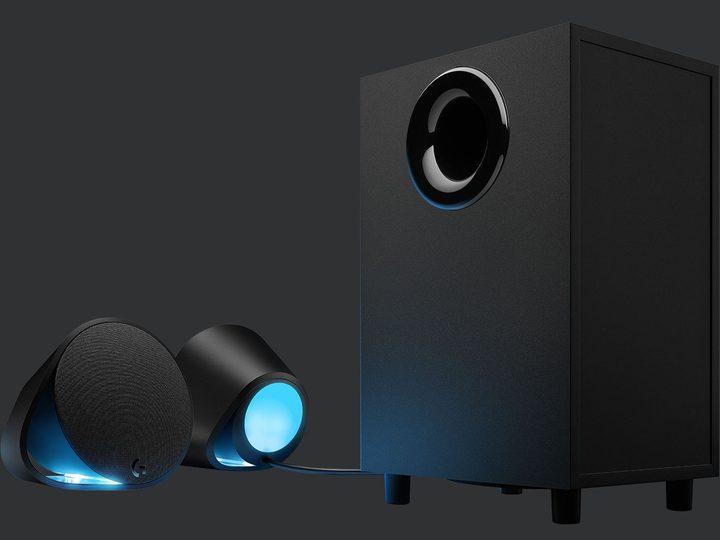
If you don’t use headsets very often but want to hear your PC’s audio, the Logitech G560 is easily one of our favorite computer speaker systems to date. The Lightsync features allow you to switch the speaker lights to any color you want to complete the experience.
The Logitech G560 Lightsync offers DTS:X surround sound with 3D positional audio and 240 watts of peak power for a sound experience that can really blast you away. Just make sure you have room for the large subwoofer!
HTC Vive Cosmos

If you really want to experience what your PC can do, it’s time to get a VR headset. The best you can get right now is HTC’s brilliant Vive Cosmos.
HTC’s latest model uses six integrated camera sensors, so there’s no need to set up base stations or other types of external sensors. Inside, the LCD panels support a 2,880 x 1,700 combined resolution, 90Hz refresh rate, and 110-degree field of view.
The new Vive Cosmos design is more comfortable than ever before and features a range of faceplates that allow for some customization — and a cool little flip-up design for rapid transitions. The handheld controllers are also more accurate than ever — and they now glow!
Xbox One Wireless Controller
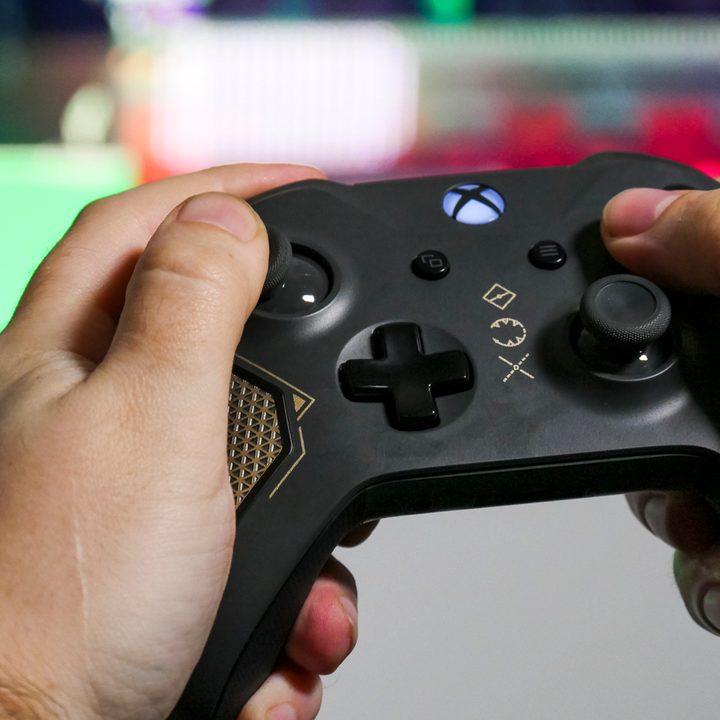
PC gaming doesn’t often mix well with gamepads — they’re not as precise as a mouse and keyboard setup. However, there are games that cry out for a traditional controller. In those instances, it’s important to have one of the best-engineered gamepads on the market, rather than some off-brand one with bizarre compatibility issues.
That’s why it’s never a bad idea to have an Xbox One controller handy. The new version, exemplified by the Xbox One Recon Tech Special, can connect to your PC via a wired connection or over Bluetooth. It’s comfortable to hold for long periods of time, and the soft tension behind the triggers offer just enough resistance so you can really make use of their pressure sensitivity.