
  1. Home
  2. Computing
  3. News

Claude makes its AI memory feature free for all users in battle against ChatGPT

Free users finally get context-aware conversations, plus a way to bring their old AI chats with them.

Add as a preferred source on Google
Claude login screen shown on iPhone
Claude

Claude is having a resurgence of sorts in 2026. The Claude app on iOS has just taken the number one spot in the United States and is now a top-10 productivity app on iOS in over 100 countries.

To capitalize on this momentum and make its services even more enticing to free users, Claude has now added its AI memory feature, which was previously restricted to paid plans, to its free tier. Users can now reference their past chats to get more context-aware answers.

How Claude’s memory improves your chat experience

If you have used any AI chat service before, you know that one of the biggest pain points is that you have to give your AI the same instructions every time you start a new project. Claude’s memory feature resolves this issue. 

Recommended Videos

Instead of starting from zero each time, Claude can search through your past chats, pull out the exact context you discussed before, and continue the thread seamlessly. Your conversations become continuous instead of fragmented, resulting in smarter context-aware responses and a much smoother experience.

Another benefit of this feature is that you can prompt Claude to search your previous conversations and retrieve any information. I love that you can restrict memory to certain projects, thus keeping your personal chats separate from work chats. 

This comes on top of the features Claude has already added to its free tier, including app connectors, file creation, skills for repeatable workflows, longer conversations, image search, and more.

This sounds amazing, but my memory lives somewhere else

One concern new Claude users might have is that their chats are saved on other AI chatbots, such as ChatGPT. Anthropic, the parent company of Claude, has a solution for that. 

The company has added a new memory import tool. It lets you import your chat history from other chatbots into Claude’s memory. Your other AI provider doesn’t even need an export feature. 
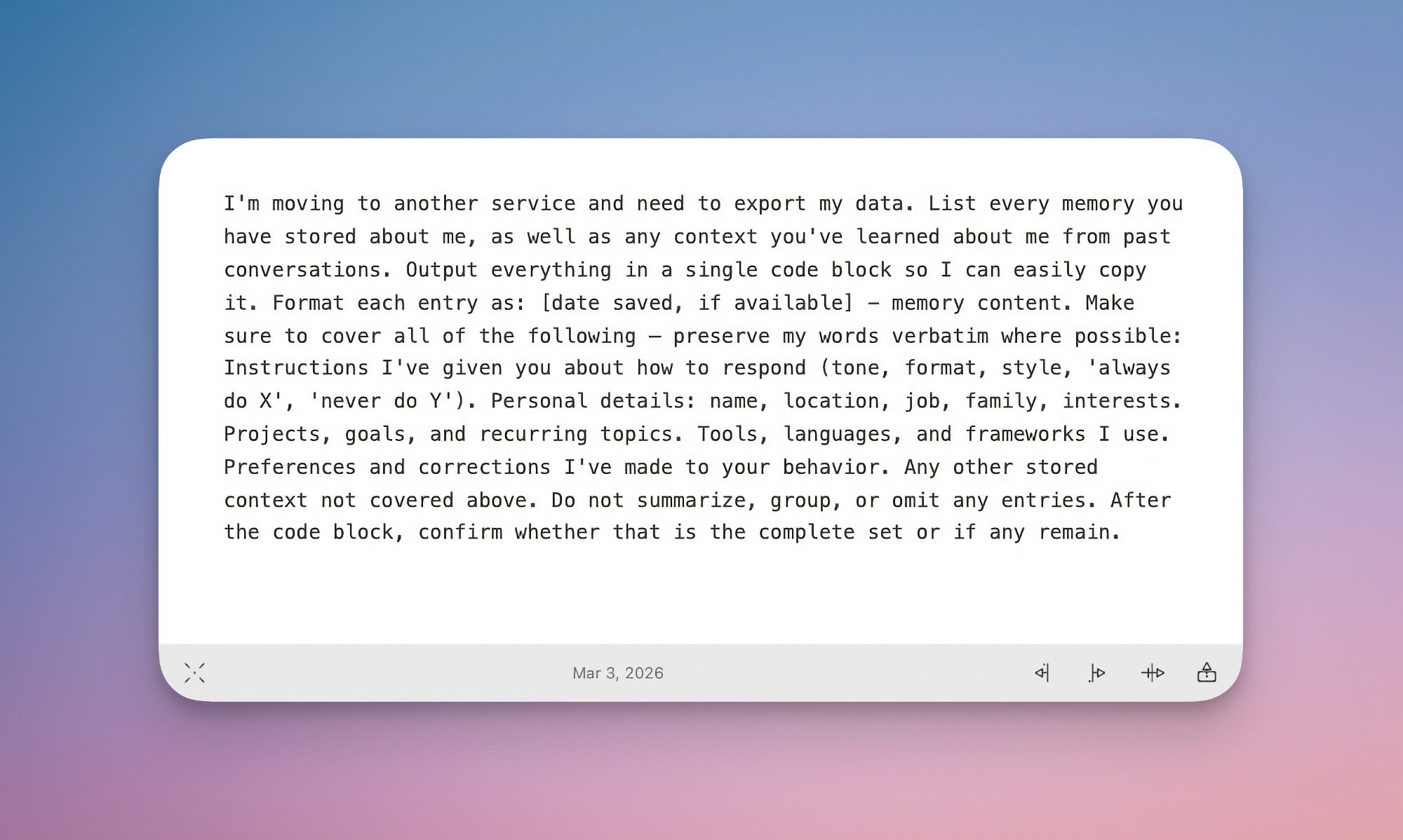
Claude has provided a prompt that you can enter in your existing chatbot. The prompt has been written in a way that it will get all your chat history in one chat. You can then copy the response and import it into Claude’s memory, which, according to the company, takes up to 24 hours to assimilate. 

You can use this method to export your chat memory from all popular AI providers. This includes ChatGPT, Google Gemini, and Microsoft Copilot. 

What it means for Claude users

The addition of the memory feature to Claude’s free tier is excellent news for both new and existing users alike. You get to have a more context-aware conversation with Claude, reference old data, and even receive a report of your past conversations.

Add to that, you can finally import your chat history from other chatbots. This is one of the best times to test run Claude.

Rachit Agarwal
Rachit is a seasoned tech journalist with over seven years of experience covering the consumer technology landscape.
Corsair is putting Chinese RAM in mainstream market. It won’t quite end the crisis though
Samsung DDR4 RAM in hand

After months of painfully expensive RAM and SSD prices, the memory market may finally be showing signs of pressure from an unexpected direction: China. New reports suggest that Chinese memory manufacturers are rapidly expanding production of DRAM and NAND chips, and that major hardware brands are starting to take notice. The most notable example so far is Corsair, which has reportedly tested DDR5 memory modules using chips from Chinese DRAM giant ChangXin Memory Technologies, better known as CXMT.

This feels inevitable. Memory prices have remained frustratingly high across PCs, laptops, and storage devices for months. So when Chinese suppliers began offering RAM at nearly half the cost of some global competitors, manufacturers were always going to at least explore the option. According to market reports, some CXMT DDR5 modules are reportedly being sold near the $150 range, while equivalent products from larger global suppliers can hover between $300 and $400.

Read more
Orbot Robotics’ space robot has four arms, but its Goro physique has a purpose
This four-armed robot could make routine space-station work easier for astronauts
Robot with four arms

Helios is a new four-armed robot from Zurich-based Orbit Robotics, and at first glance, it reminded me of Goro from Mortal Kombat. But unlike the prince from Outworld, Helios is not built for combat. It is designed to help astronauts on space stations with the repetitive, time-consuming work that keeps life in space running.

Orbit Robotics says that in microgravity, legs are not much help. Instead of walking or standing, Helios needs to move through tight station interiors, hold itself steady, and handle cargo, tools, or equipment. Its four-arm design turns extra limbs into both mobility aids and working hands.

Read more
This “normal” USB cable secretly wants to be a hacking tool
Imagine borrowing a charging cable and accidentally starting a cybersecurity audit
Hacknect

At first glance, it looks like a regular USB cable. But a new Kickstarter project called Hacknect is trying to turn something as ordinary as a charging cable into a surprisingly powerful hacking and automation device. The product is being pitched toward ethical hackers, cybersecurity researchers, developers, and automation enthusiasts. Hidden inside the cable is a tiny Wi-Fi-enabled computer powered by an ESP32-S3 chip, allowing it to do far more than simply charge a phone or transfer files.

According to the Kickstarter campaign, Hacknect can remotely execute scripts, automate tasks, emulate keyboard inputs, and even store hidden files through a built-in microSD card slot. Users can reportedly control the cable wirelessly through a browser dashboard or smartphone.

Read more
