  1. Home
  2. Computing
  3. Legacy Archives

Dropbox drops a new look onto its desktop application

Add as a preferred source on Google
dropbox_dt
Image used with permission by copyright holder

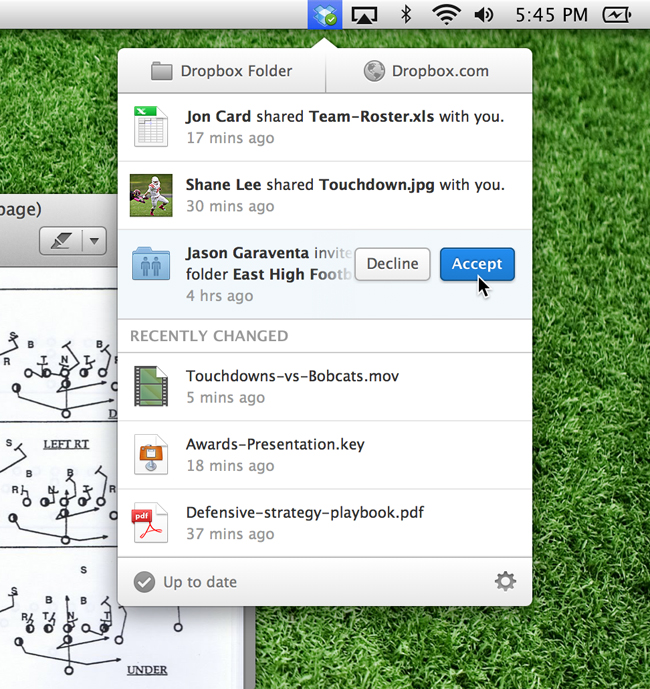
Love Dropbox but wish it was less clunky? How about giving you better notifications of what files have been shared and what’s been recently updated? Your wish has been granted. Dropbox just announced it’s adding new features to its desktop application for PC and Mac, with Linux to come later. Dropbox is far from a newcomer in the cloud storage space and the service continues to up its game in response to competition while still offering drop-dead simplicity and 2GB of free storage. The company made its service even easier today for desktop users with the addition of drop down menu that indicates recent changes, allows easier access to your files and shares links to files faster.

This redesigned version of Dropbox looks a lot slicker on both OS X and Windows than the previous version. The little Dropbox icon still resides in the menu bar  on OS X and the system tray on Windows, but clicking on the icon no longer opens a file window. Instead, there’s a list of shared files, changes and uploads, with large links to your home Dropbox folder and Dropbox.com. If you want to see how much space have you left or pause a file sync, click on the settings icon. From the settings menu, you can also get more space, help, or quit the program entirely. 

Recommended Videos

We think it’s about time that Dropbox updated its desktop application since it hasn’t changed drastically in a few years. The new look is definitely less clunky and makes sharing files across different dropboxes much more straight forward.

The new version of Dropbox, 2.0, may be downloaded directly from the site. Dropbox is also updating its iOS and Android apps with the new notification system. If the update isn’t appearing on your phone yet, it can be downloaded directly from Dropbox’s site.

(via The Dropbox Blog)

Meghan McDonough
Former Contributor
Meghan J. McDonough is a Chicago-based purveyor of consumer technology and music. She previously wrote for LAPTOP Magazine…
Microsoft is retiring the Together Mode in Teams in favor of something cleaner and simpler
Teams is retiring Together Mode for layouts people may actually use
Computer, Electronics, Laptop

Microsoft Teams is retiring one of its more recognizable meeting features, and it might be for the best. The company announced that Together Mode is going away in Teams as Microsoft is shooting towards a simpler set of meeting layouts.

To recall, Together Mode was introduced during the pandemic-era video call boom, placing participants inside shared virtual environments such as auditoriums or classrooms. It was a cute idea at the time, but it never became the everyday meeting view for most people.

Read more
Experts are worried that smarter AI gets, the dumber we might become
Experts say chatbots can help research, but leaning on them too hard risks outsourcing the work that builds intelligence
OpenAI CEO Sam Altman during the Uncapped podcast in June 2025.

AI can now answer questions so quickly that the search itself can feel optional. That convenience worries the Royal Observatory Greenwich, which has warned that instant AI answers can weaken the curiosity, scrutiny, and source-checking behind real knowledge.

The risk hides inside the usefulness. Chatbots can help people test ideas, move faster, and find new angles, but a finished response can also cut users off from the messy trail that makes learning stick. When that happens, information arrives without the struggle that turns it into judgment.

Read more
Miss the old PC days? This website lets you experience Wikipedia like it’s Windows XP
This XP-style Wikipedia explorer turns online research into a nostalgia trip, while showing how much browsing changes when search takes a back seat
File, Webpage, Person

Wikipedia has an unofficial new front door, and it looks like a desktop from a very specific era of family PCs, school labs, and chunky blue title bars.

Developer Sami Smith has built a browser-based Windows XP Wikipedia explorer that turns categories into folders and articles into documents. It’s playful, slightly inefficient, and more interesting than another AI search box bolted onto the web.

Read more