  1. Home
  2. Computing
  3. Emerging Tech
  4. Legacy Archives

Engineer creates old-world mechanical computer with 3D-printed parts

Add as a preferred source on Google
TurboEntabulatorComputer
Image used with permission by copyright holder

Let’s be honest; a mechanical computer probably isn’t practical in this day and age. Back in the 1800s, mechanical computers were works of modern art and a huge step in engineering. All you history buffs might recall Charles Babbage’s “Difference Engine,” (1822), or even the “Kerrison Predictor” (late 1930s). But the only place you’re likely to see a mechanical computing creation today is at your local science museum. At least, that used to be the case, until one brave electrical engineer decided to create his own version.

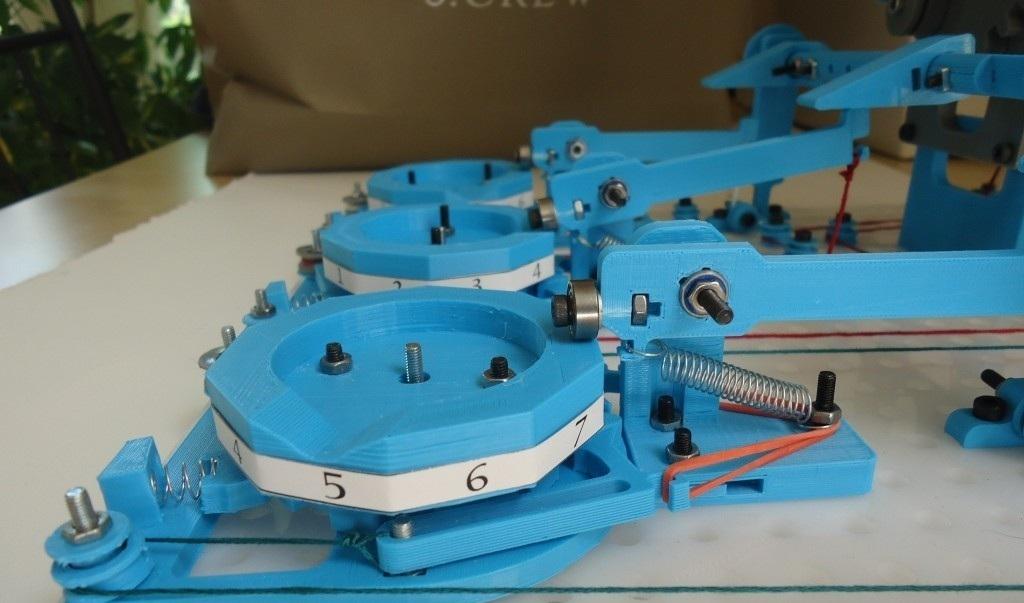
An inventive chap, known simply as “Chris” used his electrical engineering background to put together a simplistic mechanical device that tabulates numbers. The Turbo Entabulator, as Chris dubbed it, uses a construct to punch out a series of numbers onto cards that would make any Fibonacci fan proud. That’s the extent of this archaic-looking machine, and although it doesn’t do much more than tabulate, the key feature of this machine separates it from all other mechanical computers in existence.

Recommended Videos

Chris used his MakerBot 3D printer to assemble this unique creation, which makes it one of the first old-world mechanical computers to be made from new-world technology. It also (most likely) makes it the first “computer” to technically be “printed.”

The project wasn’t without struggle, though. “The mechanical counters [were fiddly],” Chris told TechHive. “I had extremely little experience designing anything with moving parts prior to this project. The counters don’t always ‘snap’ into position, and can wind up reading ‘7 3/4’ instead of ‘8’, which can jam up the machine when you go to process the next instruction.” Still, when you watch the video, and realize that the machine is completely mechanical, requiring human-powered cranking to operate, you understand just how impressive this feat really is.

If you’re interested in learning more about the steps that Chris took to build the Entabulator, you can view the journey on his blog. He also uploaded some “schematics” to Thingverse, where you can take a crack at building your own device. 

Russ Boswell
Former Digital Trends Contributor
Russ Boswell is an aspiring video game and technology journalist from Colorado. He's been an avid gamer since he was old…
Open-source GIMP reskin gives it a familiar Photoshop look without the hefty fee
This open-source Photoshop lookalike starts with good old GIMP
PhotoGIMP announced to make GIMP feel like Photoshop

Switching from Photoshop to GIMP might feel like a big move. Everything is suddenly in the wrong place, and the UI could feel alien. This is exactly where PhotoGIMP comes in. PhotoGIMP is a free, community-driven patch for GIMP 3.0 and newer that reshapes the open-source image editor into something much more familiar for Photoshop users.

It doesn’t turn GIMP into Adobe Photoshop. The patch just shakes up the layout, shortcuts, and app identity to match Photoshop, so that new users don't feel lost on day one.

Read more
Google I/O 2026: What to expect from Gemini, Android 17, and more
Google is about to put AI into everything again
Google I/O 2026

Google is preparing to kick off its annual developer conference, Google I/O 2026, and this year’s event is shaping up to be heavily focused on artificial intelligence, Android 17, and the future of Google’s ecosystem. The conference begins on May 19 at the Shoreline Amphitheatre in Mountain View, California, with CEO Sundar Pichai expected to lead the keynote presentation. The event will be livestreamed globally through Google’s official I/O website and YouTube channels.

While Google I/O has traditionally focused on developers, this year’s announcements are expected to directly affect everyday users across Android phones, Search, Chrome, Workspace, and smart devices.

Read more
Microsoft is retiring the Together Mode in Teams in favor of something cleaner and simpler
Teams is retiring Together Mode for layouts people may actually use
Computer, Electronics, Laptop

Microsoft Teams is retiring one of its more recognizable meeting features, and it might be for the best. The company announced that Together Mode is going away in Teams as Microsoft is shooting towards a simpler set of meeting layouts.

To recall, Together Mode was introduced during the pandemic-era video call boom, placing participants inside shared virtual environments such as auditoriums or classrooms. It was a cute idea at the time, but it never became the everyday meeting view for most people.

Read more