  1. Home
  2. Computing
  3. News

Google finally makes sharing easier in Docs and Drive

Add as a preferred source on Google

Google rolled out an update to Docs and Drive today that makes sharing files a little bit simpler. As originally reported by 9to5Google, the new Share menu is considerably smaller, and all of its elements are more compact and better organized.

The first thing you will notice is that “Share with people” and “Get link” have been condensed to one box. In the last version, Sharing with individual people was its own stand-alone box, with another box for link sharing directly beneath it. In the new Share interface, the “Get link” box has been entirely removed, and now you can simply copy the link with the button in the bottom left corner. It’s cleaner, removes a lot of needless text, and is far easier to find than before.
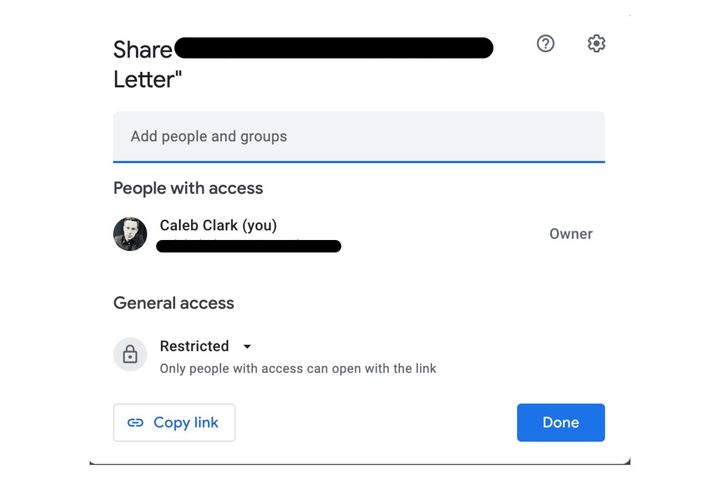
Google's new and more compact Share UI.
Image used with permission by copyright holder

The “Share with people section” is largely unchanged. It has been retitled “People with access,” but otherwise the steps for sharing files with individual people are unchanged. Below that is the new “General access” section, which lets users adjust who can view the link. It can be set to restricted (where only the people added can view the link), a specific workspace ( a set group of users, like a company), or to anyone with the link. These settings used to be in the “Get link” section.

Recommended Videos

The “Copy link” button is directly below general access, as we covered above.

There is also a setting shortcut in the top-right corner that adjusts user settings. Those settings are:

  • Editors can change permissions and share
  • Viewers and commenters can see the option to download, print, and copy

Toggling these off restricts sharing and permission changes to the original file creator, and it restricts viewers from downloading, printing, or copying the document (at least conveniently).

Overall, these are useful changes to the sharing UI. Consolidating the Copy link button, in particular, is going to save a lot of people looking around for a commonly used feature.

Caleb Clark
Former Digital Trends Contributor
Caleb Clark is a full-time writer that primarily covers consumer tech and gaming. He also writes frequently on Medium about…
Android desktop mode made me miss my laptop in record time
I tried writing and publishing from Google’s phone-to-monitor setup, and the future of mobile computing immediately started sweating.
Computer, Electronics, Laptop

Android 17 desktop mode has a very simple pitch. Plug your phone into a monitor, add a keyboard and mouse, and watch the slab in your pocket pretend to be a computer. I wanted to give that pitch a fair shot, so I tried using it for an actual workday instead of a cute demo.

The goal was boring on purpose: write an article, edit it, build the page in WordPress, upload whatever needed uploading, and publish the thing without running back to my laptop like a coward.

Read more
As AI turbocharges digital abuse, UK agencies urge parents to limit who sees kids’ photos online
The National Crime Agency and Internet Watch Foundation are asking parents to tighten privacy settings as AI-generated abuse material rises.
Social Media

Parents who post pictures of their kids online are being told to rethink the habit. The UK's National Crime Agency and the Internet Watch Foundation have issued new guidance urging families to lock down their social media accounts, warning that publicly shared photos are increasingly being pulled and altered by AI tools to create child sexual abuse material.

The two organizations say most parents have no idea this is happening. Criminals no longer need to contact a child directly to generate such material. They can scrape an ordinary photo and run it through widely available nudify apps.

Read more
I used ASUS’ dual-screen laptop as a portable creative station, and my desk PC started collecting dust
The Zenbook Duo might be the creator setup I wanted in college
Computer Hardware, Electronics, Hardware

With laptops, brands are constantly in a balancing act between portability and workspace productivity. The ASUS Zenbook Duo UX8407AA tries to dodge that choice with a design that brings a whole setup in a compact form factor.

I used the Zenbook Duo as a creative machine, mainly with design apps, illustration work, writing, and multitasking. The model I tried runs on Intel’s Core Ultra 7 355, paired with 32GB of memory and a 1TB SSD. That gives it enough horsepower to handle Photoshop and Animate, for sketches and animations, and a lot more without breaking a sweat.

Read more