  1. Home
  2. Computing
  3. News

Gemini gets image creation trick in Docs and Calendar access in Gmail

Add as a preferred source on Google
Gemini running on the Google Pixel 9 Pro Fold.
Ajay Kumar / Digital Trends

Google has announced a laundry list of feature updates for Workspace users, with a focus on using its Gemini AI across products like Gmail, Docs, and Calendar. 

For folks who rely on the side panel in Gmail, there is some good news. Gemini can now directly access the Calendar information from within the inbox side panel and perform relevant actions. 

Recommended Videos

Let’s say you are drafting an email and need to reference your calendar entries; Gemini will now do that for you. You can ask it to check the schedule for a particular date, create an entry (one-off or recurring), and create a new event without leaving the Gmail interface.

Using Gemini for Calendar access in Gemini side panel.
Google

The new capability is helpful but not holistic. For example, Gemini in Gmail can’t perform tasks such as adding or removing a person from an event, showing attachments, synchronizing schedules to find the best spot for a meeting, specifying work location, or handling meeting rooms. 

Gemini in Gmail will be able to access Calendar details for paid Gemini users or subscribers of the Google One AI Premium plan. Moreover, it is limited to English language support at the moment. 

Google’s AI toolkit is also bringing image creation superpowers to Docs. Back in September, Google introduced the ability to upload full-bleed cover images in Docs. Users are able to pick from a curated gallery they can access from the new Cover Image option in Docs or upload from a local gallery. 

Now, users can use Gemini to directly create media that they can use as a cover image or even as inline photos. The text-to-image pipeline is handled by Google’s Imagen 3 image-generation model. Notably, users can create photorealistic images, as well.
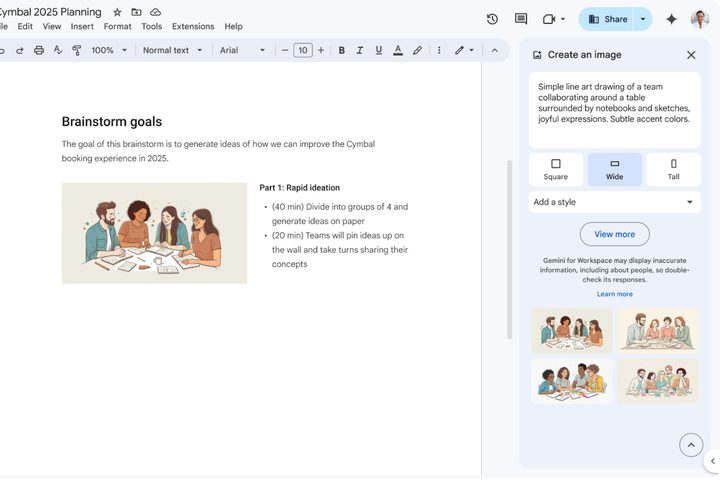
Using Gemini to directly create images in Gemini.
Google

More importantly, users will also be able to specify not only the style of picture but also dictate the aspect ratio. To create images, just follow this path: Insert > Cover image > Help me create an image

In order to add an inline picture, this is the pipeline: Insert > Image > Help me create an image, then type in an image description.

This feature has already started to roll out for business and education Gemini users, plus folks paying for the Google One AI Premium subscription plan. On a related note, Google has also finally launched the standalone Gemini app for iPhone users.

Earlier this week, Google also added support for uploading Docs and Sheets directly from Google Drive while creating a custom Gem assistant. The updated list of document and text files now includes “TXT, DOC, DOCX, PDF, RTF, DOT, DOTX, HWP, HWPX, and Google Docs,” says Google.

Nadeem Sarwar
Nadeem is the Managing Editor at Digital Trends.
Your next free Google account might only come with 5GB of storage
Google's free storage has been a competitive advantage over Apple's 5GB iCloud limit for years, but that’s changing.
Electronics, Mobile Phone, Phone

Google has quietly altered one of the most reliable promises in consumer tech: 15GB of free cloud storage. For years, signing up for a Google account meant getting 15GB of free storage, shared across Gmail, Drive, and Photos. However, that’s changed. 

New accounts are now defaulting to 5GB (same as iCloud), with the full 15GB available only if you have entered your phone number during setup. The prompt users are seeing reads: “Your account includes 5GB of storage. Now get even more storage space with your phone number.”

Read more
Sony shows off AI-touched Xperia 1 VIII camera samples. It’s an epic self-own that I can’t digest
Sony built the Xperia 1 series for people who know what a histogram looks like. Xperia Intelligence appears to have been built for everyone else, and the sample images make that tension impossible to ignore.
Sony aggressive AI photography featured.

Sony has a camera legacy that most brands, regardless of whether they make cameras or smartphones, dream of. The company rewrote what full-frame sensors could do with its Alpha series. 

That particular rendering of skin tones, that restraint with saturation, the commitment to accurate white balance; the company’s color science is precisely why cinematographers, videographers, and photographers like me, in the consumer tech space, swear by its color science and camera hardware. 

Read more
Razer’s new Blade 18 gets Arrow Lake refresh and a modest $3,999.99 starting price
For $3,999.99, you get the base model with Nvidia RTX 5070 Ti. A 5090 variant is available, too.
Razer Blade 18.

Razer has officially unveiled the 2026 Blade 18 today, and at the heart of all three configurations is an Intel Arrow Lake processor. 

I’m talking about the Core Ultra 9 290HX Plus, which features 24 cores, up to 5.5GHz clock speed (with boost), 36MB cache, and an onboard NPU that delivers up to 13 TOPS of compute power. 

Read more