

Character.AI is a fascinating chatbot service and one of the first that allowed users to ponder whether artificial intelligence could be used for personal endeavors. While many people have had fun creating personalities that emulate notable figures, including Super Mario and Elon Musk, several other characters allow you to explore more in-depth topics, including talking to psychologists, dating coaches, and job interview practice. With such characters, you might find yourself inputting personal information that you don’t want saved in the long term.
Luckily, there is a simple way to permanently delete your chats from Character.AI conversations. In addition to alleviating privacy concerns, deleting chats from the chatbot service can also help you manage space on your device, remove personal data from your device if you are sharing or selling it, or even just allow you to start fresh with a new conversation.
How to delete Character.AI chats permanently

- Go to the Character.AI website and log in to your account.
- Select the chat you want to clear. If you have many chats open, you might have to scroll through the options to find the character. Allow the chat to populate.
- Keep in mind, that if you haven’t logged into Character.AI or haven’t accessed a particular conversation for some time, it might go into an archive and the chat might appear clear when you access it again. However, you can retrieve the chat in order to delete it permanently.
- Select the Three-dot icon in the upper-right corner and then select History. If there are Legacy conversations available, select them and allow them to populate into the chat. Then you can proceed with deleting.
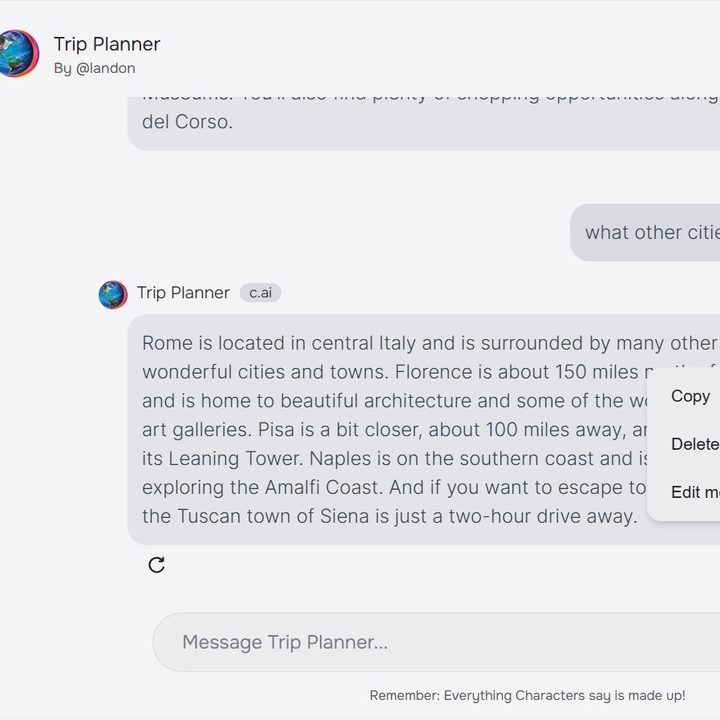
- With the saved chats now available, you can now delete the messages you no longer want stored. Keep in mind you will have to delete each message one by one. Each message has a Three-dot icon that will appear if you put your cursor up to the right side of your screen. Select the Icon to reveal a drop-down menu, which includes a Delete message option. Select the option, confirm the deletion pop-up, and watch the message disappear from your chat.
Things to keep in mind when deleting your chats
- If there is information you want to remember for later, be sure to save it on another medium outside of Character.AI.
- AI services like Character.AI use your previous interactions with the platform to personalize your experience. Deleting your chat history can change the AI algorithm and how the chatbot interacts with you in the future.
- Certain data might not be deleted from platform servers right away or companies might have data policies that allow them to keep certain data even after it is seemingly deleted. Be sure to be well-versed on a company’s stance on usage and backups. You can do so by reading the company’s terms and services.
- If your information is extremely sensitive, it is best to not share it on Character.AI.


