  1. Home
  2. Computing
  3. News

Slack’s desktop app finally has dark mode. Here’s how to enable it

Add as a preferred source on Google
slack dark mode screenshot
Screenshot

Slack desktop app users can finally use the workplace chat app with the popular visual theme, dark mode. The collaboration software company announced the desktop availability of an optional dark mode feature on Thursday, September 12, via a tweet and a blog post.

According to Slack’s blog post on the matter, dark mode can be enabled on all versions of the desktop app: Mac, Windows, and Linux. The desktop availability of dark mode is in addition to the mobile platforms that already had the feature. But while the feature is now available on all platforms, Slack’s post did mention one caveat:

Recommended Videos

“…it’s worth pointing out that dark mode is device-specific: We don’t want to assume that just because you want dark mode on desktop, you’ll also want it on your phone … but you’re now free to set it on both.”

And so you’ll need to set each version of Slack you use (browser, desktop, mobile) to use dark mode individually. Just because you enable dark mode on one of them, doesn’t mean they’ll all sync up accordingly. In addition, at this time, the desktop app dark mode feature also won’t sync up with whichever mode you’re currently using on your computer. So just because your operating system dark mode settings are configured one way, that doesn’t mean the Slack app will sync with those settings. But the company did say that the ability to sync with one’s operating system will be an available feature of the app “in the near future.”

Enabling dark mode on the Slack desktop is simple. And looking at Slack’s guidelines, the method for doing so appears to be the same across desktop platforms, since the company’s directions only differentiate between “desktop” and “iOS” and “Android.”

Here’s how to enable dark mode in the Slack desktop app.

Step 1: In the top left corner, select your workspace’s name.

Step 2: From the menu that pops up, select Preferences.

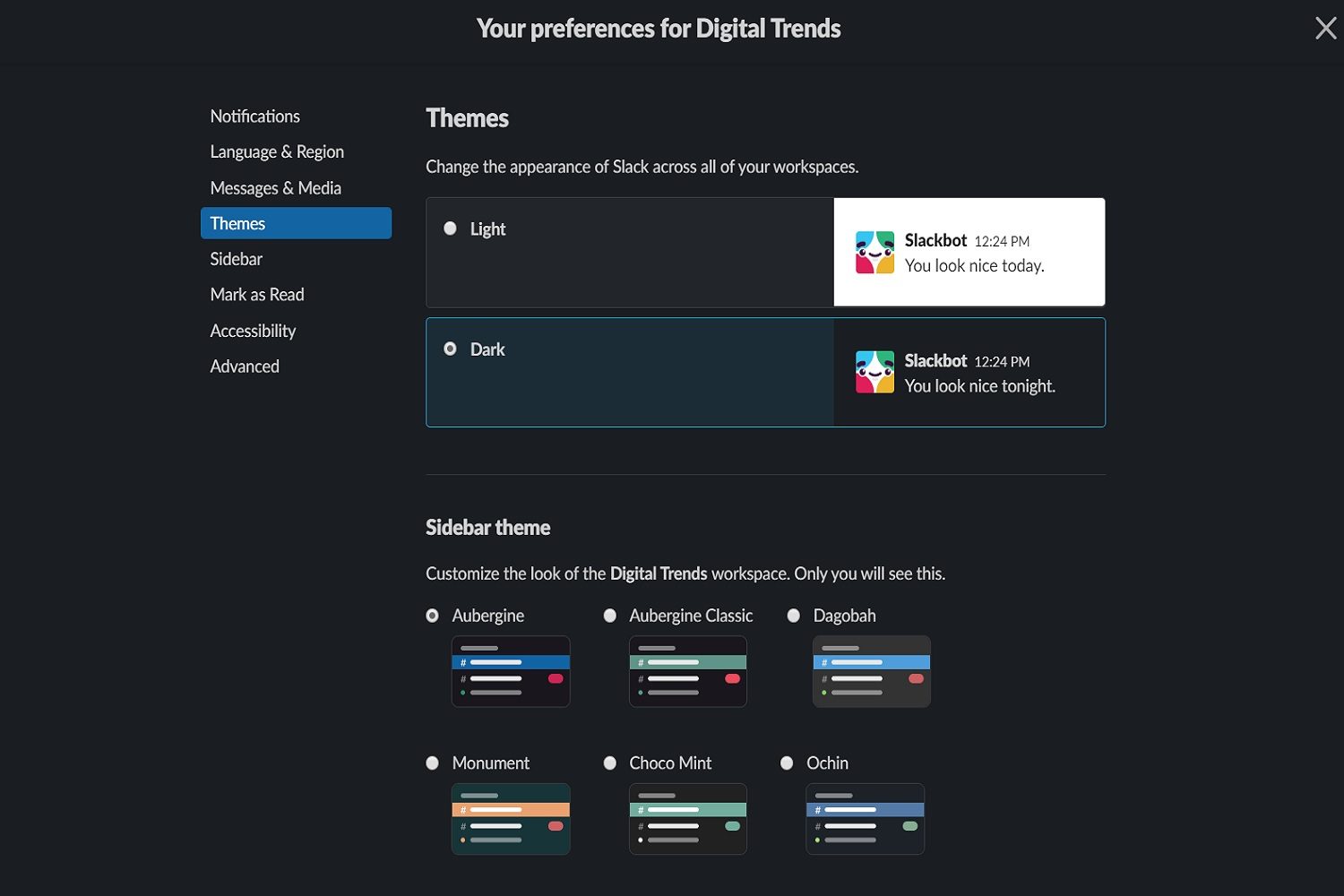
Step 3: On the next screen, select Themes from the left side of the screen.

Step 4: Under Themes, select Dark.

Once you pick either Light or Dark, the app itself will switch immediately to that theme to show you a preview of it. It’s also worth noting that, in that same Themes menu, you can also choose a companion theme for your sidebar. These sidebar themes come with different color palettes.

Anita George
Anita George has been writing for Digital Trends' Computing section since 2018. So for almost six years, Anita has written…
Claude Fable 5 is leaving subscriptions, but maybe not for good
High demand is pushing Claude Fable 5 out of subscriptions for now
Claude Fable 5 and Claude Mythos 5 Official Render

Anthropic’s most advanced publicly available Claude model is still leaving standard subscription access after July 7, but the company is now trying to calm fears that the move is permanent.

Fable 5 recently returned to Claude after drawing scrutiny from the U.S. government. Anthropic said it would be included on Pro, Max, Team, and select Enterprise plans for up to 50% of weekly usage limits through July 7. After that date, the model is set to move to usage-credit billing, meaning users will pay for access outside their regular plan limits.

Read more
Yet another research breaks the hype bubble for AI browsers serving serious security flaws
Four popular AI browsers can be exploited to steal your data from other open tabs.
ChatGPT Atlas browser on a MacBook.

AI browsers are being sold as the next big thing. They can summarize pages, book trips, and even make purchases for you. But a new study from the University of Washington found that four of the seven most popular ones come with a security risk serious enough to let malicious websites steal data from other sites you have open. The more capable the browser, the bigger the risk turns out to be.

The 30-year security rule that AI browsers are breaking

Read more
Valve just gave away the blueprint for its coolest Steam Machine mod
Valve giving away the recipe instead of the dish, and honestly, we're okay with it.
Valve Steam Machine Featured Design Coverplate

While Valve’s Steam Machine launched at a higher-than-expected price due to the AI-driven chip shortage, it seems that the company is not sitting on its haunches and is still working hard to make the product more enticing to users. 

One of the coolest features of the Steam Machine is the user-customizable front faceplate, and Valve has just made it better. The company open-sourced its "Inkterface" project, which allows users to build their own e-ink faceplate for the Steam Machine.

Read more