
Applying AI in your spreadsheet workflows can save you a lot of time, and with Gemini AI integrated into Google Sheets, you can take your data management to the next level. In this guide, we’ll walk you through everything you need to seamlessly integrate Gemini AI into Google Sheets.
Discover how Gemini can enhance your ability to analyze data, automate repetitive tasks, and optimize your entire spreadsheet experience, making your work more efficient and insightful than ever.
How to integrate Gemini into Google Sheets
Just as with adding Gemini functionality to Docs, Sheets, and the rest of the Workspace suite, you can’t do it with the free tier. You’ll have to subscribe to the $20-per-month Google One AI Premium Plan to gain access, or you can use a work or school account if it has the Gemini for Google Workspace add-on.
Simply select the Try Gemini Advanced! radio button in the top-right corner of the Gemini home screen, then follow the prompts to get signed up.
Getting started with Gemini

Once you’ve subscribed to the One AI Premium Plan, launch Sheets in a new tab and open a new, blank spreadsheet. In the upper-right corner of the screen, next to the Share radio button, you’ll want to select the Gemini AI button to expand the Help me side bar.
Here, you’ll be able to either prompt the AI to generate a new table to your specifications or select from dozens of predesigned tables in nine business categories, from event planning and customer service to recruitment, marketing and inventory management.
However, Google does note that the “‘Help me organize’ prompt currently can’t be used to edit or refer to existing content in your spreadsheet.”
What Gemini can do in Sheets
Gemini can perform a number of tasks in Sheets, ranging from data analysis and organization to creative applications. It can act as a digital tutor, walking you through Sheets more advanced capabilities, like applying conditional formatting or generating graphs from your data.
Notably, Gemini is not currently capable of actually making the graphs and charts on your behalf, though it can generate formulas, scripts, macros and detailed reports based on your natural language request. The AI can also summarize data for you, both from the immediate spreadsheet and from files on your local or Google Drive, as well as identify trends and patterns in your data that might otherwise go unnoticed.
You can also feed it unstructured data and Gemini will automatically clean it up, identifying and correcting errors and inconsistencies, then organize it into tables and databases based on the type of data. Gemini can then generate ideas for data analysis techniques and potential visualizations, as well as the descriptive text for charts and graphs.
What you can do with Gemini in Sheets
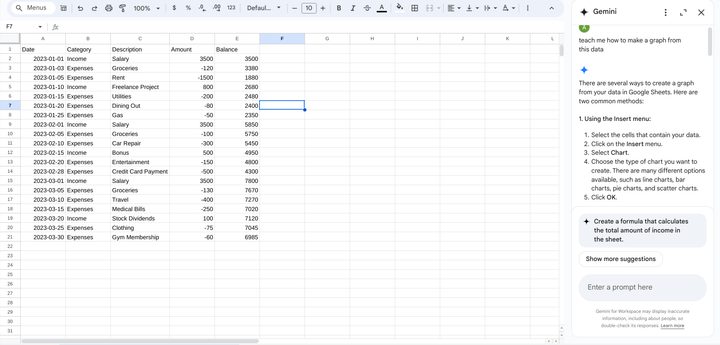
Gemini in Sheets eliminates a lot of the drudgery associated with spreadsheets and drastically lowers the barriers to entry when applying more advanced functions to your database.
For example, I had Gemini first generate a Sheets spreadsheet of financial data for a fictional personal budget, then asked the AI to analyze various aspects of my fake financials. For questions like “what was the average cost of my expenses in February” or “what was my single largest expense in March,” the AI would respond with both the correct answer and display the formula it used to come to its conclusion.
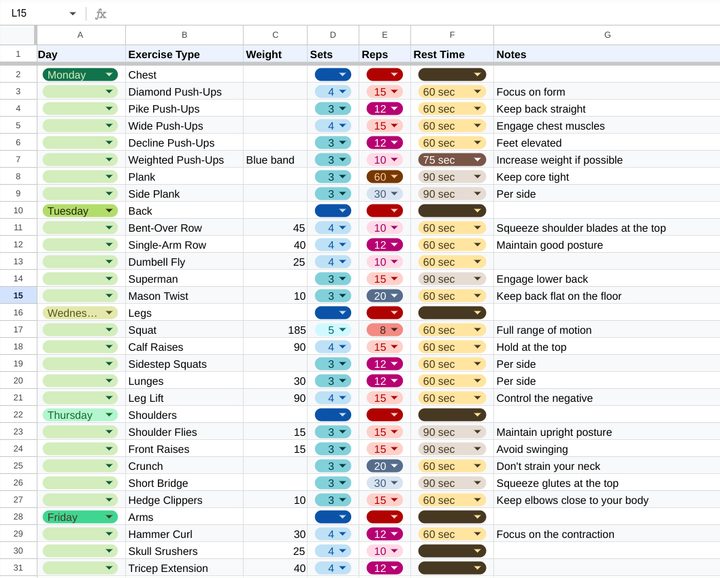
It’s also handy in non-business applications. I gave Gemini in Sheets a list of calisthenics exercises and it gave me a fleshed-out, color-coded workout-tracking sheet covering the exercise type, the day of the week to perform it, weight, sets and reps, and even rest time.
It wasn’t perfect, I had to reorder a couple rows to put some exercises on their proper training days (calf raises aren’t generally part of my shoulder routine), adjust some of the suggested weights to more reasonable levels, and generally ignore the “notes” it gave me, but overall, using the AI saved me from having to slog through the manual data entry and formatting that I would have had to do otherwise.
How will you use Gemini AI and Google Sheets?
Learning how to use a spreadsheet is typically a steep learning curve. With Gemini AI supporting the use of Google Sheets, once complex tasks can be smoothly automated, with little effort on your part. You might, for example, use it to find and highlight duplicates in Google Sheets (even if you prefer the manual method).
Other AI tools can be integrated with spreadsheets. So, you might use Microsoft Copilot AI with Excel, for example.


