Artificial intelligence is constantly evolving, with new features being released all the time from text to video generation from Google Gemini and AI companions having real voices you can hear and speak to from ChatGPT.
Microsoft Copilot has created an experimental platform called Copilot Labs which allows you to try out new features before they release to the public – for free. As these are in early access, they aren’t perfect, but are a great way to test out cool new features.
Below we’ve explained what exactly Copilot Labs is and how to use it, as well as outlined what the currently available experiments are on the platform.
What is Copilot Labs?
Copilot Labs is a platform from Microsoft, linked to its AI companion, which allows you to test out and provide feedback on experimental AI features before their wider release. The features which are available on Copilot Labs are still in early development phase meaning they can have bugs and issues, and this is what Microsoft is hoping to iron out.
There are new experiments featured on Copilot Labs every so often such as 3D model generation, AI-powered gaming experience and a feature that allows Copilot to react with facial expressions. Using these features are free so long as you have a Microsoft account – you don’t need to pay for a subscription, however those who are on paid tiers get even earlier access to Copilot Labs features.
How to use Copilot Labs
Whether you just want to browse the available Copilot Labs features or you want to make use of some of the experiments, you can do by navigating over to the Copilot Labs website.
The homepage will show you which experiments are available for you to use. Be sure to sign in on the top right of the page before getting started to ensure you get full access to the features.
Select which feature you’d like to try out, which will then open up an explanation about the experiment including how it works and how you can access the demo. You can then hit the Try now button at the top of the page which will take you through to the experiment.
As stated earlier, you may encounter issues or bugs as these features are in early access so be prepared for any issues. You can then provide feedback straight to Microsoft about the problems you faced so they can work on fixing them.
How to use Copilot 3D

The latest experiment added to Copilot Labs is Copilot 3D which allows you to turn 2D images into 3D models with one click, you can then use this 3D model however you like. This means even if you have no prior 3D modeling experience, you can make use of detailed 3D models based off of photos or even drawings.
Once you launch into the Copilot 3D, you can select Upload Image at the bottom of the screen. You can then upload your image in either a PNG or JPG format – for best results you want a clear single subject with a plain or simple background.
After uploading the image, Copilot 3D will then automatically generate a 3D model which you can then view and download as a GLB file. This can be added to games and websites or 3D printed. Your creations are save to Copilot 3D for 28 days – you can manually delete them at any time.
How to use Copilot Appearance

Copilot Appearance is currently limited to users in the US, UK and Canada. This gives you a new and more visual way to chat with Copilot as it provides you with real-time expressions, a voice and conversational memory making the chatbot feature of the AI companion more human-like.
In order to use Copilot Appearance, you need to navigate to the main Copilot Microsoft chatbot and then enter Voice Mode by clicking the microphone icon. Open the Voice settings menu by clicking the gear icon and then turn on the toggle for Copilot Appearance.
As you ask a question or chat with Copilot Appearance, you’ll see it speak back to you with facial expressions, nods and enthusiasm.
How to use Copilot Gaming Experiences
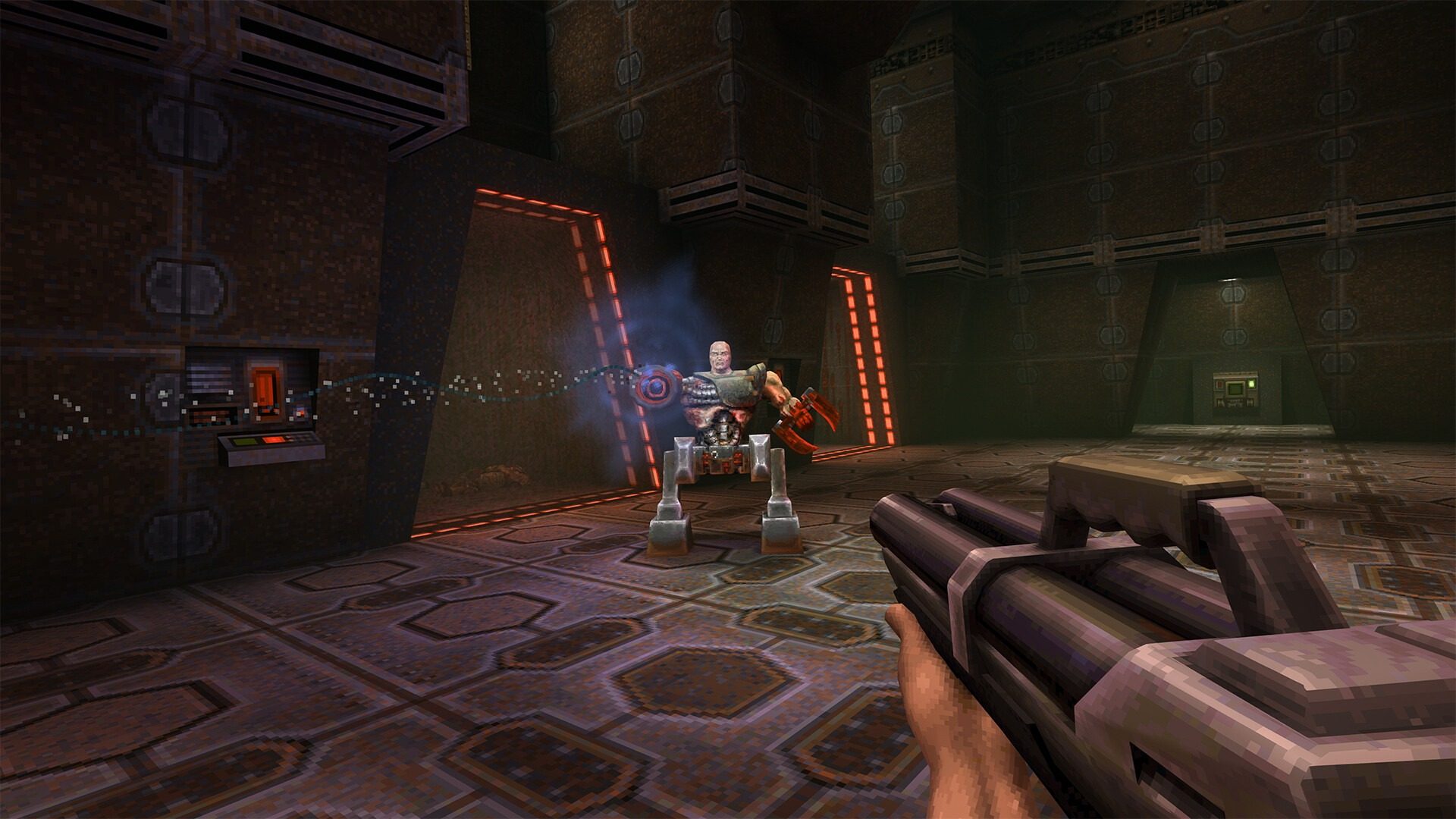
Copilot Gaming Experiences is a new AI-powered gameplay experience hosted within Copilot Labs. This demo showcases how generative AI can simulate interactive gameplay by generating gameplay scenes in real time.
One of the key experiences within Copilot Gaming Experiences is based off of the classic title Quake 2. As you proceed through the demo, every input generates a new moment in the game as if you were playing Quake 2 running on a traditional game engine but all done in real time.
Each demo session is time-limited – for me this ended up being less than a minute each time – and you need to be over 18 to play. In order to get started, head over to Copilot Labs, hit the Copilot Gaming Experiences option and then press Try now at the top of the page.
Once you’ve pressed this, it will open the demo in a new tab which will ask you to confirm your age and then being to load the game. Loading can take a long time but once booted up the game can be played in the browser window with controls on the left hand side of the screen.