

As of February 8, 2024, Google Bard has been retired for Google Gemini AI.
These days, Google is all-in on AI. Google Bard is an AI chatbot, and it’s very much meant to be a rival to the ever-popular ChatGPT.
And while it does replicate a lot of what ChatGPT does, Google has become highly invested in this space and has already made some significant updates to the tool that take it beyond what ChatGPT can do.
What is Google Bard?
Like ChatGPT, Google Bard is a conversational AI chatbot that can generate text of all kinds. You can ask it any question, as long as it doesn’t violate its content policies, Bard will provide an answer. Although Bard hasn’t officially replaced Google Assistant, it’s a far more powerful AI assistant.
That’s because it’s based on Google’s own LLM (Large Language Model), known as LaMDA (Language Model for Dialogue Applications). Like OpenAI’s GPT-3.5, the model behind ChatGPT, the engineers at Google have trained LaMDA on hundreds of billions of parameters, letting the AI “learn” natural language on its own. The result is a chatbot that can answer any question in surprisingly natural and conversational language.
LaMDA was originally announced at Google I/O in 2021, but it remained a prototype and was never released to the public. Once ChatGPT was launched in late 2022, however, Google moved quickly to release a chatbot powered by LaMDA that could compete. Google Bard was first announced in February 2023.
Is Google Bard available?

After being announced, Google Bard remained open to a limited amount of users, based on a queue in a waitlist. But at Google I/O 2023, the company announced that Bard was now open to everyone, which includes 180 countries and territories around the world.
Bard is also now available in Japanese and Korean, with up to 40 languages to be supported soon, according to Google.
Bard is still labeled as an “experiment,” but it’s now widely available for anyone to start using.
How to use Google Bard

To use Google Bard, just go to bard.google.com. Like all of Google’s products, it’ll require you to log in with your Google account. You’ll also need to agree to the terms of service, but once you click through, you’ll rather quickly be able to start using Google Bard. Like ChatGPT, Bard is mostly just an empty text field, which says “Enter a prompt here.” Type in your prompt or question, and Bard will provide an answer.
Helpfully, Google gives a few random ideas to get you started with, which are different each time you open up Bard. The first example I was given was the following: “What’s a fast, balanced, vegetarian meal for me to make? It should be high in protein and fiber.” Bard then provided a bullet list of five different meals, including a tofu scramble, lentil soup, and vegetarian stir-fry. From there, I can take the conversation in any direction I want, whether that’s to ask for five more meals, or for five different recipes for one of the meals.
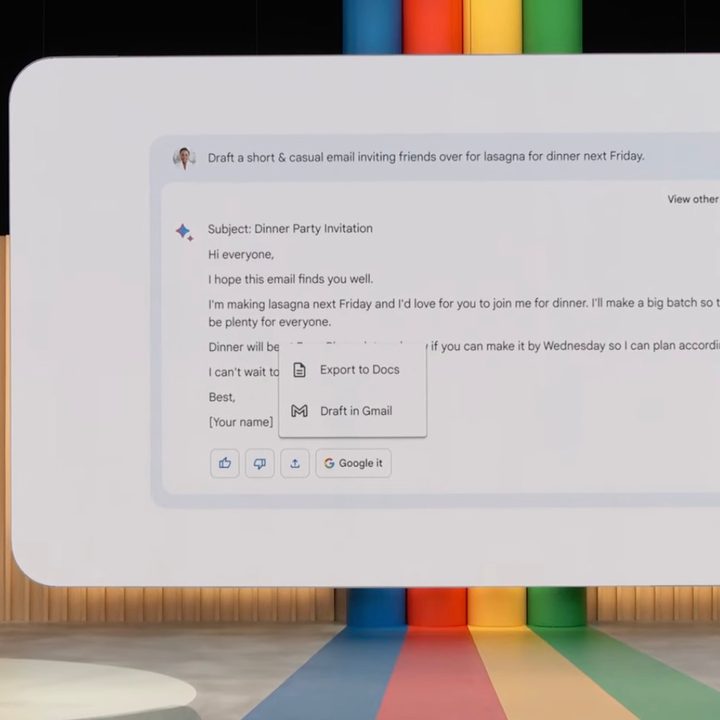
Beyond the basics, Google Bard has a few important features that set it apart from other chatbots. First, you’ll see that with every response, Bard also gives you two other “drafts” of the same answer. Just click View other drafts to access the other answers. In this case, one of the drafts provided a detailed recipe of one particular meal and the other was a slightly modified version of the first draft. You can even click Regenerate drafts to have Bard attempt another answer. However, I’ve noticed that regenerating the drafts often produces very similar results. You’re better off editing the prompt by clicking the pencil icon or using a new prompt to try to get a better answer from Bard.
All of your chats with Bard are in a single scroll window, which is deleted if you close the window. You can see (and delete) all the prompts in “Bard activity” in the sidebar, but the actual answers from Bard aren’t accessible. Fortunately, Google allows you to export responses directly to Gmail or Google Docs. If you’re using Bard to code, you can export to Replit instead. Just click the share icon under an answer from Bard, and click where you want it export to.
Lastly, there’s a Dark Mode you can use by clicking on the toggle in the bottle left of the sidebar.
What is Google Bard used for?
Google Bard has all kinds of different use cases. The sky’s the limit with AI chatbots, especially more powerful ones like Bard. It’s a great brainstorming tool, outliner, and collaborator. People have undoubtedly used it to write essays, articles, and emails, as well as for creative tasks like writing stories and poems.
And as of fairly recently, you can use Bard to write and debug code.
As Google warns, though, it’s not recommended to use Bard’s text output as a final product. It’d be wise to only use Bard’s text generation as a starting place.
Google Bard limitations and controversies
Unlike ChatGPT, Google Bard has access to all of the internet. That means it can reference current events and modern context. That doesn’t, however, mean that all its information is 100% correct. As Google admits, Bard is prone to hallucinations.
For example, I asked Bard who the editors of Digital Trends were, which it did not have correct, despite all that information being displayed directly on our About page.
When it was shown off for the first time on February 6, 2023, Google Bard made a mistake in answering a question about the James Webb Space Telescope’s recent discoveries. It claimed that it had been the first to take a picture of an exoplanet outside of our solar system, but in fact, that happened many years earlier.
That Google Bard displayed this erroneous information with such confidence caused heavy criticism of the tool, drawing comparisons with some of ChatGPT’s weaknesses. Google’s stock price fell several points in response.
The biggest limitation of Bard, though, is it inability to save chats. You can export them, but once you close the window, they’re gone.
Is Google Bard better than ChatGPT?
Both Google Bard and ChatGPT use natural language models and machine learning to create their chatbots, but each has a different set of features. At the time of writing, ChatGPT is entirely based on data that was mostly collected up until 2021, whereas Google Bard has the potential to use up-to-date information for its responses and can freely search the internet when asked. Because it’s plugged directly into the internet, you can also click the “Google it” button to get related searches. That’s one major advantage Bard has over ChatGPT.
ChatGPT, on the other hand, has a major focus on conversational questions and answers. It’s especially good at creative tasks too. By Google’s own admission, ChatGPT has greater potential to answer more questions in natural language at the moment.
A recent report even indicated that Bard was trained using ChatGPT data without permission. Google has denied this accusation, though CEO Sundar Pichai has stated that Bard will soon get updated to be more competitive with ChatGPT, calling it a “souped-up Civic compared to ChatGPT.” This was before the announcements from Google I/O, so we’ll have to see how the updates compare in actual use.
Most importantly, ChatGPT has the ability to save all your chats, neatly organized into “conversations” in the sidebar. As of now, Bard can export your chats, but not save them. I like the drafts function of Bard, but in terms of long-term usability, ChatGPT remains the better option.
Google Bard text-to-image creation

Google has announced that it will soon have text-to-image creation built right into Bard, not unlike Bing Chat. Microsoft’s Bing Image Creator is powered by Dall-E, while Bard’s text-to-image generation will come from partnership with Adobe.
Firefly, as it’s called, is Adobe’s text-to-image generative tool that’s being introduced in a variety of Adobe’s creative applications, starting with Adobe Express. Firefly is trained on the company’s own stock image library to get around the ethical and legal problem of image accreditation.
Text-to-image generation was announced at Google I/O 2023 and was said to be coming in the following weeks. At the time of writing, text-to-image generation doesn’t appear to be available yet. When Bard is prompted to “create an image of a bird in a forest,” the chatbot responds with “That’s not something I’m able to do yet.”
Beyond generating new images, Bard does currently support images in responses, including photos from Google Search and the Knowledge Graph.
With so many AI options around, which is the best AI chatbot?


