  1. Home
  2. Computing
  3. Features

I finally switched to Microsoft Edge for this one feature

Add as a preferred source on Google

Microsoft Edge has gotten increasingly better over the years, but I’ve stuck with Google Chrome — perhaps by habit, if nothing else. After all, a web browser is the kind of application I don’t want to think about. That’s why the flashier features of recent updates to Chrome, Edge, or even Arc haven’t swayed me. I don’t use Copilot, Collections, or even tab groups. That left me defaulted to Chrome.

I’m now using Microsoft Edge, though — and it’s not because of the most common complaints about Chrome, such as its well-documented memory usage. No, no. My reason for deciding to leave Chrome for Edge is based on a feature that was actually launched way back in 2022. For the longest time, I ignored the Edge sidebar — after all, the less clutter in my web browser, the better.

Recommended Videos

You should try Microsoft Edge with Teams

But then I tried it. In particular, I pulled it up with Microsoft Teams. We’ve been using Teams as an organization for many years at this point after switching from Slack, and the benefit of which has always been its integration into the broader Microsoft 365 ecosystem. We use SharePoint, and despite my continued inclination to use Google Docs and Sheets, having all your collaboration tools in one place is certainly handy.
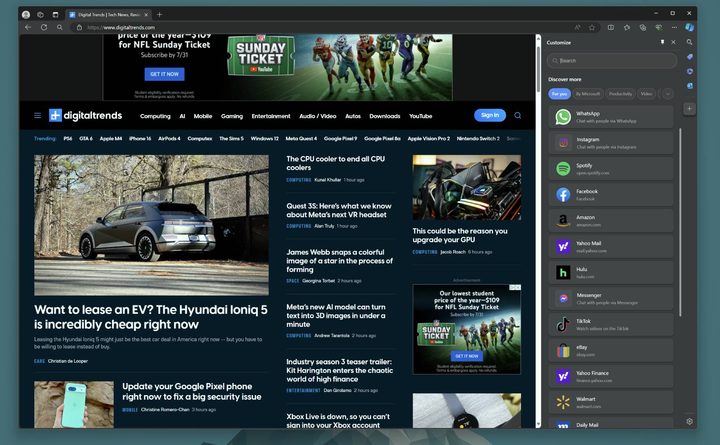
The Teams sidebar open in Microsoft Edge.
Digital Trends

Never have I felt that more, however, than when using Teams built right into Edge. I’m in Teams and my browser all day — the two are pretty inescapable. I’m constantly copying and pasting between the two, referencing things, and opening links — just like a lot of people who work in front of a computer do, I would assume.

But something about having Teams built right into the sidebar has really clicked with me. For some people, Outlook is going to be more useful. But for me it’s Teams. Not having to constantly click away or even deal with a second window has really been convenient for me. I just don’t need the full Teams window in 90% of cases. Having just my list of chats at a glance at all times is fantastic. You don’t need necessarily need to be in the Microsoft ecosystem to take advantage either, since plenty of third-party apps are supported.
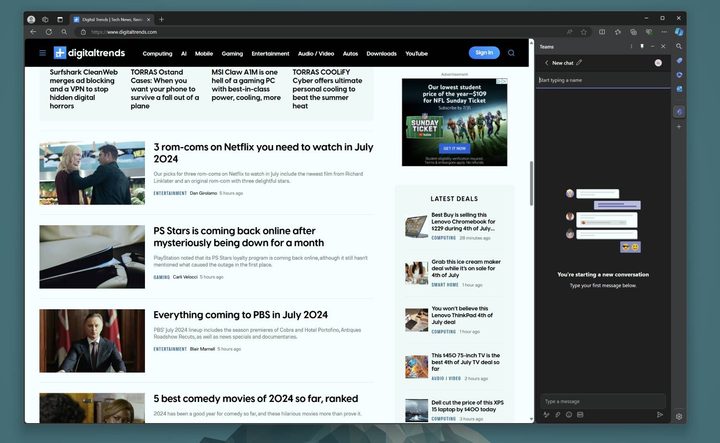
The Teams sidebar in the Edge browser.
Digital Trends

Now, there’s a major asterisk here. I’ve appreciated the Teams Sidebar in Edge most when working on a large monitor, which I do here in the office. When I work on a smaller laptop, the sidebar can get in the way. I often prefer to have a full-screen view of what I’m working on in my browser, and in that case, it’s less ideal.

Obviously, this is a feature that’s useful only in my scenario. I’m not at all saying it’s a good reason for everyone to ditch Chrome. Microsoft Edge and Google Chrome remain well matched. But if your work requires you to stay on Teams throughout your day, I’d at least give it a shot.

Luke Larsen
Former Senior Editor, Computing
Luke Larsen is the Senior Editor of Computing, managing all content covering laptops, monitors, PC hardware, Macs, and more.
Asus reveals world’s first OLED esports monitor and a Color ePaper secondary display
Computer, Electronics, Pc

Gaming monitors have spent years chasing one goal: higher refresh rates. Asus just pushed that race into new territory with what it calls the world's first OLED monitor built specifically for esports players.

Unveiled under the ROG banner, the new Strix OLED XG259QWPG Ace combines a compact 24.5-inch panel with a staggering 540Hz refresh rate, bringing OLED's rich visuals to a category that has traditionally favored speed over image quality. But that's not the only unusual display Asus announced. The company also introduced a color ePaper monitor designed for productivity, reading, and low-fatigue viewing. It's an odd pairing on paper, but both products show how display technology is moving beyond traditional LCD screens.

Read more
Asus ROG drops Edition 20 gaming gear and your eyes need to feast on these beauties
Computer Hardware, Electronics, Hardware

Gaming PCs have become increasingly powerful over the years, but genuinely memorable designs are harder to come by. To celebrate its 20th anniversary, Asus' Republic of Gamers (ROG) is trying to change that with the new Edition 20 lineup — and at least on looks alone, it has succeeded.

Leading the charge is the ROG G1000 Edition 20, a limited-edition prebuilt desktop that swaps the usual black-and-RGB gaming aesthetic for a striking gold-accented design. It feels less like a collector's item built for enthusiasts who want their PC to be the centerpiece of the room. Every unit ships with its own serial number, reinforcing the idea that this is a celebration piece rather than just another high-end gaming desktop.

Read more
OneDrive is getting an AI feature that names your files so you don’t have to
Microsoft's Copilot Suggested Rename reads what's inside your OneDrive files and suggests better names for them automatically.
Microslop Microsoft AI Copilot logo

Renaming files is one of those tasks that sounds trivial until you are staring at a folder full of documents or files called Document1, Scan_04182026, and FinalFINALv3. Microsoft is doing something about it.

A new feature, called Copilot Suggested Rename, is on the Microsoft 365 roadmap. It is scheduled to roll out starting June 2026. The AI-powered OneDrive feature reads the content of your file and automatically recommends clear, descriptive file names, saving you time. 

Read more