
Coming back from a recent trip, I found myself sorting through a pile of photos that needed a little cleanup. Nothing dramatic. A distracting object here, an awkward background detail there. My first thought was Photoshop, but the full version requires a subscription, and I’m neither skilled enough to justify paying for it nor in need of everything it offers.
Mobile editing apps weren’t much more appealing. I have fat fingers, and there’s a special kind of frustration that comes from trying to make a precise adjustment on a phone screen only to tap the wrong thing three times in a row.
So I figured I’d try the obvious alternative. AI image tools have been improving at a remarkable pace, and every company in tech seems convinced that the prompt box is the future. Why not see if I could simply describe the edits I wanted and let the machine handle the rest?
And, to be fair, it worked. Sometimes. Other times it felt like I was trapped in a polite argument with software that kept misunderstanding perfectly reasonable instructions. The experience was enough to make me realize that image editing is changing rapidly, but not necessarily becoming simpler.
Why every editor wants to become a chat box
That exchange is quickly becoming the new shape of image editing. Adobe is building Firefly deeper into Photoshop and experimenting with conversational creative assistants. Canva has turned design tasks into a buffet of “Magic” buttons. Google’s Gemini image tools, ChatGPT image generation, Midjourney, Ideogram, Runway, and every other ambitious visual AI platform are circling the same idea: editing should feel less like operating software and more like asking for help.
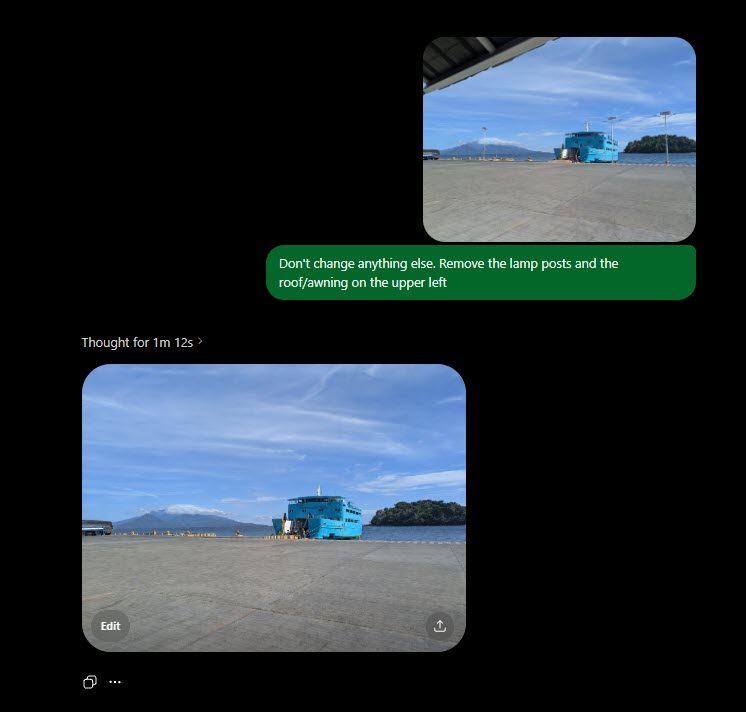
The reason isn’t mysterious. Most people never wanted to become Photoshop monks. They didn’t want to memorize selection tools, blend modes, adjustment layers, healing brushes, and the sacred difference between “Save” and “Export as.” They wanted to erase a person from the background, fix a crooked photo, extend a scene, make a product shot less ugly, or generate something good enough for a presentation without opening a tutorial that begins with “first, understand non-destructive workflows.”
The prompt box is seductive because it skips the ceremony. It doesn’t ask whether you know what a layer mask is. It asks for a result.
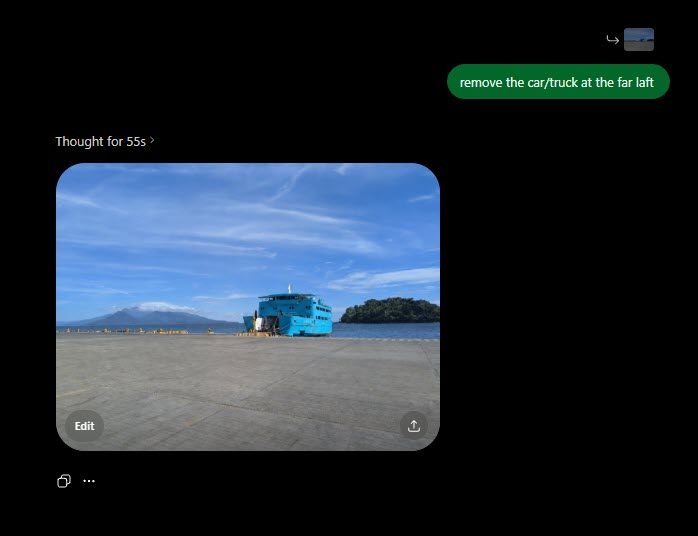
The appeal is obvious, and sometimes it really does feel like liberation. A casual user can now do in 20 seconds what once required patience, software knowledge, or a friend who owned Photoshop and owed them a favor. The old barrier was technical. The new barrier is fuzzier: you still need to know what looks right, what looks fake, and where the machine has quietly decided to improvise.
When editing becomes negotiation
The problem is that asking for help isn’t the same as getting help. Anyone who’s used AI image tools for more than five minutes knows the little emotional dip that happens when the result is almost right, which somehow makes it more annoying. The person is gone, but the background now has the texture of melted wallpaper. The lighting is better, but the whole photo looks like it was shot for a luxury dentist. The object moved where you wanted it, but the AI quietly redesigned the table, changed the shadows, and added a mysterious extra finger because apparently hands are optional.
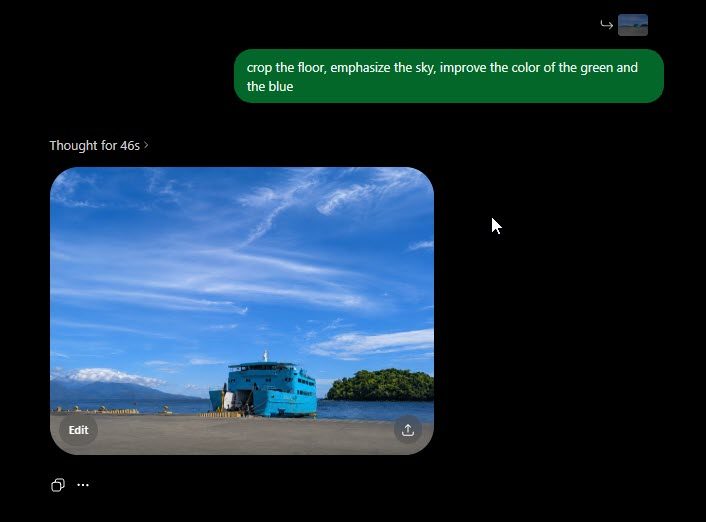
This is where editing becomes negotiation. You’re not only editing the image anymore. You’re editing the request. Make it warmer, but don’t make it fake. Remove that object, but keep the background natural. Make the sky moodier, but don’t turn it into a fantasy poster. Keep the face the same, which shouldn’t need saying, but very much does.
Old editing tools were annoying because they made you learn their rules. Prompt-based editing is annoying because it pretends language is enough, which is generous nonsense. Language is mushy, visual judgment is slippery, and AI models have a bad habit of being confident in the way a mediocre intern is confident: fast, eager, and occasionally convinced that the brief included a second moon.
“Zoom and enhance!”
The marketing version promises instant designers. The reality is smaller and less flattering: more people can now make design-shaped things without understanding the machinery underneath. That’s still a meaningful shift. It just deserves more suspicion than any product demo where every prompt works on the first try.
The first result is often the best sales pitch. It can look shockingly good at a glance, especially when the edit is simple. Then you ask for corrections. Fix the lighting. Restore that detail. Make the face less waxy. After a few rounds, the image can start drifting away from itself. Details soften, people turn into blobs, and the clean little edit becomes less impressive the harder you try to fix it.

For professionals, that can be useful without being relaxing. The boring work gets faster, but the supervision gets heavier. Someone still has to catch the flattened image, broken composition, softened detail, and impressive-for-three-seconds output before anyone else sees it. Some of the job moves from doing to directing, which sounds cleaner until the intern keeps giving everyone porcelain skin and suspiciously perfect lighting.
For casual users, the interface gets friendlier and the power gets closer. The frustration just gets harder to name. When a traditional editor annoyed you, at least the villain had buttons. When an AI editor gets a reasonable request wrong, the problem starts to feel like a conversation going badly.
Photoshop will survive. Powerful tools usually do. But its old logic is being absorbed into a simpler, stranger interface. The future of editing may not be learning where the tools are. It may be learning how to talk to a machine that keeps pretending it understood you.


