With so many AI tools available, it’s hard to actually find one that can act instead of just chat. AI companions like Copilot or Gemini use chatbot functionality which allows you to speak with them, but they can’t actually complete tasks for you.
Even with the pro version of Gemini, which I recently subscribed to and became obsessed with, Gemini can draft an email for you but can’t actually hit the send button. Gemini’s chatbot can provide you with opening hours and a link to your favorite restaurant’s website, but it can’t book the table for you.
This is where Opera comes in with its brand new AI browser called Neon. The claim here from Opera is that Neon can act. It can shop, book, compare, and even apply for jobs. Instead of just asking it to draught a message for you, it can supposedly actually send that message.
I decided to give Neon a go and see if it actually lived up to these very high expectations that Opera set. Before actually getting into it, it’s worth noting that Opera Neon costs $19.90 per month. In turn you don’t get any ads, and you get unlimited access to the Neon AI software, which can both act as a chatbot or complete tasks for you.
When first opening Neon, I wasn’t really sure about the interface. While it does look like any other web browser, it took me a second to actually find where I can access the ‘Neon Do’ menu.
And then this is where it all started going downhill. I asked Neon to send a message in WhatsApp. The process started out pretty well, it opened the WhatsApp web app which I was already signed into, and then found the appropriate contact which I asked it to send the message to.
After this, it got stuck in a loop. It couldn’t find the text box where it needed to type the message and it also consequently couldn’t find the send button. So it got stuck in a loop between starting a voice note and opening the emojis panel. I cancelled the operation and then put in the prompt again twice. All three times, the same thing happened.
Maybe WhatsApp just isn’t Neon’s forte, so I decided to give it a go with some other prompts. It was able to book tables for me at restaurants and open multiple tabs or web pages based on what I had asked it, for example, if I was looking for sources for a new story.
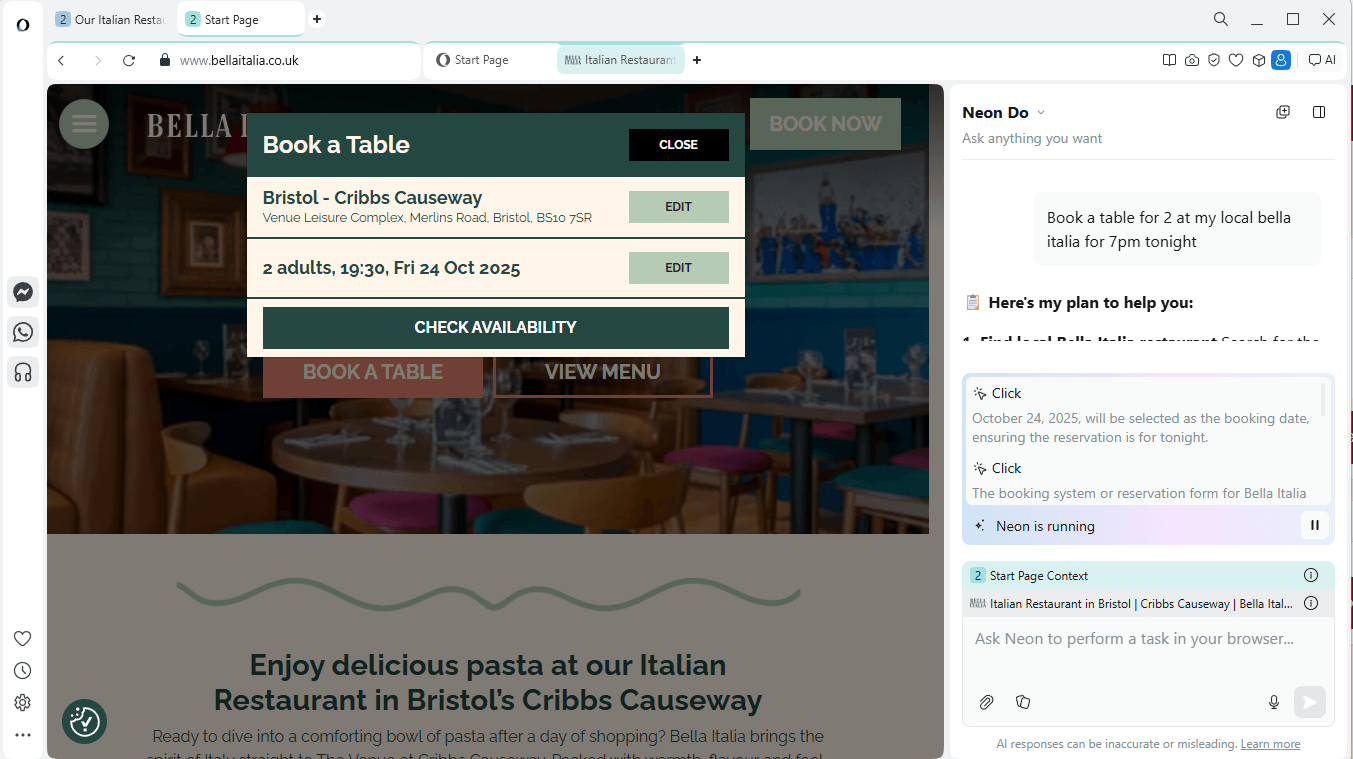
However, despite the fact it was able to do this, it doesn’t mean it necessarily should, considering it took an excessive amount of time to complete each task. I asked Neon to book me a table at my local Bella Italia for 7 p.m. this evening and for starters, it picked the wrong location (which was still in my city but not my closest restaurant) and also the wrong time. It then also asked for human input where I needed to fill out the form.
Even with the human input, it still took five minutes to make this booking where it would have taken me less than a minute to just do it myself. Each time Neon has to think about an action, like where to click or what to press, it takes an excessive amount of time to process this.
So, while it can do most of the tasks that it promises on the tin, I’m still annoyed that it can’t send a WhatsApp message, It can’t do them particularly well. Any task that it sets out to do, it will take so much longer than if you just go and do it yourself.
While this is seemingly a step in the right direction from Opera, it just feels like Neon needs a lot more fine-tuning before it can be ready to launch. There’s no use in having an AIO browser that can do all of these tasks for you if it takes five times the amount of time for it to do them.
Hopefully, over time, and as Neon learns and grows, it will be able to do these things much quicker. But, for now, it just seems like something I’ll probably be avoiding.
Of course, there are other things that you can use Opera Neon for, as it comes with a built-in AI chatbot. However, there are so many AI chatbots out there that you can already use for free. Why would you pay almost $20/month for this one?
It’s worth noting that Opera Neon is still in early access and not available to the public yet. Hopefully, it means that they’re fine-tuning and figuring out these problems. However, from the experience that I had using the browser, it didn’t seem particularly promising just yet.
If you’re looking to give Opera Neon a go, you can sign up to the early access period over on the Opera Neon website. However, you will have to pay the subscription fee despite the browser not being entirely ready to launch yet.