  1. Home
  2. Computing
  3. News

If you’re into AI coding, OpenAI just puts its Codex on Windows

Codex lands on Windows with a proper native app, giving developers a new AI coding sidekick.

Add as a preferred source on Google
OpenAI Codex app render showing codex chat window
OpenAI

There’s finally some good artificial intelligence news for Windows users, and no, it’s not Microsoft forcing Copilot onto them whether they want it or not. Instead, it’s something developers might actually be excited to install.

The good news is that OpenAI has officially launched the Codex app on Windows, and this isn’t just a port. It’s a proper, native Windows experience built from the ground up with developers in mind. 

The Codex app is now on Windows.

Get the full Codex app experience on Windows with a native agent sandbox and support for Windows developer environments in PowerShell.https://t.co/Vw0pezFctG pic.twitter.com/gclqeLnFjr

— OpenAI Developers (@OpenAIDevs) March 4, 2026

The Codex app lets you manage multiple projects from a central interface. On Windows, it runs natively using PowerShell inside a dedicated Windows sandbox. You’re not running something designed for macOS and awkwardly shoved into Windows, but a native Windows app. Until now, Windows developers had to watch from the sidelines, but that changes today.

What’s inside the Codex app

All the features that made Codex popular on other platforms are now available in the Windows app. Skills let you discover and extend Codex’s capabilities by connecting it to other apps, Automations allow Codex to work in the background without you having to babysit it, and Work Trees let you run multiple independent tasks within the same project simultaneously.
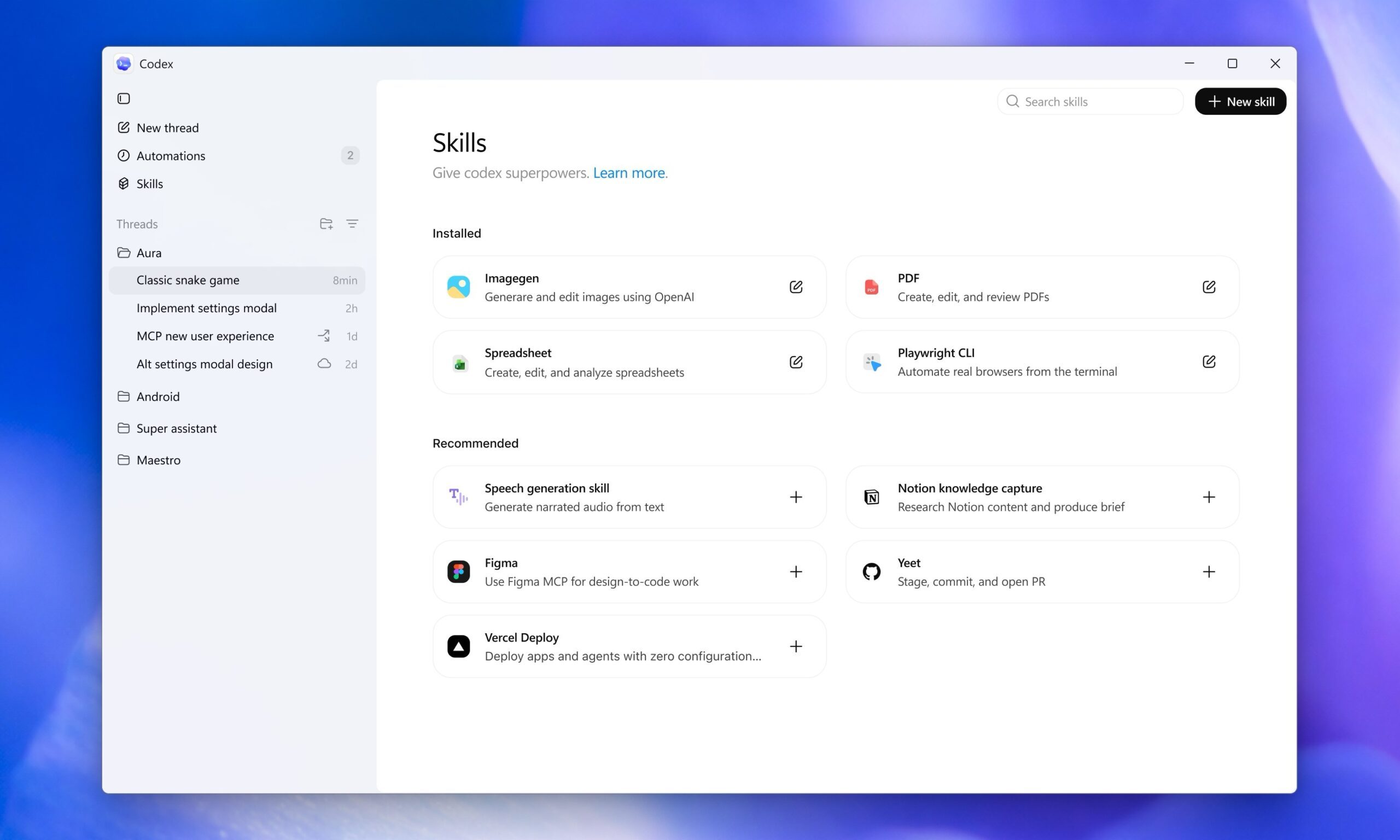
The Windows version also comes with platform-specific extras. There’s a dedicated WinUI skill in the skill gallery for Windows app developers. If you prefer working in Windows Subsystem for Linux, you can switch both the coding agent and the integrated terminal to run inside WSL.

How to get Codex app for Windows

If you’ve been waiting for ChatGPT’s AI coding companion on Windows, the wait is over. You can download Codex from the Microsoft Store or directly from OpenAI’s website. 

Recommended Videos

After downloading, sign in with your existing ChatGPT subscription or an API key, and you’re good to go and ready to start generating, debugging, and refining code directly on your Windows machine.

Rachit Agarwal
Rachit is a seasoned tech journalist with over seven years of experience covering the consumer technology landscape.
Google’s new desktop mode makes one thing clear: Samsung DeX was onto something
Android 16 finally brings a real desktop mode to Pixel phones, but Google’s long-awaited move mostly proves Samsung spent years getting the hard parts right
File, Webpage, Person

I’ve been waiting for Android to take desktop mode seriously for years. Back in 2019, I bought a OnePlus 7 Pro and wasted an embarrassing amount of time trying to brute-force its half-baked desktop mode into something useful.

The idea made perfect sense to me even then. Phones were already absurdly powerful, and the thought of carrying one real computer in my pocket felt less like science fiction and more like delayed common sense.

Read more
Anthropic launches Claude design to simplify visual creation with AI
Finally, AI that designs your slides so you don’t have to
Claude

Anthropic has introduced a new AI-powered design tool called Claude Design, aimed at helping users create visual content such as prototypes, presentations, and marketing assets through simple conversational inputs. The product, developed under Anthropic Labs, is currently available in research preview for paid Claude subscribers and is being rolled out gradually.

Claude Design is powered by the company’s latest vision model, Claude Opus 4.7, and is positioned as a tool that bridges the gap between technical design expertise and everyday creative needs.

Read more
AI triggered a RAMmageddon so bad that Apple looks like the sensible choice
Laptop prices got so stupid in 2026, that Apple turned into the value king.
Student using MacBook Neo in classroom.

I really didn't want to believe it, but here we are. Apple is now looking like the sensible laptop brand. Not the cool underdog. Not the affordable alternative. Apple, in 2026. The reason is not that the company suddenly became generous, but rather the rest of the competition has suddenly become so deranged that a MacBook lineup starting at $599 feels weirdly grounded.

Apple's MacBook Neo starts at $599, while Microsoft's own 13-inch Surface Laptop now starts at $1,199 after this month's price hikes. This isn't a small gap that you can ignore. Meanwhile, Apple's MacBook Air with M5 starts at $1,099 with 16GB of memory and 512GB of storage, which looks like one of the few premium laptops still priced by human beings.

Read more