
 As the old Bob Dylan song goes, “The iTunes, they are a changin’.” Okay, so maybe that’s not exactly what Dylan sang, but Apple has given iTunes 11 – the latest version – a major overhaul, implementing unfriendly changes to the user interface and eliminating many useful features. If you find yourself cursing the newest features of Apple’s media management program, there is still hope for you out there. There are a few iTunes alternatives that let you better-manage your media and regain functionality that was lost, such as finding duplicate songs, comparing playlists, and DJ functionality. Here are the best we found, tried and tested.
Tomahawk
Free
Linux, Mac, Windows

Keeping track of where your songs are located can be a massive hassle. Not only is there your iTunes collection, but don’t forget about Spotify, Last.fm, Grooveshark, and SoundCloud. Enter Tomahawk, an open source program that pools music from your personal collection, streaming services, and even your friends’ collections. Enter an artist, song, or album and Tomahawk will chop through the clutter to find the version of the song that includes the greatest amount of matching metadata, such as artist, album, and track number. Plus, it displays “footnotes” about each artist including top songs, related artists, and the artist’s wikipedia page.
Beyond your local music collection, Tomahawk has a collection of “resolvers” (Tomahawk calls it a “plug-in for any searchable/streamable source of music”) that works with music services including Official.fm, Subsonic, Ex.fm, and the ones mentioned above. Simply check the box next to the services you want to add within the software, enter account information (if necessary), and you’re all set. Some services, such as Spotify and Grooveshark, require premium accounts to work with Tomahawk.
Tomahawk eliminates the need to hop between various applications and browser windows to find a song, plus you can create playlists for songs from multiple sources and even create Pandora-like stations based on a song, mood, artist, loudness, “danceability,” and several other parameters. Tomahawk displays charts from Billboard, Hype Machine, Last.fm, and Spotify, and new releases from on iTunes and Rovi.
doubleTwist
Free
Mac, Windows
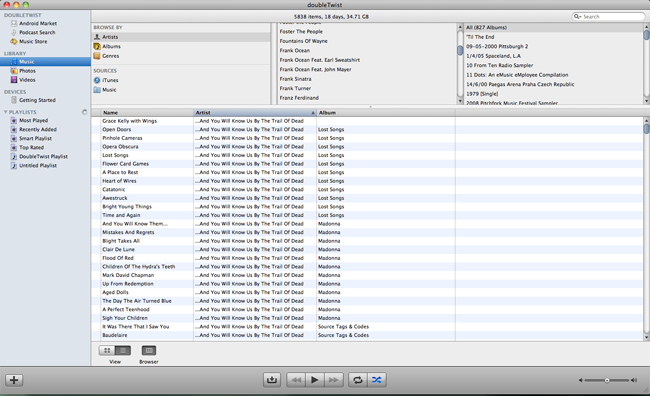
Chances are that if you’re a music fan with an Android smartphone, you’re already using doubleTwist on your device to sync your music. However, did you know that the desktop version of the software provides much of the same functionality of iTunes, but loads a bit faster? Plus, in addition to organizing your music and videos, it keeps track of your photos, too.
Looking for new music? DoubleTwist has Amazon’s MP3 music store built right into its interface for easy purchasing. Like iTunes, the program lets you make customized playlists and smart playlists for your music collection. One of our favorite smart playlists only puts songs on our phone that have been added to our library during the last 30 days. It’s an easy filter to set and ensures that you always have the newest albums in your collection easily accessible.
Lastly, Android users can sync their music, photos, and videos wirelessly via the add-on AirSync app, available for $4.99 in the Google Play store.
JRiver Media Center
30-day trial, $50
Windows

If your main gripe with iTunes is that you need an AirPlay-enabled device or an Apple TV to play your media on your TV or another computer in your house, JRiver Media Center might appease you. This robust program organizes your music, videos, and photos in one central location, but it’s capable of streaming your collection to other devices on your home Wi-Fi network.
Media Center automatically imports your content when you first open the program, unless you instruct it otherwise. When we say it “imports your media,” it means the software leaves almost no media file untouched; if it’s on your computer, Media Center will find it. It won’t play DRM-protected content, but it does make it easy to rip all of your DVDs and CDs for cataloguing. It’ll also scrape as much metadata as possible, so that CDs you import will always have matching artwork – something that isn’t always the case with CDs ripped into iTunes.
That’s not all Media Center does. If you have a TV tuner installed on your computer or a video capture adaptor hooked up to a cable or satellite box, Media Center can record shows on TV in the same way a DVR would; if you delve into that, you’ll want to make sure there’s a plenty of space on your hard drive. It also works with streaming services such as SHOUTcast, SomaFM, PublicRadioFan.com, and Last.fm.
The real benefit of Media Center is how well it handles video streaming to a DLNA-enabled devices such as TVs and Blu-ray players, as well as Android and iOS devices. It also allows you to use your smartphone as a remote, and you can even access your home library from anywhere via the Internet through a password-protected website.
Like iTunes, it’s also able to create playlists and smart playlists, and group playlists together.
All of Media Center’s functionality doesn’t come cheap: One license of the program will set you back $50, but you can use all the features during a 30-day trial to determine if it’s the right media solution for you.
MediaMonkey
Free
Windows

If you don’t need all the bells and whistles of JRiver’s Media Center, but still want to keep your content nice and tidy, MediaMonkey is the way to go. This Windows program comes in free and paid ($25) versions, but the freeware does enough for most users. Like the other iTunes alternatives MediaMonkey automatically imports music and videos from your existing hard drive. However, we noticed that it missed some of the files that Media Center, doubleTwist, and iTunes added to our library.
MediaMonkey isn’t as slick looking as Tomahawk or Media Center, but it does allow for customizable playlists. It includes access to SHOUTcast and Icecast Internet radio and can also play media across your local network.
If you’re a fan of podcasts, MediaMonkey provides a more robust experience than other iTunes alternatives. There’s a podcast directory and options to automatically sort podcasts by genre and year.
MediaMonkey will sync with not only Android smartphones, but also iPhones and iPod Touches, which may be key for Windows users looking to ditch iTunes completely while maintaining their iPhone.
(Heart image via Kanate/Shutterstock)


