

After months of Copilot showing up everywhere in Windows 11 like an overenthusiastic guest who refuses to leave, Microsoft is finally dialing things back. The company has started scaling back Copilot integration in core apps like Notepad and Snipping Tool, replacing flashy AI branding with writing tools and, in some cases, removing AI buttons from the interface entirely. So, it’s quite clear that Windows is getting a cleanup, and Copilot is the first thing on the chopping block.
Windows 11 Trims Copilot from Notepad and Snipping Tool
Let’s start with Notepad, the app that somehow went from barely changed in decades to AI-powered creative assistant in record time. In the latest Windows Insider builds, the loud Copilot branding in Notepad has disappeared. That bright, attention-grabbing icon sitting in the corner? Gone. In its place is a much more restrained pen icon labeled “Writing tools.” The twist, of course, is that nothing under the hood has really changed. Features like rewrite, summarize, and drafting assistance are still available. They’re just no longer wearing Copilot’s neon badge while doing it.
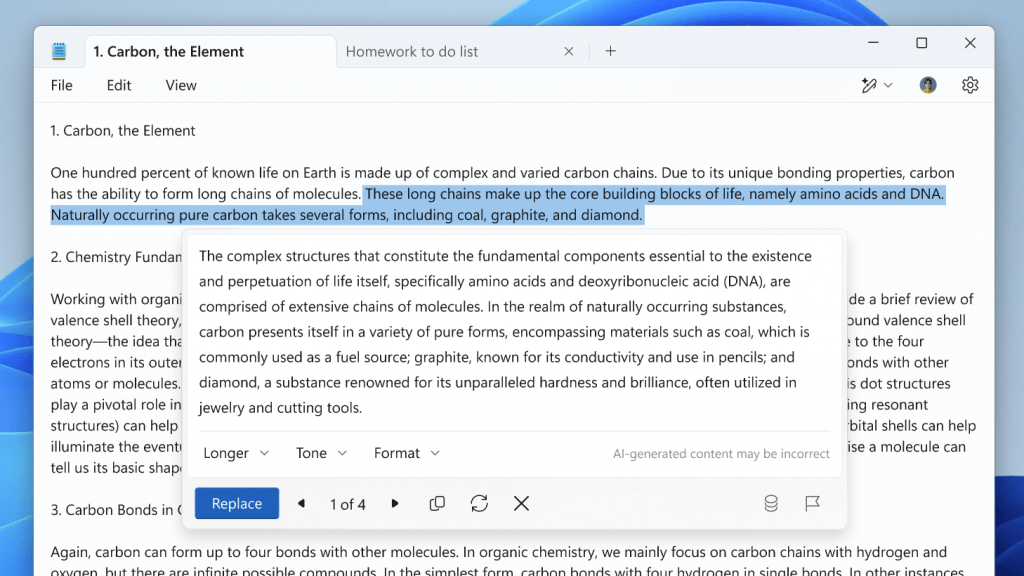
Even the settings have been reshuffled. What used to be clearly labeled AI-related controls are now tucked under a more neutral Advanced Features section.
On the contrary, when users captured a screenshot with markup tools enabled, a Copilot button would appear, nudging them toward AI-powered actions like visual search and enhancements. But now it’s just gone.Even more interesting, this removal applies broadly. Unlike Notepad, there isn’t even an option to toggle it off. It simply disappeared. For something Microsoft once embedded quite visibly into the app, the silence is kind of loud.
Microsoft admits it may have gone too far with Copilot
This isn’t happening in isolation. Microsoft recently acknowledged in a Windows Insider blog post that it had likely pushed Copilot integration too aggressively across Windows. The company outlined a strategy shift, stating it would reduce unnecessary Copilot entry points across several apps, including Notepad, Snipping Tool, Photos, and Widgets. So, this is definitely a deliberate rollback.

Not too long ago, Copilot branding felt unavoidable in Windows 11. It was in system apps, UI elements, and even basic utilities. It was like a personality overlay for the entire OS. Now, Microsoft seems to be rethinking that approach. The focus appears to be shifting away from visible branding toward quieter, background AI functionality — if it’s needed at all. It’s easy to interpret this as Microsoft backing away from AI, but that’s not really what’s happening. The company isn’t removing Copilot’s capabilities; it’s removing its loud presence.


