During the Build 2017 keynote on Wednesday, Harry Shum, executive vice president of Microsoft’s Artificial Intelligence and Research Group, detailed the company’s plans to bring artificial intelligence into the hands of every developer. This initiative includes making enhancements to the Microsoft Bot Framework, adding new AI-based “cognitive” services and a new “lab” for testing experimental cognitive services, incorporating artificial intelligence into additional products and services, and more.
For starters, Microsoft’s Cognitive Services suite brings machine-based intelligence spanning vision, speech, language, knowledge, and search to applications. They’re the backbone of features like facial recognition, speech recognition, text translation, image search, and so on. Microsoft now provides 29 distinct Cognitive Services, with Bing Custom Search, Custom Vision Service, Custom Decision Service, and Video Indexer added to the portfolio Wednesday.
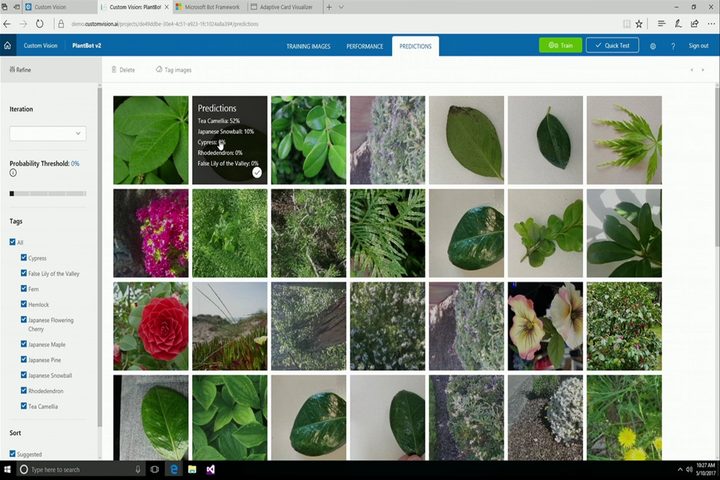
Cornelia Carapcea, Microsoft senior product manager, came on stage to demonstrate Custom Vision Service. This enables developers to create their own custom artificial intelligence models across speech, language, text, and image understanding. To create a model, developers merely bring their training data (a dozen photographs, for example), click a button to train the model in minutes, and then create the final model to be used in applications.
In the onstage demo, Carapcea used a smartphone app to recognize a just-plucked plant in a photograph taken by the device. She pointed out that the recognition aspect feature didn’t require deep learning, thousands of training images, and a wait time of “hours” as the model learned that specific plant.
Prior to the demo, she uploaded around 24 images of that specific plant to a photo album stored on the Custom Vision Service platform. She also had loads of other plants uploaded, and she eventually clicked on a big green “train” button to create what she called an “end point” that would be used by the mobile app to recognize a variety of plants.
She said that once a model is created, “active learning” kicks in to analyze all additional images taken by users of the app. This feature will hold on to all images that best define the plant visually, and then present those selected images to the developer along with a “confidence” percentage. The developer clicks on each questionable image to save it as a stored reference and then retrains the model, thus making it “smarter.”
To see this feature in action, head over to Microsoft’s dedicated Custom Vision site.

In another demo demonstrating the power of Microsoft’s Cognitive Services platform, creative director Alexander Mejia of Human Interact talked about a pre-alpha build of Starship Commander, a choose-your-own virtual reality adventure narrative. The game uses natural language processing enabling players to have “real” verbal conversations with the in-game characters. What’s cool about this aspect is that the studio created custom words based on the game’s science-fiction theme, which isn’t possible using off-the-shelf voice recognition software.
One of the services used in the Starship Commander backend is Language Understanding Intelligent Service (LUIS), which enabled Human Interact to create the custom language model. The game also relies on Custom Speech Service so that it understands all the sci-fi lingo spoken by the players.
“With LUIS, you basically give it a couple of statements,” Mejia said. “You crunch it, you start typing in your own statements, and it’s shockingly scary how good it picks up, even stuff you didn’t put in there.”
Microsoft also launched the Cognitive Services Labs platform, enabling developers to play with experimental cognitive services. One of the first experiments on the plate is a gesture API that enables end users to control and interact with apps using simple hand motions. Shum indicated more experiments are coming.
“The improvements we are making in understanding speech and language are driving a paradigm shift — moving away from a world where we’ve had to understand computers to one where computers understand humans. We call this conversational AI,” Shum said in press release.
In addition to new Cognitive Services, the company announced expansions to the Microsoft Bot Framework, a platform for creating intelligent “robots” within apps and services. Since the platform’s launch in 2016, more than 130,000 developers have signed on, and now Microsoft is enhancing the platform with “Adaptive Cards” that can be used across multiple apps and platforms.
“Developers also can now publish to new channels including Skype for Business, Bing and Cortana, and implement Microsoft’s payment request API for fast and easy checkout with their bots,” Shum added.
Microsoft also injected its Azure cloud platform with a service called Batch AI Training, which enables developers to train their own deep neural networks using any framework they choose, such as Microsoft Cognitive Toolkit, TensorFlow, and Caffe. Developers can create their environment and run these models against multiple processors, multiple graphics chips, and “eventually” field-programmable gate arrays (FPGAs), which are integrated circuits that can be configured by developers.

Finally, Microsoft announced a new Office feature called Presentation Translator. Available in PowerPoint, it uses the company’s AI capabilities to translate PowerPoint presentations between multiple languages in real time. Attendees of a meeting can use a link generated by Presentation Generator to see the translation on their device. It joins PowerPoint Designer and Office Researcher, two previous features that used the company’s AI knowledge.
According to Yina Arenas, Microsoft principal program manager, the Presentation Translator add-in relies on the Custom Speech Service and Translator Speech API services offered on Microsoft’s Cognitive Services platform. To demonstrate the new add-in’s use, she went into PowerPoint and clicked on the “Start Subtitles” button. A pop-up menu appeared that allowed her to choose the language she would verbally use in the presentation (Spanish), and the language she wanted to use in the subtitles (English). She also chose where the subtitles would reside in the presentation.
Now here’s the kicker. Shum downloaded the Microsoft Translator app to an iPhone, scanned a barcode on the PC’s screen (users can also enter a unique conversation code), and then chose his native language — Mandarin Chinese. After that, Arenas moved on to demonstrate the real-time translation across multiple devices.
“Artificial intelligence can eliminate the linguistic barriers between the presents,” Arenas said aloud in Spanish. Meanwhile on the PC monitor, her words appeared in English while they also appeared in Chinese on Shum’s iPhone. After that, she unmuted the presentation, allowing Shum to verbally make a statement in Chinese through the iPhone’s built-in microphone. The statement appeared on the PC monitor in English.
“The PowerPoint Translator add-in custom-trains the model based on my voice and my slides using the power of the Custom Speech Service,” Arenas said.
Overall, these changes don’t have much immediate impact on consumers. However, Microsoft hopes that its Cognitive Services and Bot Framework will allow the design of next-generation applications that use AI to interact more intuitively with users. Only time can reveal the wisdom in this approach, but the company’s continued commitment in these areas, which were first detailed in-depth during last year’s Build conference, shows the company expects big things from these technically complex initiatives.
Updated 5-10-2017 by Kevin Parrish to reflect three onstage demos.