
Microsoft held its Windows 10 event Wednesday morning, and just as the company promised, it was focused on the future of Windows 10. Hardware took a backseat at first, with the next major Windows 10 update starting the event front and center. Wednesday’s Redstone 2 preview, along with future updates, will be released as the Windows 10 Creators Update in early 2017.
You can start getting your hands on the new bits by joining the Windows Insiders program, and if you own a Surface Pro 4 or Surface Book then you’ll be able to really give the next version an early workout.
But hardware was hardly ignored at the event. Microsoft introduced the highly anticipated Surface All-in-One (AIO), dubbed the Surface Studio, and the new desktop PC is both everything everyone expected and quite a bit more. It’s the perfect stationary machine for any creative person, offering a superior screen and the ability to morph from a traditional upright AIO to a nicely angled drawing surface leveraging the Surface Pen. Microsoft also introduced the Surface Dial, a hockey puck controller that works on a desktop surface with other Windows 10 Anniversary Update devices and can be placed directly on the Surface Studio’s screen for even more enhanced input.
Below, we provide an overview of everything announced at Microsoft’s October 2016 event:
New Windows features

The first new tagline used at today’s event was “3D for Everyone,” communicating the idea that Windows 10 Creator Update will incorporate 3D into your workflow in new and innovative ways. First up was a new version of Paint 3D that will make creating 3D scenes easy for anyone, from children to adults. You’ll be able to use your smartphone’s camera via the new Capture 3D app to scan an object and convert it to a 3D image that can be imported into Paint 3D. In addition, Microsoft is enabling 3D image support in the Office 365 productivity suite.
These 3D images will also be shareable via a new web site, Remix3D.com. This site will serve as another community specifically aimed at sharing 3D objects among real people, and if you’re a Windows Insider then you can sign up now for immediate access.
The ultimate purpose of the focus on 3D, however, seems to be to create an ever-growing gallery of objects for use with Microsoft’s HoloLens augmented reality solution. Windows 10 Creator Update, therefore, looks like it will be working hard to expand the use cases for HoloLens beyond the dry academic and scientific settings of today and make it useful for real people.
Finally, Microsoft made brief mention of upcoming OEM virtual reality systems that will support the Windows 10 Creator Update. Few details were provided on the new VR options, but they’ll be starting out at the relatively affordable price point of $300.
Gaming
Microsoft has already talked a great deal about its renewed emphasis on gaming. The Xbox One S extended the company’s console to a more attractive offering that has put Microsoft in first place in the console market for the last few months. Next up will be Project Scorpio, a 4K gaming beast to be introduced in late 2017 or so.
At the event, Microsoft introduced a new feature specific to gamers who want to share their experience with other gamers. Xbox Game Broadcasting, based on the Beam streaming service that Microsoft acquired, is exactly that feature, and it makes it easy to join in with communities and broadcast a shared gaming experience.
Microsoft also introduced the ability to create custom tournaments via Xbox Live Arena. Esports are incredibly popular today, and Microsoft obviously wants to plug into the growing phenomenon. Custom tournaments allow gamers to create their own contests and share them with friends on box Xbox One and PC, making e-sports into a more individualized, democratic, and cross-platform experience.
Enhanced Windows Sharing Experience
Microsoft wants to make it easier to share and communicate with all of the people in our lives. Today, contact management in Windows 10 isn’t terribly robust, and clearly Microsoft wants to change that in the Windows 10 Creator Update. The company is building much more than contact management into the OS. It’s making it possible for us to much more easily share information and resources with our most important people.
Essentially, the new Windows Sharing Experience builds contacts more directly into Windows 10 — similar to how it’s handled on smartphones, and MacOS. You’ll be able to pin contacts to your taskbar, and they’ll be constantly updated as desired with what’s going on in their lives. My People is the official name of the new functionality, and it will make contacts available throughout the OS for easily sharing information to the most important people. And there appears to be a new hook developers can tap into, that will allow them to build a common sharing function into apps.
Updated Surface Book with Performance Base

Microsoft took a few minutes to introduce an updated version of the Surface Book. The new edition, called the Surface Book with Performance Base, makes a number of important enhancements to the company’s flagship Windows 10 2-in-1. The new Surface Book model utilizes a 6th-gen Core i7 processor, an enhanced Nvidia GeFore GTX 965M GPU, and perhaps most important offers dramatically increased battery life up to 16 hours.
A new thermal solution was also described, and a potentially improved keyboard will be on hand. The Surface Book i7 will be available in November and will be priced starting at $2,400 and topping out at $3,300. You can pre-order the new Surface Book with Performance Base today.
Surface Studio, Surface Dial
Microsoft Surface Studio
The big news of today’s Microsoft event was the introduction of the company’s new Surface Studio AIO. In similar fashion to Microsoft’s introduction of the Surface Book at last year’s October event, the Surface Studio was first demonstrated as an extremely high-quality and attractive standard upright AIO that competes with Apple’s iMac. The 28-inch display is unparalleled in terms of resolution and color quality, and incorporates True Scaling that can perfectly match a piece of paper with what’s on the screen.
Then, presenter Panos Panay showed a video demonstrating rest of the story — the Surface Studio display swivels from an upright orientation to a horizontal angle that appears to be optimized as a drawing surface. Of course, the Surface Studio supports the Surface Pen, making it a large, precise, and comfortable digital easel for creatives of all kinds. The Surface Studio also supports the new Surface Dial for a unique way to control applications.
The Surface Studio will have up to an Intel Core i7 processor, an Nvidia GeForce GTX 965M or 980M GPU, and up to 32GB of RAM. Storage options will be 1TB or 2TB SSD. The computing components themselves are contained in a base unit that serves to anchor the “zero gravity” swiveling screen and offers up a single cable for a clean presentation. The Surface Studio starts at $3,000 and goes up to $4,200 at the high end, making it a relatively high-end device likely meant to stir Microsoft’s Windows 10 OEM partners into making their own new AIO devices for creative professionals. You can pre-order it now, for an expected delivery of 12/15.
Microsoft Surface Dial

The Surface Dial is a new “radial haptic” controller with two modes of operation. Place it on a surface and it can be used as a new type of controller for Windows 10 Anniversary Update machines like Microsoft’s Surface line. Place it on the Surface Studio’s screen, however, and it becomes an application-specific input device that can be programmed to offer a likely infinite array of functionality.
The Surface Dial will provide functionality based on what’s been baked into applications by developers, and Microsoft paraded out a number of partners who will be working on integrating the Surface Dial into their application workflows. Potential uses for the accessory include evoking a ruler that can be easily manipulated around the screen to kicking off a specific set of context-aware submenus. You can pre-order the Surface Dial today for $100, and shipping should start on November 10.
New Surface keyboard and mouse
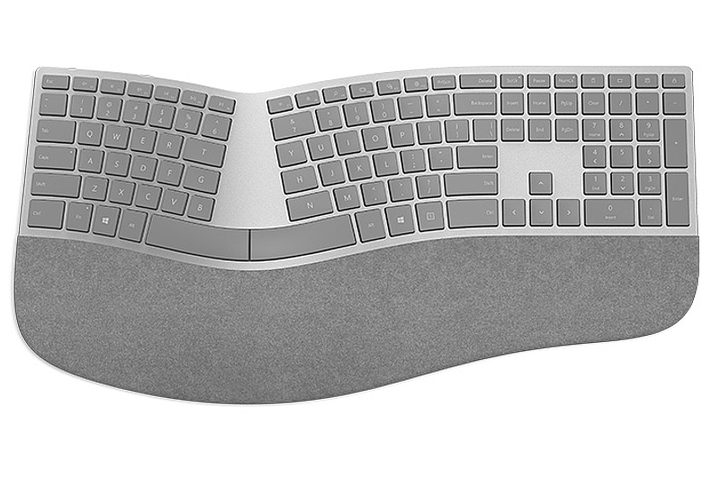
Last but not least, Microsoft announced three new Surface accessories at today’s event. There are two new Surface keyboards to choose from, and a new Surface mouse that’s optimized to at least look good when working side-by-side with a Surface device.
The Surface Keyboard is a thin and sleek unit that’s similar to many borderless island keyboards today. It takes a similar design set of design queues from Surface generally, and should go nicely with the Surface Studio. Although the keyboard is dubbed Surface, it works via Bluetooth connection with any Windows 10, MacOS, and Android device. The Surface Keyboard is available today for pre-order for $100.
The Surface Ergonomic Keyboard is the more interesting of the two keyboards announced today. It’s also a Bluetooth device, and it specifically lists Windows 10 as the compatible operating system. The Surface Ergonmic Keyboard is designed exactly as the name implies, with palm rest and keyboard geometry aimed at helping to reduce hand and wrist strain. A proprietary Microsoft material called Alcantara lines the palm rest, enhancing the overall feel of the keyboard. You can pre-order the Surface Ergonomic Keyboard for $130.
Finally, Microsoft introduced a new Surface Mouse that, once again, looks great sitting next to a Surface device but that will work with Windows 10, MacOS, and Android. The mouse is a sleek variation on the traditional input device, offering the usual wheel and two-button design. The Surface Mouse will run $50 and can be pre-ordered from the Microsoft Store.


