
With all of the improvements that Microsoft is baking into Windows 10 to make it a more productive and creative environment, the company remains committed to ensuring it’s also a fun OS. PC gaming seems to be even more of a focus than before, and a number of leaks and hints over the last few weeks have given gamers much to anticipate.
Now, those hints have materialized in more official demonstrations of the next things coming soon to Windows 10 gaming. Specifically, the next Windows Insider preview build will bring a new Game Mode and built-in Beam streaming that will be generally available in the upcoming Creators Update.
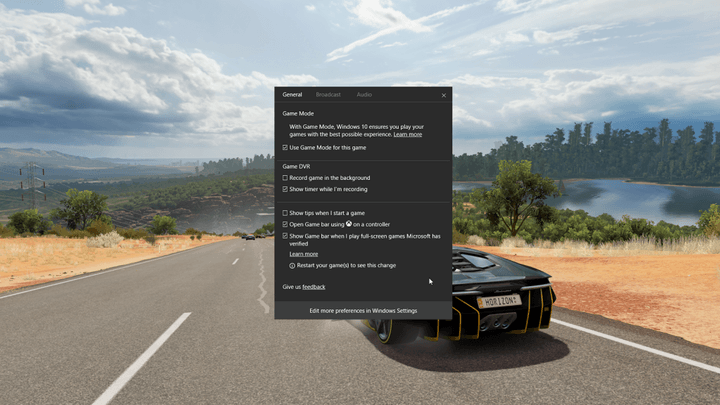
Game Mode optimizes Windows 10 when the user is playing a game. Microsoft identifies two objectives with Game Mode, hitting peak frame rates and achieving the highest possible average frame rates. Initially, Game Mode will accomplish these objectives by setting a running game as the foreground app with prioritized CPU and GPU resources.
Game Mode will receive more capabilities in later Windows 10 builds, and for now it must be manually turned on for each game using the Game bar accessed by hitting the Windows key + G keyboard combination. In the future, Microsoft hopes to make Game Mode automatic for select titles, and the company isn’t promising that the new feature will work with all games.
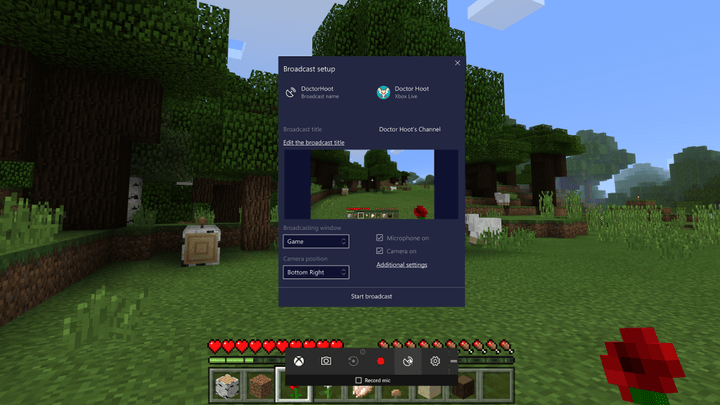
Next up in the next Windows 10 build is a first look at the built-in Beam game streaming utility. Microsoft is aiming at the best possible game streaming performance, with delays limited to les than a second, and the feature will enable live-stream interaction that the company is calling “FTL.” Again, Beam streaming is accessed using the Game bar, and will soon be joined by similar functionality on the Xbox One.
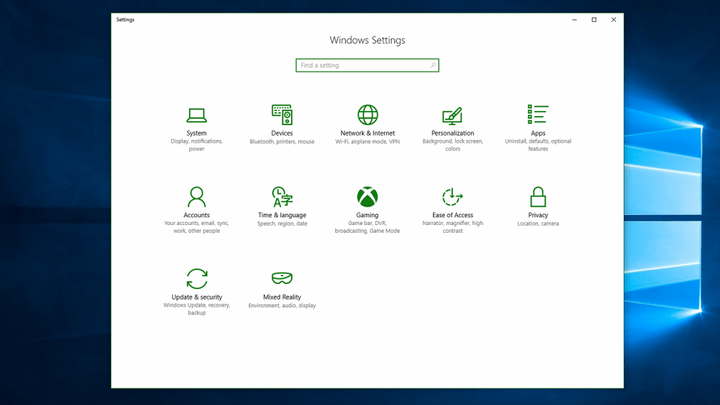
Also coming in the next build is a new gaming section in Windows 10 System Settings. This new section will pull all gaming-related settings into one place, including Game bar, GameDVR, and broadcasting. Game Mode will be included in this new section in future builds, and over time more and more system and user settings related to gaming will be consolidated here as well.
As always, if you want to gain the earliest access to these and other Windows 10 Creators Update features, then you’ll need to be a member of the Windows Insider program with your machines set in the Fast Ring. If you already are a member, you’ll be able to check out the latest and greatest Windows 10 gaming features very, very soon.


