  1. Home
  2. Computing
  3. Legacy Archives

Microsoft intros Sculpt Comfort & Sculpt Mobile mice with dedicated Windows button

Add as a preferred source on Google
microsoft-sculpt-comfort_dt
Image used with permission by copyright holder

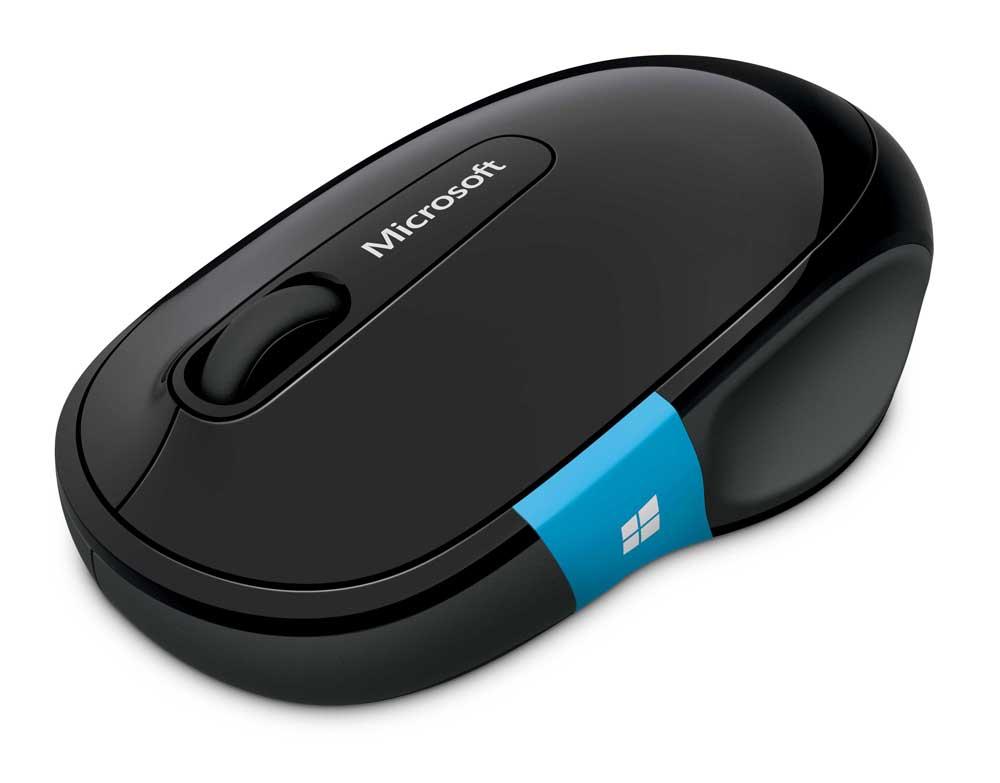
Does a mouse need a dedicated Windows button? Microsoft thinks it’ll make navigating Windows 8 easier and added it – in bright blue, no less – to the brand new Sculpt Comfort Mouse, and Sculpt Mobile Mouse.

The unassuming Windows key that’s been quietly nestled next to the Alt key for years – a wallflower compared to the more popular Control key – is suddenly very relevant to Windows 8 users. Many of the Charms-related tasks are controlled with the Windows key, and difficulties navigating with non-touchscreen Windows 8 setups has been a common complaint among the new operating system’s users. Microsofts seems to be offering these budget mice as a panacea for frustrated consumers.

Recommended Videos

The larger of the two is the Sculpt Comfort Mouse. As you might have surmised, it’s designed for extended use and, well, comfort. The Windows button on this mouse is actually touch sensitive and swiping it allows users to switch between apps. The button is located under your thumb if you’re right-handed. Microsoft isn’t too concerned with comfort for lefties, because these users will have to use their pinky to control and activate the Windows button on the mouse. It also features a four-way scroll wheel so you can scroll up, down, and side to side. This model connects via Bluetooth and is powered by a couple of AA batteries. 

 microsoft-sculpt-mobile_dt

The Sculpt Mobile Mouse is meant to be – you guessed it – used on the go. It’s not as spacious under your palm as the Sculpt Comfort Mouse, but its Windows key is located just behind the scroll wheel on the top of the mouse. On this model, the Windows key is not touch sensitive, but it does feature the same four-direction scroll wheel. Oddly enough, for a peripheral that’s meant to travel, Microsoft opted for a tiny USB dongle to enable wireless mousing instead of a Bluetooth connection. While this decision may have helped keep costs down, it’s remarkably easy to damage or lose that tiny dongle, especially when you’re frequently placing and removing your laptop from a form-fitting sleeve.

The Sculpt Mobile Mouse will cost you $29, while the Sculpt Comfort Mouse will cost $39. Both mice will be available next month.

Meghan McDonough
Former Contributor
Meghan J. McDonough is a Chicago-based purveyor of consumer technology and music. She previously wrote for LAPTOP Magazine…
Intel may bring back older desktop CPUs because DDR5 is getting too expensive
Older Intel Core CPUs from 10th to 14th Gen may get a second life
Intel Core i5-12400F box sitting in front of a gaming PC.

Intel may be preparing an unusual response to the ongoing memory crunch. According to Chinese outlet ITHome, citing ChannelGate, the company’s latest production plan includes restarting production of 13th-gen and 14th-gen Core processors.

The move is expected to increase supply across Intel’s 10th, 12th, 13th, and 14th Gen CPU families, especially in mainland China. For DIY PC builders, the timing is important. DDR5 memory prices have climbed sharply, making newer platforms harder to justify for anyone trying to build an affordable gaming PC.

Read more
Amazon wants to design in-house chips for Kindles, Fire TV, and Echo speakers
Apple did it first. Amazon is doing it now, starting with 40 million chips a year and a partner most people have never heard of.
Amazon Kindle Scribe dark mode featured image.

Apple's decision to design its own chips reshaped the consumer electronics industry. Amazon may be about to make the same call, just about two decades later.

Supply chain analyst Ming-Chi Kuo reports that Amazon is preparing to shift away from externally sourced processors for its consumer electronics lineup, marking what he describes as the company's first major processor procurement change in 20 years. The transition is expected to begin in 2027.

Read more
AI wants to summarize it all. TripAdvisor’s misleading reviews show AI will also ruin your travel plans
Spotless, friendly, and totally wrong. AI summaries are hiding the reviews that actually matter.
Tripadvisor logo on MacBook

Planning a trip is stressful enough without wondering if the glowing hotel summary you just read was written by an AI that skipped the scary parts. As it turns out, that might be exactly what's happening on TripAdvisor.

According to an investigation by consumer group Which?, reported by the Guardian, TripAdvisor's AI-generated review summaries are smoothing over serious guest complaints, and in some cases, downright dangerous ones.

Read more