  1. Home
  2. Computing
  3. News

Digital Trends may earn a commission when you buy through links on our site. Why trust us?

Microsoft just fixed one of Word’s most annoying quirks

A small shortcut with a big payoff, Microsoft's latest Word update removes friction from one of the most common document tasks.

Add as a preferred source on Google
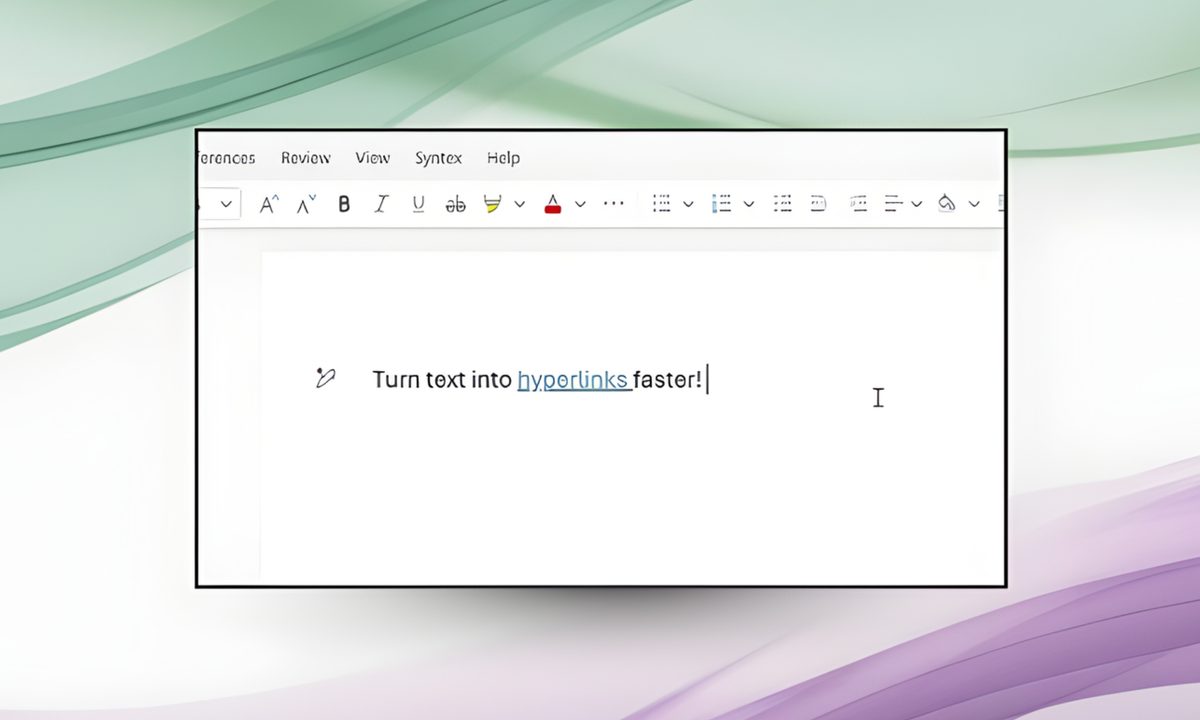
Microsoft word new hyperlinking feature.
Microsoft 365 Insider Blog

Microsoft is rolling out a new, faster, and more efficient way to add hyperlinks in Word. Instead of selecting text, opening the Insert Link dialog, and inserting a URL, users can now select text and paste a link directly over it; Word automatically converts it into a hyperlink.

Whether you’re using the software on a Windows PC/laptop or a MacBook, all you have to do is copy the concerned link, highlight a word or phrase, and press Ctrl + V or Cmd + V, and Word takes care of the rest.
Adding hyperlinks in Word just got a lot faster

No more pop-ups, no extra menus, and no breaking the typing flow, which is one of the most crucial aspects of writing in a word processing software you’re expected to live in for hours daily. Previously, pasting a link over the selected text would overwrite it entirely.

Recommended Videos

According to a Microsoft community post, the new hyperlinking feature is available to all Word for Web users. It is also rolling out to users running Word for Windows (version 2511, Build 19530.20006 or later) and Word for Mac (Version 16.104, Build 25120915 or later).

Whether you’re a student, a working professional, or someone like me who writes articles for a living and uses the hyperlink feature hundreds of times in a day, the change makes it easier to add references, Google Drive links, YouTube videos, or app store links into the text in Word.
It’s a small change, but it eliminates one of the Word’s most frustrating micro-problems. If you’ve ever sighed while opening Word’s Insert Link box for the hundredth time in a day, the new hyperlinking feature is for you.

Moreover, this is a quality-of-life improvement that makes Word behave more like a contemporary word processing app, faster and smarter.


Shikhar Mehrotra
For more than five years, Shikhar has consistently simplified developments in the field of consumer tech and presented them…
The coolest things we saw at Computex 2026, from space-ready motherboards to fan-cooled mice
The PC hardware that stole the show for us at Computex 2026
Motherboard, mouse, Laptop and router

Computex 2026 is over, and as usual, the show floor was packed with more laptops, PCs, components, peripherals, and oddball gadgets than any one person could properly process in a few days. There were sleek ultrabooks, massive gaming rigs, AI PCs, experimental designs, and plenty of products that looked like they were built mainly to make people stop and stare.

A handful of products stayed on our minds long after we left the show floor. They weren’t always the most practical, powerful, or important announcements, but each had something memorable about it. So, in no particular order, here are the coolest things we saw at Computex 2026.

Read more
Microsoft just killed one of the coolest features of its Edge browser to favor more AI
RIP Collections, you were too practical for the AI era
Edge browser icon

No no no, we are not sad. *slumps in the corner crying*

Microsoft is officially shutting down Collections, one of the more unique productivity features inside the Edge browser, and many users believe the move reflects the company’s growing obsession with AI-first experiences.

Read more
MacOS 27 could finally end Intel Mac support and bring smarter Siri upgrades
MacOS 27 rumors suggest Apple is ready to emotionally damage Intel Mac owners
MacOS

Apple’s next major Mac software update may mark the beginning of the end for Intel-powered Macs while also pushing deeper into AI-powered experiences. New rumors surrounding macOS 27 suggest Apple is preparing significant changes ranging from smarter Siri capabilities to refinements for its controversial “Liquid Glass” design language.

According to reports, macOS 27 could become the first version of macOS to substantially reduce or fully end support for Intel-based Macs, completing a transition Apple began in 2020 with the launch of its first Apple Silicon chips. While Apple has steadily shifted focus toward M-series processors over the past several years, macOS 27 may represent the clearest sign yet that the company is ready to leave Intel hardware behind. Although this is not new news - Apple was already looking to phase out Intel-powered Macs when it rolled out macOS Tahoe last year.

Read more