
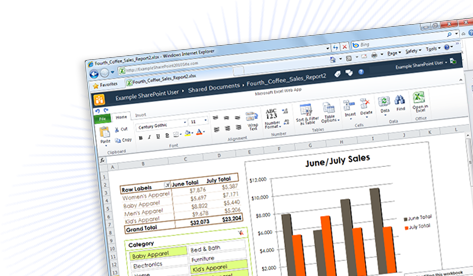
 More than three years after Google first fired its opening salvo against Microsoft Office with Google Docs, the sleeping Seattle giant has finally returned fire. On Tuesday, the company threw the switch on Office Web Apps – a competing suite of Web-based work applications including Word, Excel, PowerPoint and OneNote. With an extra three years to learn – and improve on – Google’s formula, not to mention decades of experience with its own products, Microsoft certainly has the potential to become the office suite to beat with Web Apps. But can the notoriously slow-to-evolve corporation deliver? We spent days putting the Web Apps through its paces in our own work environment to find out.
The Ribbon Returns
Microsoft’s Office Web Interface retains the “ribbon” interface first introduced with Office 2007. On one hand, that makes it incredibly easy to pick up for anyone who has found themselves using Microsoft Word over the past three years. On the other, the ribbon interface was never a complete win for Microsoft to begin with. And if you didn’t like it then, you’re not going to like it now. The same mishmash of tools that formerly found themselves under categories like “Tools” on the top menu bar have been scattered along an inch-tall ribbon. In Word, you can tab through three different iterations of it: Home, Insert, and View. Although this initially confusing ribbon design irked us at first on Office 2007, we’ve had a chance to adjust over the past three years, and we’re at least please to see Microsoft shooting for consistency rather that gambling with a another confusing and “revolutionary” design change.

Supplement or Replacement?
Although the ribbon remains, many of the creature comforts we’ve come to appreciate in the plush desktop version of Office have evaporated in the condensed version found on the Web. Small features like automatically turning a short “en” – dash into a long “em” – dash. Or creating quotation marks that “turn” to fit the text rather than sitting “straight” up and down, or underlining questionable grammar.
Google Docs shares every one of these same limitations. But how come Microsoft wasn’t able to fix them? With its repeated references to Office Web Apps a “companion” to Office 2010 on the desktop, it’s hard to believe all these shortcomings root from technical limitations, and not intentional handicapping meant to ensure the paid product (which stands at $500 in its professional form) remains supreme.
Irritating as these shortcomings are for the end user, the “companion” model also has some interesting benefits for folks who know they’ll never be able to kick the desktop version of Office forever. With Office 2010 installed on a computer, you can easily open a document started with Web Apps by simply clicking “Open in Word” from the browser-based editor. Make changes within Word, click “Save,” and they’re reflected on your online version the next time you open it or click refresh.
If you’re coming from a background with Office on the desktop (and who isn’t?) it’s hard to match or beat this seamless level of integration. To do the same with Google Docs, you need to download a file, edit it, then reupload it, possibly botching the formatting somewhere along the way. Although it’s nice to dream of a day when we won’t need anything but cloud-based solutions, the lack of ubiquitous Internet pretty much means that some scenarios, like writing an article on a plane or crunching Excel spreadsheets in the field – will always require installed software. And Microsoft has made it easier to switch back and forth than anyone else.
 Google Docs Still Supreme?

Still, on a number of key features, Office Web still falls well behind its established competitor from Google.
For anyone seeking to get any work done with the Office Web suite, its lack of autosave should throw up a major caution sign. The very review you’re reading was set back significantly after we accidentally closed a browser window we were working in without saving. Unlike the desktop version of Word, the Web App can’t warn you before closing unsaved work. And unlike Google Docs, it doesn’t autosave every few seconds to compensate. Although it’s easy enough to do it manually, making friends with the Ctrl + S shortcut again felt like returning to a high school computer lab (“Make sure to save your work every few minutes!”) after taking Google Docs’ autosave for granted.
Speed also becomes an issue. Opening a new Word document consistently took about two seconds longer than with Google Docs, and seemed to carry over into other functions as well. Loading takes even longer, and every document will load in viewing mode first, prompting another button click to open an editable version. At times, saving additions to a simple Word document even took upwards of 10 seconds. Even opening an online doc in Word 2010 – which would seem to be a snap – took 17 seconds.
Coming from a desktop environment where all of these things literally happen instantly, it can be frustrating to make the transition to the Web. That’s to be expected. But coming from Google Docs, Office Web still feels a little stiff and slow to respond.
Verdict
There’s no question that Microsoft knows how to make killer office software, and Office Web App undoubtedly shines as one of the finest cloud-based software packages we’ve seen to date. Microsoft’s Office lineage endows it with a familiarity and desktop integration that newcomer Google simply hasn’t matched yet, but many of the same niggling issues we deal with in Google Docs, along with some new rough edges, make it hard to necessarily declare Office Web Apps a clearly superior choice. If you’re an Office devotee waiting for an online component to use when you can’t get to a computer with the real thing, or share and collaborate with colleagues more easily, Office Web Apps will fill those shoes. If you want to work online as often as possible and transition back to the desktop only when necessarily, Google Docs still offers a more liveable set of tools.


