  1. Home
  2. Computing
  3. News

Microsoft Paint is about to get so much better

Add as a preferred source on Google
This story is part of our complete Microsoft Events coverage

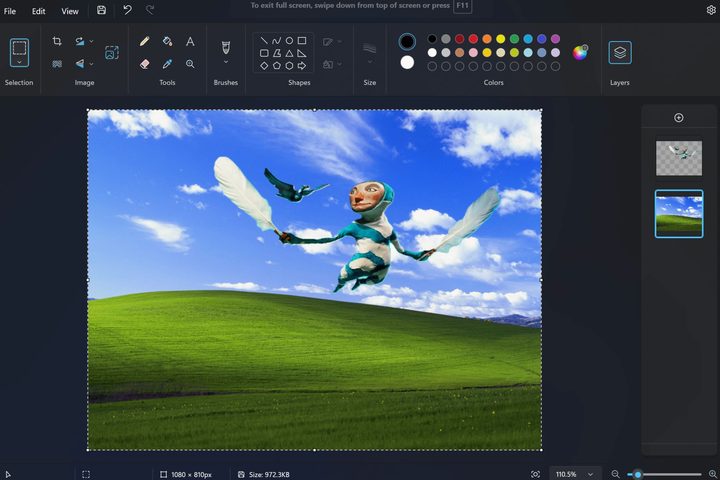
A screenshot of Microsoft Paint shows the new layers feature.
A screenshot of Microsoft Paint shows the new layers feature. Microsoft

It’s hard to complain about Microsoft Paint. After all, it’s bundled with Windows for free and provides the basics for annotating a screenshot with boxes, arrows, and text. It’s OK, but compared to every other paint app on the planet, it feels outdated.

Recommended Videos

That’s about to change. Microsoft shared the news in a Windows Insiders blog post about some great new features available now for Windows Insider users in the Canary and Dev channels.

Microsoft Paint is finally getting layers and transparency. The two go hand-in-hand to let you build a final image in pieces. Microsoft’s example loads a drawing of a fairy-like creature flying over a town.

A single click removes the background, another new Paint feature. Adding the Windows background of a grassy hill and intensely blue sky to a layer below finishes the new image.

If you’re not a Windows Insider, you’ll have to wait a bit longer to test out the new features. Hopefully, this is a change Microsoft will advance quickly.

You don’t need to wait for Microsoft, of course. There are plenty of free paint and photo apps with much more you can use right now. We recommend six of the best free photo editing apps, some that run in a browser tab.

Microsoft has the ability to turn Paint into something special, however. I’m eager to see how dramatically the experience will change with the addition of layers and transparency.

With Microsoft’s recent AI focus, perhaps we’ll see image generation become a part of Paint, taking it to a whole new level. We expect to hear about further updates to Paint and other Windows apps at Microsoft’s event on September 21. Rumors suggest Microsoft will announce AI updates to apps, along with devices like the Surface Laptop Studio 2 and Surface Laptop Go 3.

Alan Truly
Alan Truly is a Writer at Digital Trends, covering computers, laptops, hardware, software, and accessories that stand out as…
This cross-device clipboard app solves the copy-paste problem I keep running into on my Mac
ClipboardAI keeps a searchable history of everything you copy
Text, Electronics, Mobile Phone

I have lost count of how many times I have copied something important, copied another thing before pasting it, and then realized the first item was gone. It is a small frustration, but it happens often enough to become annoying. I recently came across ClipboardAI, which caught my attention because it goes beyond Apple’s built-in clipboard by saving copied items into a searchable history.

Instead of replacing the last thing you copied every time, ClipboardAI keeps a searchable record of copied text, links, codes, email addresses, phone numbers, addresses, and images across iPhone, iPad, and Mac. That means an older clip does not disappear just because you copied something new.

Read more
If you miss the feel of paper in the digital age, this app gives your Mac’s screen a textured look
A paper-like screen overlay could make long work sessions feel less harsh.
Advertisement, Poster, Electronics

Most screen-comfort tools work by changing color temperature. Apple’s Night Shift makes the screen warmer, often giving everything an orange tint. Paperman is an interesting alternative because it adds a subtle paper-like texture over the display instead.

The app is available for Mac and Windows, and it is designed to make a screen look closer to paper, matte glass, or an e-ink display. It softens the harsh contrast and reduces the glossy look of modern screens during long reading or writing sessions.

Read more
I dug these last-hour Prime Day smart home, laptop, and accessory deals that are irresistible
Deals up to 60% off, a few hours left, and no reason to wait any longer.
Electronics, Phone, Speaker

Amazon's Prime Day 2026 sale is in its final hours, giving you your last chance to get your hands on the best smart home, security, tablet, laptop, and accessory deals. I've pulled together the picks that are still live, still deeply discounted, and still worth buying before the sale ends tonight or until the stock lasts.

Best Amazon Prime Day deals on smart home devices

Read more