  1. Home
  2. Computing
  3. Legacy Archives

Mount your iMac with Apple’s new $40 VESA wall mount adaptor

Add as a preferred source on Google
imac-vesa_dt
Image used with permission by copyright holder

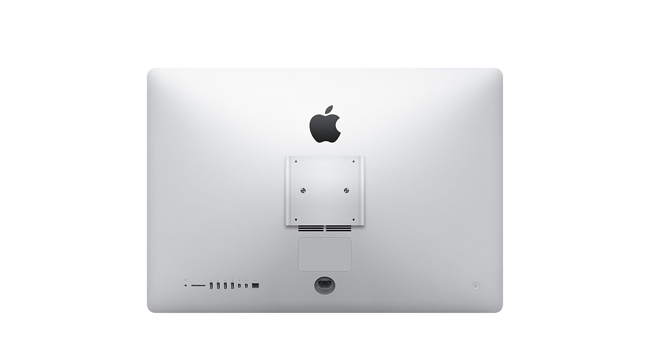
The sleek and svelte appearance of Apple’s lastest iMacs have lead many users to want to mount their machine. (On a wall, guys. Mount it on a wall.) Now the company has quietly introduced an option to add a VESA mount adaptor to its most recent line of iMacs for $40. The most recent model of the iMac did not support mounting until now. There’s one small catch, though, if you order it with the mount option, your iMac will arrive sans stand, so be sure you have a wall to hang it on or a desktop to attach it to in mind.

Earlier models of the iMac included support for VESA mounts, the term for the four screws arranged in a square that allow TVs, monitors, and other displays to attach to wall and desk mounting hardware. When Apple introduced the redesigned iMac last fall, support for VESA mounting was gone. Many users complained and, apparently, Apple listened and introduced this new option, though the company is now charging $40 for something that was included on previous iMacs, bringing the starting price of a 21.5-inch iMac to $1340.

Recommended Videos

But if you’re determined to mount your new iMac, it’s now possible. While the actual mounting device is sold separately, Apple includes a few options for adding a desktop or wall mount to your order ranging in price from $140 to $240. Even if you’re sold on the idea of tossing your iMac up on the wall, you’ll have to wait a few days longer for it. 9to5Mac noticed that iMacs equipped with VESA mounts are shipping within 7 to 10 days, while the stand models will head out of the warehouse in 24 hours. Maybe it takes Apple a few extra days to find an allen wrench to attach the mount?

Meghan McDonough
Former Contributor
Meghan J. McDonough is a Chicago-based purveyor of consumer technology and music. She previously wrote for LAPTOP Magazine…
Microsoft is retiring the Together Mode in Teams in favor of something cleaner and simpler
Teams is retiring Together Mode for layouts people may actually use
Computer, Electronics, Laptop

Microsoft Teams is retiring one of its more recognizable meeting features, and it might be for the best. The company announced that Together Mode is going away in Teams as Microsoft is shooting towards a simpler set of meeting layouts.

To recall, Together Mode was introduced during the pandemic-era video call boom, placing participants inside shared virtual environments such as auditoriums or classrooms. It was a cute idea at the time, but it never became the everyday meeting view for most people.

Read more
Experts are worried that smarter AI gets, the dumber we might become
Experts say chatbots can help research, but leaning on them too hard risks outsourcing the work that builds intelligence
OpenAI CEO Sam Altman during the Uncapped podcast in June 2025.

AI can now answer questions so quickly that the search itself can feel optional. That convenience worries the Royal Observatory Greenwich, which has warned that instant AI answers can weaken the curiosity, scrutiny, and source-checking behind real knowledge.

The risk hides inside the usefulness. Chatbots can help people test ideas, move faster, and find new angles, but a finished response can also cut users off from the messy trail that makes learning stick. When that happens, information arrives without the struggle that turns it into judgment.

Read more
Miss the old PC days? This website lets you experience Wikipedia like it’s Windows XP
This XP-style Wikipedia explorer turns online research into a nostalgia trip, while showing how much browsing changes when search takes a back seat
File, Webpage, Person

Wikipedia has an unofficial new front door, and it looks like a desktop from a very specific era of family PCs, school labs, and chunky blue title bars.

Developer Sami Smith has built a browser-based Windows XP Wikipedia explorer that turns categories into folders and articles into documents. It’s playful, slightly inefficient, and more interesting than another AI search box bolted onto the web.

Read more