
On Tuesday, August 29, Logitech introduced a pair of new wireless peripherals under its Logitech G gaming brand: the G603 mouse and the G613 mechanical keyboard. Both are based on the company’s proprietary Lightspeed wireless technology, which promises fast 2.4GHz connections so that your key commands and mouse movements are immediately received by the parent PC as if the devices were wired. They’re also surprisingly ideal for the work space.
Logitech G G603 Lightspeed Wireless Gaming Mouse


With the G603 mouse, Logitech is introducing a brand-new optical sensor called Hero, short for High Efficiency Rating Optical. It was built from scratch for power efficiency and performance, providing up to 10 times more power efficiency than Logitech’s 3366 mouse sensor, and up to four times better performance than its M010 and M000 sensors. Logitech essentially created a new bracket with Hero so that the parent mouse isn’t chewing through batteries while it performs like a wired peripheral.
For the curious, the sensor aspect includes an infrared LED that shines through an elbow-shaped illumination lens. This lens bounces the infrared light off the desktop surface, and into a specially shaped “capturing” imaging lens. This lens then reverses the beam and shoots it into the actual Hero optical sensor, which consists of hardware for turning the captured light into a pixel-based snapshot. This snapshot is then sent to the mouse processor.
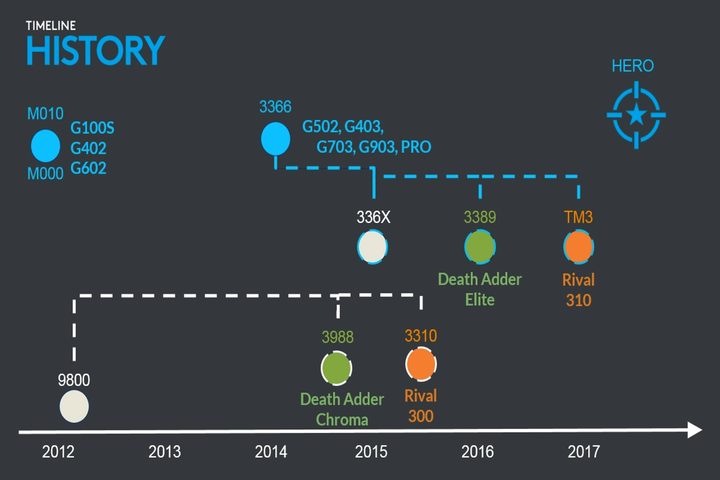
Of course, there’s a lot more going on with the Hero sensor than what’s described in our simplification. But one of the Hero sensor’s highlights is that it relies on unlocked firmware. Typically, mouse firmware is locked, making changes to the tracking algorithms and the sensor’s communication process with the mouse processor impossible. But with Hero, Logitech can update the firmware with fixes, optimizations, and “use-case” changes.
But the Hero sensor is just one piece of the G603 puzzle. As previously stated, the peripheral relies on Logitech’s Lightspeed wireless technology, promising wired-like connectivity. Because of the high-performance low-power Hero sensor, Logitech says the mouse already increases battery life. But the company introduced Lightspeed High and Low modes because office work just doesn’t require high precision input. The mouse can even connect via Bluetooth if you don’t want to deal with the miniature USB-based Wi-Fi dongle.
According to Logitech, the Lightspeed High Mode has a high, one-millisecond report rate, which is what you want for PC gaming. The Low Mode has an eight-millisecond report rate while Bluetooth ranges between 7.5 and 11.25 milliseconds. A report rate is how many times the mouse updates the parent PC with its position, and a faster report rate requires more energy. That said, the High Mode promises four to six months of battery time, and the Low Mode (along with Bluetooth) promises 18 months.
The mouse relies on two AA batteries, but if you’re using Lightspeed Low Power or Bluetooth modes, you can use only one battery. These can be added and replaced by simply removing the top plate comprising of the palm rest and mouse buttons, which appear to be held into place with magnets. Along with the two battery beds, you’ll also see a small compartment for storing the mini USB dongle.
The mouse itself doesn’t look like a gaming peripheral. It’s simple in design and built for right-handed users. It consists of the right and left click buttons, a clickable mouse wheel, a button for adjusting the sensitivity, and two thumb buttons mounted on the left side. All buttons can be configured through Logitech’s free desktop software.
What you won’t find on the G603 mouse is a USB port. Logitech is extremely confident in the peripheral’s low power consumption, and its high performance stemming from the Hero sensor and the Lightspeed wireless technology. But that low power draw is also due to the absence of any kind of illumination on the device, which is typically a feature on many PC gaming peripherals.
That said, there’s no visual flare with the G603. It blends into the office environment so the boss can give you props for purchasing productive hardware when in secret you’ve bought something built for PC gaming. The mouse comes with on-board storage, too, for using the peripheral on PCs without Logitech’s software installed, such as an office computer. Otherwise, Logitech’s gaming software will automatically apply settings for a particular game, or you can create profiles and have them automatically load when a specific PC game launches.
Overall, the mouse feels extremely responsive despite its wireless connection. It’s comfortable to use but feels slightly more bulky than other gaming mice. There are no rubberized grips, but they may not be necessary given the bulk of the device and its office-focused design. A switch is provided on the bottom for moving between High and Low Lightspeed modes, or turning wireless off altogether. Another button is available for syncing the device via Bluetooth.
Finally, note that the new G603 mouse is not compatible with Logitech’s new Powerplay wireless charging system. That’s because there’s no rechargeable battery in the G603, and no compartment for the Powercore module.
Here are the specifications:
| Processor: | 32-bit ARM-based chip |
| Sensitivity: | 200 to 12,000 DPI |
| Maximum acceleration: | Around 40G |
| Maximum speed: | Around 400 inches per second |
| Switch durability: | 20 million clicks |
| Dimensions: | 4.88 (H) x 2.68 (W) x 1.69 (D) inches |
| Weight: | 3.14 ounces (mouse only) 3.96 ounces (1x AA battery) 4.79 ounces (2x AA battery) |
| Includes: | 2x AA batteries Mini USB dongle USB dongle extender |
| Shipping: | September 2017 |
| Price: | $70 |
Logitech G G613 Lightspeed Wireless Mechanical Gaming Keyboard


As for the G613 mechanical keyboard, it’s a no-frills solution as well. It doesn’t look like the standard PC gaming keyboard, and there’s no backlighting on purpose, again to conserve battery power. It relies on two AA batteries as well, but there are no High and Low power modes as seen with the G603 mouse. Instead, the keyboard provides a single Lightspeed wireless connection promising a one-millisecond report rate.
The drawback in using Lightspeed connectivity is that it requires a mini USB dongle. If you’re already using the G603 mouse, the keyboard can’t use the dongle already installed in the parent PC. Instead, if you want to use both the mouse and keyboard, you’ll need both mini USB dongles plugged into the parent PC. The keyboard also connects using Bluetooth if you don’t have a free port.
But what’s cool about the G613 is that it includes a multi-mode feature. For instance, you can connect the peripheral to the host PC via the Lightspeed mini USB dongle, and connect to another device using Bluetooth. To tell the keyboard which device you are currently accessing, simply hit the Wi-Fi or Bluetooth button located above the Print Screen/Scroll Lock/Pause buttons. The keyboard can remember up to 10 Bluetooth devices.
According to Logitech, the keyboard promises up to 1.5 years of battery life “with normal gaming usage” versus only 40 hours if the peripheral included backlighting. Meanwhile, the Romer-G switches mounted under the caps promise a durability of 70 million key presses. These are Logitech’s proprietary mechanical switches installed in a multitude of its gaming mechanical keyboards, providing an actuation distance of 1.5mm, and an actuation force of 45g. The result is a quick acknowledgement of your key press, a quick processing of that request, and an extremely fast transport of that key press to the parent PC.
On an audible level, Logitech’s Romer-G switches have a muffled but clicky sound, and the keys themselves don’t require much pressure to actuate your commands. But what we noticed is that in a quiet environment, something inside provides a constant metallic echo/hum while we type, as if someone is banging a hollow aluminum flagpole way out in the distance. It’s not loud at all, but distractably noticeable nonetheless, and a sound not usually present in mechanical keyboards built for PC gaming.
Again, the G613 is a no-frills keyboard visually, but it does provide handy media control buttons along with volume controls. There’s no USB port for wired connectivity, and the wrist rest cannot be removed. But it’s still a PC gaming keyboard, thus it provides six “G” keys to the far left that you can program using Logitech’s free desktop software. These keys can be programmed with individual assignments, mouse inputs, multi-key macros, and so on.
Here are the specifications:
| Romer G switch durability: | 70 million key presses |
| Actuation distance: | 1.5mm |
| Actuation force: | 45g |
| Total travel distance: | 3.0mm |
| Dimensions: | 18.81 (L) x 8.50 (W) x 1.32 (H) inches |
| Weight: | 3.10 pounds without battery |
| Includes: | 2x AA batteries Mini USB dongle USB dongle extender Tablet/smartphone stand |
| Availability: | September 2017 |
| Price: | $150 |
Logitech G Logitech G840 XL Gaming Mouse Pad
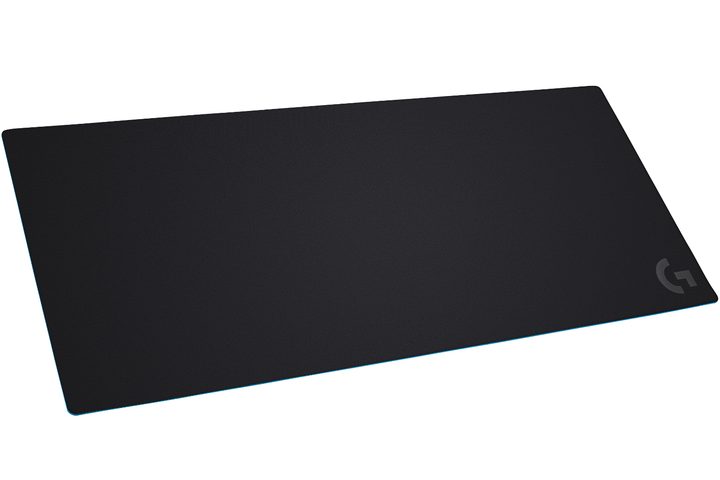
Finally, you can’t complete a new mouse/keyboard duo without a new mouse pad. The G840 XL is huge, measuring 35.43 inches wide, 15.74 inches deep, and 0.12 inches thick (3mm). Designed to spread across your entire desk, it provides a cleaner, more uniform look while you use the associated G603 and G613 products. A rubber base keeps it stationary on the desktop while a cloth-based surface enables precise optical mouse tracking, and optimal friction. It’s optimized for Logitech’s new Hero sensor along with Logitech G sensors installed in the company’s other gaming mice.
The G840 XL will ship in September for $50.


